So you haven't really said what you use your setup for. "Consumer stuff" could me just about anything that isn't professional, from talking to friends to some casual music recording, so there can still be quite a wide range of needs.
With that said, I'll just keep this general:
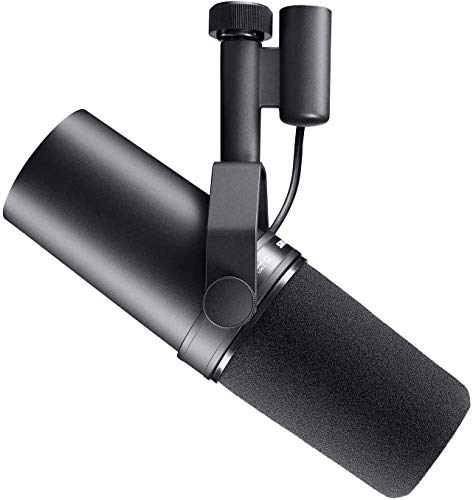
USB is plenty for the majority of consumer uses. The performance of a good quality USB microphone like the PodMic USB is plenty (assuming good microphone placement/technique and that you're not trying to use it for something it just isn't a great fit for).
For the average person, I'd say that XLR's big advantages aren't actually the performance. It's the versatility and maybe a bit of better aging as well. Once you've taken the leap to XLR, you've opened up your options to the great big world of prosumer and professional microphones and other related equipment. Not only that, if you want to upgrade or add a specific component, you don't need to replace your entire recording setup. Regarding aging, many professional microphones, especially dynamic ones like the PodMic USB can last half or even a whole lifetime. Even interfaces tend to age well (at least the decent ones; maybe not a bottom-tier one). Not that USB is fragile or expected to fail in a few years, but it's easier for it to not last decades for reasons like wearing out or damaging the USB port. If you've got the money, XLR is a better choice for future-proofing, but as you are probably gathering by now, it's likely not essential. It's really up to you.
Regarding the headphones, if you don't mind, I'd go with 250 Ω whether or not you get an interface because you can always get a headphone amplifier. It is worth pointing out that not all entry-level audio interfaces have good enough headphone amps to get a lot of volume out of the DT 990s (remember that impedance doesn't determine how much dB per watt you get, sensitivity does; impedance comes into play because that will affect the maximum wattage you'll be able to pull out of a headphone amplifier).
Regarding an interface, don't bother if you're going to buy some $50 piece of garbage. At that point, a USB microphone will likely perform better. If you want to consider this option, I'd say have at least $100 available to spend on it, but more would be preferred.
My personal recommendations for entry-level audio interfaces are the [MOTU M-Series](https://motu.com/en-us/products/m-series/), [Foscurite Scarlett 4th Generation](https://focusrite.com/scarlett) (preferably the 2i2 or better since the Solo has a weaker microphone preamp which can be an issue with some dynamic microphones), [Audient iD range](https://audient.com/id-audio-interface-range/), or the [Solid State Logic SSL range](https://solidstatelogic.com/music-and-audio-production/ssl-audio-interfaces). Within these product lines, typically the performance between models is very similar or the same; you mainly get more I/O with higher-end models. As I pointed out, the Scarletts are an exception as the Solo has significantly weaker preamps (it didn't get an upgrade for the 4th Generation like the other models did), plus it lacks other useful for beginner features that the higher models have, such as auto gain and clip protection. Since you did mention headphone usage, I'd probably lean towards the M-Series as they have very competent headphone amplifiers for entry-level interfaces.
Finally, as another commenter said, you might want to get the PodMic USB either way. You can start with a USB connection and if you find yourself wanting to move to XLR in the future (for example, if you start doing work with a DAW, which might work better with an interface and ASIO drivers or if you just want to take that step up), you can do so without needing to buy a new microphone. The XLR performance of the PodMic and PodMic USB should be identical or at least nearly identical (I have tested the similar Shure MV7+ and MV7X and can confirm the XLR outputs on these mics have identical performance).
I hope this helps!
The answer already is great! I will add, I have found sound absorption panels helpful for this, in addition to the mics and audio mixer. I had 4 of us recording in a smaller space, and I could tell a difference when I put those on the big, hard walls in the room. My space is an octagon room (who builds those? annoying AF), but we had sound bouncing from one person into another's mic. We also worked on placement, where each of us sat, where the mic faced, and talking directly to them, in a normal speaking voice. I have one cohost who naturally speaks louder, and her sound was picking up constantly if she was sitting directly next to someone. I don't know what your set up is like for video recording, but maybe with some creativity and placement, it will help.
I have a tascam audio mixer, because I can plug 4 xlr mics into it, as well as a usb connection, phone, etc if someone has to record virtually. I've used the Scarlett focus rite for 2 mics which is great too. I use Shure MV7X XLR Podcast Microphones, and they aren't entirely perfect for not picking up others all the time, but they do a great job when we have only 2 of us. They are actually on a pretty good sale right now. This is something that drives me nuts when i'm editing, I hope you find a great solution for you two!
The Samson Q2U is the budget king. Also has the benefit of both USB and XLR, so you can start with USB, buy an interface later and keep using it, then ultimately upgrade your mic later if you want. The Podmic USB is great, but at $200 it’s a lot to ask. That said it does come with the APHEX processing and also includes XLR, but you lose the APHEX processing when you run it in XLR mode if I remember correctly.
I’ve used a Podmic in the past, albeit the XLR only version, and while it’s a great sounding mic, over time I grew to not really like how it sounded with my voice and ended up switching to the MV7X. It’s a very bright microphone. It sounds much better when paired with Rode’s processing.
I strongly recommend XLR into an interface, but I can recommend the Shure MovieMic lavalier wireless.
I use them on internal company projects, but not lengthy podcast material.
For that I use Shure MV7x into a Scarlett. I also use Shure 58 into Behringer Euphoria.
If you insist on wireless, like I said, check out the MovieMic. Comes with a pair that are easy to use into laptop or into a camera if you are using one.
Look specifically for a “vocal microphone” because there are other kinds better suited to instruments.
I’m partial to the Shure brand.
Here’s a decent Shure vocal mic: https://www.amazon.com/Shure-MV7X-Podcast-Microphone-Voice-Isolating/dp/B09BZZCGC8/ref=asc_df_B09BZZCGC8?tag=bingshoppinga-20&linkCode=df0&hvadid=80814224057305&hvnetw=o&hvqmt=e&hvbmt=be&hvdev=m&hvlocint=&hvlocphy=108206&hvtargid=pla-4584413752096614&psc=1
Top External Microphones on Reddit
1
Shure
SM58
79% positive of 373 users
Indestructible live workhorse; but muffled for studio vocals.



 AudioMan612