Running these analyses costs money. Buy through my links to help keep lights on! I may get a small commission.
Reddit Reviews
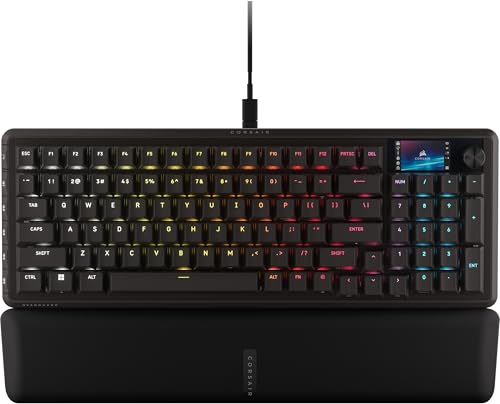
I just got the vanguard pro 96 today and will write my impression of it here. Note I did already do the firmware update as well. Because of all the issues with customization, I was unable to test more after trying to get it to work for half a day... I may go back to my Logitech g915 TKL instead Pros: * I like how it feels when I type on the keyboard Cons: * Webhub is seriously buggy, * any settings I make takes forever to save or load, * unable to upload custom gif to the 320x170 lcd screen since it bugs out when uploading then freezes the webhub app, * it deleted all my custom keyboard settings twice, and I had to factory reset once just to get app to work again * webhub app only works on certain browsers, and even then sometimes does not recognize the keyboard and I have to plug unplug until it recognize the keyboard * would have liked it to work with ICUE app, but it does not. * lighting effects constantly bugs out or does not even work TLDR: the webhub app is really a buggy mess and made trying to use the keyboard harder than it should be.
I bought this and I think it’s a very nice feeling keyboard for my standards, I can at least say that either this or webhub was not ready to go. The fact that Icue isn’t supported is very annoying. I’m not a big fan of Icue either, because of how many issues it has. I get webhub is a new early feature, it’s so clunky and annoying to navigate. Having to disable Icue to tweak something is so tedious and it gets old after a few times. Not to mention that whenever I alter something on the vanguard pro 96, the keyboard softlocks and I can’t use the fn key or change things so I have to unplug and re-plug it in. The changes take forever to take effect. I really like the keyboard, it just sucks that I have to wait even longer to be able to utilize it properly, because Icue support was over looked. Would have been better to just have support and then end support when webhub was ready to take over. Edit: I forgot to mention that the feet could have been longer to get a little bit of a better, more comfortable angle and to make the LCD a little higher, just so I could actually see it without leaning forward way over my setup just to take a peak.
No, and that is the problem. iCUE support is supposedly coming, but who knows, may return mine and get the K70 PRO TKL when PBT model is back in stock soon. I had an ABS keycap version and returned it for the Vanguard. Now I want my K70 back, but with PBT 😂 I had mapped the iCUE button to do PRNT SCRN, and I cannot stand having my arrow keys squished over to the left on this VP96!
Like onevstheworld said, it's essentially like swapping the cluster on the right of a TKL with a numpad. If you can't live without that nav cluster, then maybe the compromise isn't for you (and that's fine). A lot of people tend to not need those keys, but still want a full numpad, and this layout is perfect for them.
Yes, between Vanguard Pro and regular it is hall effect vs mechanical switch. As for the K100, the main differences will be the type of switch (Vanguard uses MGX magnetic switches, which support Rapid Trigger for custom actuation and reset points vs the optical switches in K100), layout (96% vs full-size), and deeper Stream Deck integration with dedicated Virtual Stream Deck key.
Both are hotswap so you can swap other compatible hall effect switches in the Pro, and mechanical switches into the regular Vanguard.
https://preview.redd.it/vnp0m03e5gxf1.jpeg?width=4000&format=pjpg&auto=webp&s=01c1d62b2e30de29e048bccc34fb1402a95c8859 Added the Vanguard Pro to my 96% collection
Have been using the Vanguard Pro 96 for about a month now and have been loving it. I picked up some Owlab Ti HE switches in case I didnt like the stock switches, but have yet to feel the urge to swap them all out....yet. https://preview.redd.it/ukv8cofaqh1g1.jpeg?width=4000&format=pjpg&auto=webp&s=0749eb8904618dc45f00259389b9f00067a7675e
https://preview.redd.it/75uumwty7a4g1.jpeg?width=4000&format=pjpg&auto=webp&s=3b1b3ca5c82942e4d39ee74500ec47e39563e053 Swapped in the Gateron Jade Max's to be a tad firmer on the actuation. Been loving it so far.
https://preview.redd.it/j55dzqs6rygg1.jpeg?width=4000&format=pjpg&auto=webp&s=c16e7ef504d4f71fbb2d3fbede0820669652e831 Looks great! But I'd be careful when Firmware updates are available, I've had a support ticket open for over 3 weeks now because they pushed a an update that causes me to constantly have to factory reset my Vanguard 96 Pro.
Not making a “pro” product compatible with your own damn software is certainly a bold move, and a hell nah from me
That’s me. I love low profile keyboards. I have a 815 and 2 915s in my offices and a Corsair Vangard Pro 96 at home with the virtual elevator built in with HE switches.
It's available in my area today, so I can purchase it. I was already looking forward to its release, but the lack of iCue support seems to be a persistent issue. It's a good option for new Corsair users, but for those who already own a lot of Corsair products, this is a bit of a turn-off. Users are asked to disable iCue to configure their keyboard settings. I don't understand why they're asking them to do such a tedious task. The Makr75 supports both. Of course, I understand there were some serious bugs associated with it at launch. If Corsair delayed it because of that issue, I can understand. But if they abandoned iCUE support, that's not understandable. https://preview.redd.it/1nhcptto5frf1.png?width=1554&format=png&auto=webp&s=49c7aa84b0fd4ec1834544a56c1a16fb273d8a77 Web HUB can be understood as being similar to icue's DMM mode, which means it's difficult to expect the same level of support as icue. I don't understand why this decision was made.
For icue control, K70 PRO TKL Web HUB, Vanguard Pro 96(96% layout) Web HUB is Same as Device Memory Mode and Don't need to use icue. Special features that require iCue are unavailable, and important features like lighting and macros are also limited. While WebHub can be easily configured through a browser, it does have its drawbacks, so be aware of these. Vanguard support in iCue is currently under development, and its release date is currently unknown.
I ended up buying the Corsair MAKR PRO 75, which was first released in Korea during CES. I hadn't originally planned to buy one, but I wanted to try a full-aluminum keyboard. I passed on the original MAKR75 because it didn't have magnetic switches, but now that it's been upgraded with magnetic switches, it's worth the investment. I'm currently using a Vanguard 96 Pro at work and a K70 PRO TKL at home, which I'll be keeping for the time being. The keyboard isn't wrapped in paper like other Corsair keyboards, but in cloth packaging, making it recyclable. Additional accessories include a switch/keycap puller, a screwdriver, additional screws, and an extra gasket. Corsair uses silicone gaskets. I think there are about six of them. Think of them as a safeguard against loss during disassembly and reassembly. This keyboard features a 75-key layout with a dial. The keycap set features a clean black/white combination, with yellow ESC and Enter keys. The keycaps are OEM profile PBT double-shot keycaps. The dial has a ring, allowing you to identify its function by color. However, unlike other Corsair keyboards with dials, changing the dial function requires holding it down for about two seconds, making it somewhat inconvenient. Because the development of the Makr75 predates the K70 PRO TKL, some of its features are less convenient than those of the PRO TKL, most notably the lack of a game mode. This upgrade simply involves the use of magnetic switches, which is a drawback. The spacebar features additional noise reduction between the stabilizer and the switches, and the PRO model comes standard with an FR4 switch plate. The switches are MGX HyperDrive, and other magnetic switches, such as Gateron, can be used. The bottom case features a PC/MAC mode switch, allowing you to adjust the CMD/WIN keys and other keys for Mac and Windows OS. Since the case is fully aluminum, the bottom case is also made of aluminum. The height adjustment is not a lever-type like on other keyboards, but a magnetic, detachable one, eliminating the risk of damage. Unlike the much-criticized Vanguard 96, the MAKR75 supports iCue. While WEBHUB is also supported, iCue's functionality is fully functional, so fortunately, you won't need to use WebHUB. The dial also allows for customization, similar to the Vanguard, making it an improvement over the PRO TKL. It also provides a magnetic switch calibration UI in icue, eliminating the need to use WebHUB when replacing magnetic switches. Like the PRO TKL, you can individually configure the actuation points for each key. WebHUB doesn't allow this. However, Rapid Trigger differs in functionality compared to WebHub. Currently, Continuus Rapid Trigger can be activated in WebHub, but not in the iCUE UI. The K70 PRO TKL has this feature in iCUE. While it remains to be seen whether this feature will be implemented in iCUE, it's available in WebHub, so I expect it will eventually be implemented. The K70 PRO TKL wasn't initially available either, but it was added with an iCUE update. In any case, while the price is high, if you're interested in a full aluminum keyboard, it's worth checking out. There are DIY options for customizing it to your liking, and future functionality can be expanded with a wireless keyboard (battery included) and LCD module. While the LCD module can display sensor information when connected to iCUE, it lacks touch functionality and the volume dial controls are gone, so I wouldn't recommend it. Corsair's new Galleon 100SD is quite expensive... While the integrated Stream Deck makes it highly functional, the lack of iCUE support is definitely a factor that's holding me back from buying it. It's hard to believe that a $349 keyboard can't offer custom lighting presets, which even the cheapest Corsair keyboards offer. Anyway, among the products introduced at CES, the MAKR PRO 75 seemed like the only one worth buying.
I don't have that problem with my Vanguard and this one doesn't either.
Rankings by Use Case
Top recommendations from others in the same boat
Best for Competitive FPS gaming

Top pick
Wooting - 80HE
Best for Couch gaming

Top pick
NuPhy - Air60 HE Magnetic Switch Gaming Keyboard
Best for Mmos and complex macros

Top pick
Corsair - K95 RGB PLATINUM XT Mechanical Gaming Keyboard
Best for Silent gaming in shared spaces

Top pick
Wooting - 80HE