
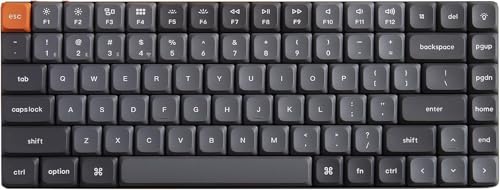
Keychron - K3 Max QMK/VIA Wireless Custom Mechanical Keyboard
Running these analyses costs money. Buy through my links to support the site! I may get a small commission for some links, and it doesn't cost you anything. Thank you!
Reddit Reviews:
Filter by Topic:
Based on 1 year's data from Mar 27, 2026 How it works
 ijavs 1.0
I went all out earlier in the year and tried a bunch of low profile keyboards. Nuphy air75 he / Keychron K3 / Nuphy air75 v2 / Keychron B1 / Logitech MX mechanical / Logitech MX / If you want to buy a keyboard that will last you the next 5+ I would spend the $$ on the Nuphy HE or the Kechron K3, specially if you are going to use it for gaming. Otherwise the best cheap is the Keychron B1. I kept the Nuphy He, because I loved the magnetic keys, and the Keychron B1 because I can take it anywhere. My advice is that if you are going to be moving around with any of these, you must buy a keyboard case. Non of them felt like they would withstand a drop. Note: I did not try the lofee because it was the only one that required me to pay shipping fees if I returned it, so I didn’t take my chance. But I have seen great reviews.
operationDIE 1.0If you're fond of low profile keyboards, I couldn't recommend Keychron K3 Max enough. Good build, don't need software as you can configure it via browser, supports VIA/QMK. My only gripe is that keycaps are not shine through, but you can easily replace them if that bothers you. Be careful when you shop, as there are many variants such as rgb/white, 8K/1K, hotswap/non-hotswap, etc. Also make sure you buy from your local retailer of Amazon, as Keychron's customer support is abysmal if you buy directly (check Keychron's subreddit). I would generally avoid those tacky "gamer" boards as they are overpriced. If you have a low budget, go for redragon k616 fizz. I had k617, The only difference is that the k616 is wireless.
phasepistol 1.0It’s not the full key set you want, but I put together a Keychron K3 with YMDK DSA profile keycaps https://imgur.com/gallery/writerdeck-ipad-air-on-nulaxy-foldable-metal-stand-keychron-k3-with-ymdk-dsa-profile-keycaps-TtwxNcI#koN4qNF
Shiro-derable 1.0k3 max is way better for 75% low profile, 2.4ghz, cable and bluetooth
Winter_Ad_9289 1.0some recommendations: * Keychron K3 Pro/Max (Max support 2.4GHz wireless, Pro does not. Both support Bluetooth) * Lofree Flow/Flow Lite (Flow has an aluminium case, supports QMK/VIA. Flow Lite has a plastic case and no QMK/VIA. Both are wireless via 2.4GHz or Bluetooth. * Nuphy Air75 V3 (would prefer the 2 aforementioned boards over this as Nuphy has had issues with exploding batteries with older keyboards, but so far there has been no reports of this on the V3. Supports 2.4GHz wireless and Bluetooth. The Blush Nano switch is basically the Red switch but a bit more mushy, similar-ish to your K380 in terms of feel.) Tips for keeping the battery healthy. * do NOT use the keyboard in wired mode, unless you specifically remove the battery from the keyboard. * use the battery until it is around 20% left, then charge it to around 80%. just try charging it and testing how long it needs to be charged for to reach that level for your first time and take note for future reference. for the Logitech MX Mechanical/Mechanical Mini, I wouldn't get it as it does not support any sort of customizability in the form of QMK/VIA or alternatives. it's USB-C port also does not support data transfer, only charging. so you can't use the keyboard in wired mode, which will inevitably happen when the battery swells and you are forced to remove it and use the keyboard in wired mode.
G952 0.5I love my low profile keyboard! Keychron K7. It’s the best. (Could be biased haha)
janups 0.4I have few from keychron and nuphy - all low-profile. I use them everyday home/office/livingroom and I do not even prefer one over the other, all of those are in ANSI layout and this is my preference, got the red switches for, like how tactile those are. I also have Logi MX keys but in local layot and just because of it I do not like it, other than that it is also fine. As for connection - I have the dedicated adapter, BT and cable, depending on the setup - I see no difference in response times while typing or gaming. As for RGB - I apriciate it only in livingroom while watching movies. Oter than that I do not care, I do not look on the keyboard while typing. From wow side - nuphy is much more eye-catching, I got many positive comments about it while using in the office. If you configure something - make sure to have the shine-through key caps, the "behing keys" backlight is rubbish. For config, VIA software - whatever - I never cared about it, function lock was always there, never needed anything more. Except for nuphy v2 - I had to set it,as was F keys by default, but easily done with browser plugin and VIA software, I think it is unified. If you need macros etc - all is linux compatible (except logi - this I have no idea), As for your question: "The best Gaming Keyboard to buy for Gamers now?" I nmy opinion there is nothing like "gaming keyboard". Keyboards can be good or bad. Good keyboard is good for gaming and typing, bad is bad for everything xD
Deto 0.3I have a keychron low profile keyboard that I like. Feels easier to type - less travel distance
Die4Toast 0.3If you're thinking about Keychron it might be better if you wait a bit longer since a new low-profile model is apparently being worked on. Additionally, if you want to use your keyboard wirelessly for tasks other than office work/internet browsing you should consider buying one that has a dedicated 2.4GHz dongle. The Keychron K Max series has one (alongside a better MCU iirc) and isn't that much more expensive compared to the K3 Pro. And one last thing - don't ever consider buying low profile boards from NuPhy. Speaking from my own experience while the hardware is decent (case/switches/keycaps) the firmware so so horribly bad that the 2.4GHz mode is practically unusable. The marketed 1200 hours of battery life also seems a bit overly generous.
Gears6 0.3I'm typing on a Drop keeb right now, but wouldn't buy one today. I'm moving over to Keychron low profile. Has wireless, low profile switches and cost a lot less. Also has QMK/VIA support.