

Running these analyses costs money. Buy through my links to help keep lights on! I may get a small commission.
Reddit Reviews
 0Iivers
I recently ended up ordering VXE R1 Pro, I've been wanting to order this mouse ever since it became popular around March 2024, but I never did because the seller i tried to buy it from the time actually sold out. So I never got it. But recently I found a d3al where it was cheap as hell, and so I ended up getting it. Here are my thoughts about it: Shape: Here's my first complaint. I'm changing from Chaos M3 Mini which is a VV3 Mini with heavy backhump. If you compare M3 Mini to R1 on Eloshapes it may look like these shapes are nearly identical with the exception of VXE being slightly lower hump and it flaring out more. But the issue why I don't think this shape works is because of the center grip. For me personally I find it too wide in terms of grip width, as I'm a believer of RJN's pen analogy. In comparison, M3 is an hourglass shape, but my issue with that mouse too is I could find it to be couple milimeters wider and lengthier. Another thing I find an issue with is I feel like the rear is a little too pointy. It'd be much better if it was a little more back and flared out more. Other than that, the shape is servicable. I'm able to perform well with it and I don't ever lose control trying to readjust my grip. And here's where the Minecrafter POV comes in: When I butterfly click I tend to palm my mouse, pushing the hump deep into my palm. But I noticed two issues. One, the click length. It's short. when I butterfly, my dip crease tends to hang over the clicks, which is very uncomfortable. M3, despite being 1mm shorter in length, has much lengthier clicks and because of it it's much easier to butterfly on. (2nd photo to demonstrate, not a perfect photo but you can see that M3 has lengthier clicks) And again, because the hump sits a little higher than I'd prefer, I need to push the mouse deeper into my palm than I normally do with M3, causing the clicks to feel even shorter. The benefit is the clicks are wide enough to put on both fingers on them, so I don't feel cramped when butterflying. Clicks: They're fine, they feel like lighter HBSPD, but not as spammable as TTC 60m. Barely any pretravel on center of the click, while on the front it becomes a little worse. The pretravel on the hand is significantly weaker, again not egregious on center of the click, but on the front It's baaad. I can't really offer on how the clicks feel themselves, as I don't seem to notice sharpness and tactility when it comes to mechanical switches. Jitter clicking on this mouse feels good, I'm able to get \~12CPS, albeit it I'm a little rusty at doing it. Butterflying feels alright, I get around \~19CPS, but TTC 60m's are much superior at butterflying though. Coating isn't grippy enough to drag click, and I don't like applying Grip tape because of its adhesive potentially leaving residue on the mouse. But its click tensioning is very good, so I'm able to get consistent results. Also my unit tends to pick up slam clicks, for anyone curious. Side buttons: Too heavy. Again, I'm a Minecraft player, and I tend to sort my hotbar using side buttons (My offhand is forward sidebutton). M3 has much lighter side buttons and because of it I'm able to navigate my hotbar much easier. Scroll wheel: Again, too heavy to scroll and to click, the steps are too defined, and I'm not able to scroll through as easily as compared to M3. Also the wheel itself can be smaller, It's too big personally, and it does get in the way sometimes when I butterfly. Coating: Smooth to the touch with dry hands, kinda sandpaper feel to it. I have really sweaty hands so when they do eventually get sweaty it's fineee. It doesn't slip out of my hands and it does stick to the mouse well. The coating on the M3 is better though, whereas R1 I wanna describe as not very rubbery and more sticky, M3 feels like an eraser/rubber in touch, and I much prefer that. Overall, coating's nice, just not the most optimal for me. Skates: Dyed skates, not exceptional. Can alter from smooth to scratchy depending on the pad. Not slow, but not necessarily the fastest either. They're alright. Build Quality: I leave it last because I don't got much to say, no creaking nor squeaking, no bending anywhere. Overall: I don't mind VXE R1, I feel like it's a good mouse, but when it comes to Minecraft I can't really recommend it. The clicks except for the main ones are too heavy, and I don't find it ideal for butterfly clicking. For Jittering it's good, because of its light clicks and good tensioning. I wouldn't recommend it for drag clicking stock, the provided grip tape should do a good job with drag clicking. Performance is really good for PvP, I don't feel any click or motion latency at best settings. The side button and the wheel click are too heavy, so if you're a Speedrunner who uses either of these for controls I wouldn't recommend it either.
drazydababyYour grip style and hand size make a huge impact on recommendations. I have 6.5inch hands roughly, and a full palm grip and I had a lot of issues replacing my previous generation glorious model d. That mouse gave me no hand pain and it took several purchases to find ones I like. Shape is king for me and always will be. I like the razer deathadder hyperspeed, and mchose A7 ultra. These two really feel great in my hand and aren't too big like many mice are for me. I tried pulsar x3 crazylight, logitech dex 2 superlight, mchose m7, keychron m3 mini and m7, steelseries aerox 3 gen 2, logitech g705 All the above gave me hand pain except A7 ultra and DeathAdder hyperspeed. Hope this helps and you find something you like.
Dynamic089Well I if I’m not mistaken the m6 has a 1000 hz polling rate with, the m7 can be bought with a 8000 hz polling rate. I mean more is always better but I’m also quite sure you wouldn’t notice the jump there as 1000 hz is already quite quick. For example via Bluetooth on all mice the max polling rate is about 125 hz so just for comparison. But if you know you need the 8000 hz polling rate maybe the m7 is something for you. I sadly can’t speak about the other mice but you should be able to find that out. I recently had the m3 mini and have to say the lightness is an advantage and disadvantage, coming from a g502 (heavier than the m3 for sure) the m3 felt quite cheap for example but I guess all light mice do that as they are made of plastic, maybe it’s something you get used to.
OverlyOptimisticNerdTried the Magic Mouse. Obviously, it didn’t work. Tried Logitech. Their software has issues for me and their gaming mice have known issues of the clicking and scroll wheels failing after 1-2 years. Finally settled on Keychron. Went with the M3 Mini myself. But like some of their other options too. And if they do fail as fast as Logitech? Easier to replace at one quarter the price.
Keychron. I have the M3 Mini, but get any one that you want based on your shape preferences. The softwares is simple and just works. The side buttons work out of the box for WoW and FFXIV. But you need to install software for the mouse to not have weird issues. Keychron Engine is fine. Linear Mouse and Better Mouse also work, if you prefer.
sanekfixakaI use the Keychron m3 mini, it’s superb!
Usual_Ad3066I use the Keychron M3 Mini Despite the name, size is closer to a normal mouse, lightweight (55 g), high-res sensor, 1000Hz (or 4000 Hz) polling rate for low latency on USB-C dongle and wired, Bluetooth (125Hz) for convenience, onboard controls for immediate DPI/polling toggles, macOS software for customization.
Very subjective but I use a Keychron M3 Mini and it's been good enough for me. Looks like an average office mousse, Lightweight (55 g), high-res sensor, 1000Hz (or 4000 Hz) polling rate for low latency on USB-C dongle and wired, Bluetooth (125Hz) for convenience, onboard controls for immediate DPI/polling toggles, macOS software for customization.
I have the M3 Mini, it's slightly smaller than the regular one and lacks RGB, which is fine by me. Great mouse, fast and reliable either through USB-C dongle or wired. Bluetooth is good enough and versatile for hooking up to many devices. It has a native Mac app for customization, though I never used it.
arrogantheartWell, usb-c dongles are still quite rare, but my Keychron M3 came with one, and that’s a gaming mouse that actually works quite well with a Mac (web-based configuration that is multi-platform). It seems most, if not all Keychron mice come with usb-c dongles. Also, the new MX Master 4 comes with a usb-c dongle, but that’s not a gaming mouse.
Yes. It is nice, gets the job done and has solid specs. It’s not at the level of my Basilisk V3 Pro, but it’s 3x cheaper and, as you asked for, comes with a USB-C dongle. And the fact you don’t have to install any software to adjust it (as I said, you can use a web app) is great.
Well, MX Master 4 comes with flow, and also USB-C but it’s not a gaming mouse which OP requested. It can still do gaming, of course, I’ve played games on it, but it’s clearly focused at productivity. Honestly, depends on the game but I just use BT on my Mac and use it with my Razer. But Keychron is a nice, solid mouse.
BadlyBurnedOliveTreeI recommend Keychron M3A1 instead, great mouse, never had an issue, and bought it for a good price
Rankings by Use Case
Top recommendations from others in the same boat
Best for Competitive FPS

Top pick
Razer - Viper V3 Pro
Best for Large hands

Top pick
Teevolution - Terra
Best for Left-handed

Top pick
Razer - Viper Ultimate
Best for Minecraft pvp (high CPS)

Top pick
Glorious - Model D Series
Best for MMO gaming
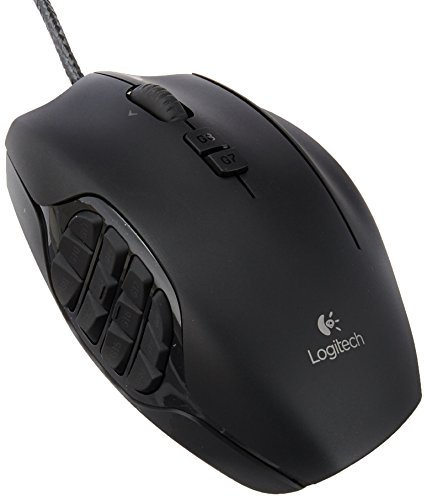
Top pick
Logitech G - G600 MMO Gaming Mouse
Best for Multi-button FPS or MOBA

Top pick
Razer - Naga Trinity


