I find this quite strange because I share the same concerns as you, but unlike you, the curved side of the EC2 is why I always used mice based on that; IME 3.0, and then EC2 versions over the years (EC2 OG with glossy sides, EC2 Blue rubberised, and a few years ago the EC2-DW. However, I switched to the Vaxee AX O because I experienced some skipping issues with a few EC2-DW units. My Vaxee has recently given me some double-clicking issues after a year and a half, and I'm thinking what's next
Hello Mouse mavens, I'm trying to replace three dying Logitech M310 mice (one has a dead button, two act like low battery but batteries were replaced and checked with a multimeter, etc). I'd describe my grip style as claw-ish and I wear size Large exam gloves. The M310 fits well in length and depth but my pinky hangs off awkwardly, and my favorite mice have been the Intellimouse Explorer 3.0 and Intellimouse Optical. Sometimes I play FPS games, other times simulation or strategy, and I do occasional image editing for work. One concern of mine is hardware and OS compatibility, as I have a generic wired mouse that works acceptably in Windows, but in an UEFI BIOS it only moves left-or-right, never up-or-down; I'll also be testing various NAS OSes (probably Linux based) soon. Finally, and biggest restriction: my budget is $30 per mouse. I am fine with both wired and wireless options, and I haven't paid much attention to technical specs like polling, DPI, acceleration, etc., and don't care about lighting options. I'm considering the following mice and would love some feedback! Thank you!
* VXE [Dragonfly R1 $24\~$29](https://www.atk.store/products/vxe-dragonfly-r1-series-wireless-mouse?variant=44857375326426) and [A9 Series $25, $30](https://www.atk.store/products/atk-dragonfly-a9-series-lightweight-wireless-mouse?variant=46320045949146) (models base, N, SE+ and base, SE, respectively. Dunno about shipping cost. EDIT: [R1S is $16](https://www.amazon.com/ATK-Dragonfly-R1-Lightweight-Adjustable/dp/B0GHRVGJ9Y?th=1) and [A9 & A9 SE are $26](https://www.amazon.com/ATK-Dragonfly-A9-Lightweight-Adjustable/dp/B0FNCDN8SX?th=1) on Amazon)
* [Redragon M602 Griffin $17\~$24](https://www.amazon.com/Redragon-Wireless-Backlit-Rechargeable-Programmable/dp/B08M9FZWN9/145-1237786-8696952) wired or w/less, [Redragon M711 Cobra wired $17](https://www.amazon.com/Redragon-Million-Adjustable-Comfortable-Programmable/dp/B0751D11BL), [M810 Pro w/less $26](https://www.amazon.com/Redragon-M810-Wireless-Buttons-Capacity/dp/B09ZY348SY/145-1237786-8696952)
* FFJ [Master01 $20](https://www.amazon.com/FFJ-Wireless-Bluetooth-Programmable-Rechargeable/dp/B0F532HLFP/145-1237786-8696952?content-id=amzn1.sym.8a163a7b-6a2a-45ae-8510-8d5419efb828&th=1) or [Master02 $20](https://www.amazon.com/FFJ-Master02-Wireless-Bluetooth-Programmable-dp-B0F66XYY1N/dp/B0F66XYY1N)
* Logitech [G305 $24](https://www.amazon.com/Logitech-LIGHTSPEED-Wireless-Gaming-Mouse/dp/B07CMS5Q6P/145-1237786-8696952)
* Fantech [Helios Go XD5 $30](https://lethal.gg/products/fantech-helios-go-xd5-wireless-gaming-mouse) (also idk ab shipping)
I appreciate everyone who commented, and who voted on said comments. Seems the Logi G305, Redragons, and FFJs were universally shunned. Since my total budget was $90, I went with one Fantech XD5 for $37.24 after tax/ship/coupon, one ATK Dragonfly A9 SE for $25.98, and an ATK VXE Dragonfly R1 S for $19.98, for a total of $83.20. I look forward to seeing which one is my favorite. I plan to keep the XD5 at home, take the A9 with me on the road, and have the R1 on my (new to me) server that I'll probably rarely need to use.
I hope that my post helps someone else on a tight budget. Hopefully I'll remember to come back and tell y'all how they fare in a couple weeks or months. Until then, cheers!
WOT inc.
My friend, do not fret, you might be able to fix this :) might not even need to replace any switches. I got the same issue years ago on my old IE 3.0 after 13 years of use. I found that if I clawed hard at the chassie so it lifted a bit and clicked, it didn't double-click. So I disassembled it, added small spacers to all screws and reassembled. It works perfectly fine today and I bought it in 2003. Everything just got compressed over the years, on a very sensitive part.
I mean same thing happened to my Zowie FK2 after about 1 year(speedrunning), exact same solution worked with that too and I still use it as backup or for visitors. The switches are very sensitive and when mice gets worn, they start sagging and getting all loosey goosey, It's generally that simple with mice.
But you can swap microswitches as well.
People will absolutely scoff hard st me for this, they tend not to believe it. But if you're "throwing it away anyway". If you want to be very, very brave. Run it in the dishwasher without detergent, twice and dry it for a day at 50-75c in the oven. The double clicks might just be due to gamer gunk.
None of you would believe me if I told you how many times I've ran my Corsair K65 and K70 in the dishwasher. Bought both at a good deal about 10 years ago, both work perfectly fine today, except left arrow key on the K70. Not a huge loss, it seems to randomly start working with each interval of washing though, same goes for the LEDs, usually there's one or two who doesn't like green... Red seems to always work though.
Every single visible screw is rusted, but they just keep going. It's quite amazing really. Definitely sticking with Corsair in the future as well.
I tend to spill, a LOT at my PC 😄 Hence why I bought two at the same time back in the day. And why I started to get the idea of running them in the dishwasher. One of the best things I ever did.
No I will not stop eating or drinking at my PC.
Why should I? Corsair unofficially has my back!
Edit: I'll add this. I make a blunder, I correct it with the tools I have and the product keeps working, over and over and over and over again. What do you do if you spill on your keyboard? Buy a new one?
WOT inc.
My friend, do not fret, you might be able to fix this :) might not even need to replace any switches. I got the same issue years ago on my old IE 3.0 after 13 years of use. I found that if I clawed hard at the chassie so it lifted a bit and clicked, it didn't double-click. So I disassembled it, added small spacers to all screws and reassembled. It works perfectly fine today and I bought it in 2003. Everything just got compressed over the years, on a very sensitive part.
I mean same thing happened to my Zowie FK2 after about 1 year(speedrunning), exact same solution worked with that too and I still use it as backup or for visitors. The switches are very sensitive and when mice gets worn, they start sagging and getting all loosey goosey, It's generally that simple with mice.
But you can swap microswitches as well.
People will absolutely scoff hard st me for this, they tend not to believe it. But if you're "throwing it away anyway". If you want to be very, very brave. Run it in the dishwasher without detergent, twice and dry it for a day at 50-75c in the oven. The double clicks might just be due to gamer gunk.
None of you would believe me if I told you how many times I've ran my Corsair K65 and K70 in the dishwasher. Bought both at a good deal about 10 years ago, both work perfectly fine today, except left arrow key on the K70. Not a huge loss, it seems to randomly start working with each interval of washing though, same goes for the LEDs, usually there's one or two who doesn't like green... Red seems to always work though.
Every single visible screw is rusted, but they just keep going. It's quite amazing really. Definitely sticking with Corsair in the future as well.
I tend to spill, a LOT at my PC 😄 Hence why I bought two at the same time back in the day. And why I started to get the idea of running them in the dishwasher. One of the best things I ever did.
No I will not stop eating or drinking at my PC.
Why should I? Corsair unofficially has my back!
Edit: I'll add this. I make a blunder, I correct it with the tools I have and the product keeps working, over and over and over and over again. What do you do if you spill on your keyboard? Buy a new one?
WOT inc.
My friend, do not fret, you might be able to fix this :) might not even need to replace any switches. I got the same issue years ago on my old IE 3.0 after 13 years of use. I found that if I clawed hard at the chassie so it lifted a bit and clicked, it didn't double-click. So I disassembled it, added small spacers to all screws and reassembled. It works perfectly fine today and I bought it in 2003. Everything just got compressed over the years, on a very sensitive part.
I mean same thing happened to my Zowie FK2 after about 1 year(speedrunning), exact same solution worked with that too and I still use it as backup or for visitors. The switches are very sensitive and when mice gets worn, they start sagging and getting all loosey goosey, It's generally that simple with mice.
But you can swap microswitches as well.
People will absolutely scoff hard st me for this, they tend not to believe it. But if you're "throwing it away anyway". If you want to be very, very brave. Run it in the dishwasher without detergent, twice and dry it for a day at 50-75c in the oven. The double clicks might just be due to gamer gunk.
None of you would believe me if I told you how many times I've ran my Corsair K65 and K70 in the dishwasher. Bought both at a good deal about 10 years ago, both work perfectly fine today, except left arrow key on the K70. Not a huge loss, it seems to randomly start working with each interval of washing though, same goes for the LEDs, usually there's one or two who doesn't like green... Red seems to always work though.
Every single visible screw is rusted, but they just keep going. It's quite amazing really. Definitely sticking with Corsair in the future as well.
I tend to spill, a LOT at my PC 😄 Hence why I bought two at the same time back in the day. And why I started to get the idea of running them in the dishwasher. One of the best things I ever did.
No I will not stop eating or drinking at my PC.
Why should I? Corsair unofficially has my back!
Edit: I'll add this. I make a blunder, I correct it with the tools I have and the product keeps working, over and over and over and over again. What do you do if you spill on your keyboard? Buy a new one?
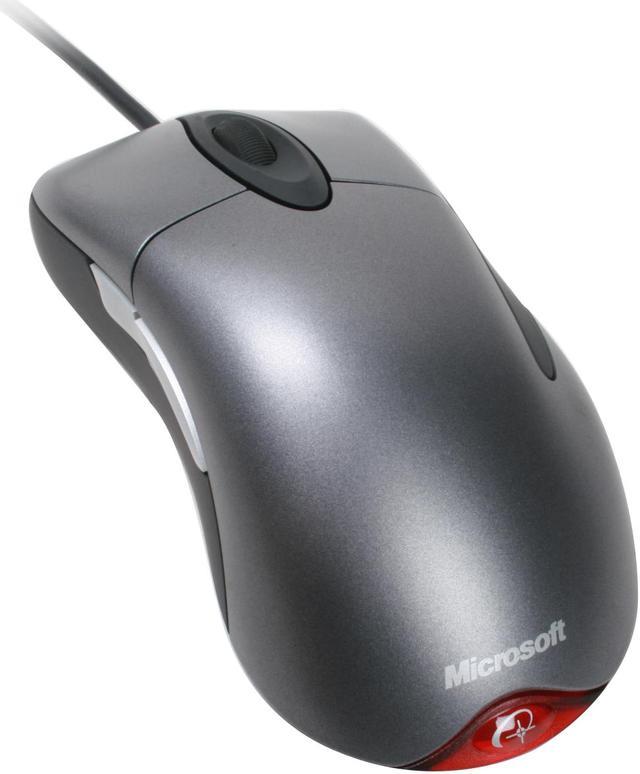
If it tracks and responds properly, as well as feels good to use for you, then it’s good. - Don’t buy into this age-old trend of “gaming mice”. It used to make a difference in quality like two decades ago, though even THEN there were poor so-called “gaming mice”. But you can have a great mouse that isn’t even marketed for “gaming”. - For example, I had the IntelliPoint 3.0 by Microsoft, which at the time was ahead of most for being optical (and great at it), as well as having additional buttons on the side, as well as “ergonomic” (asymmetrical) which then all became the norm.
So just try out any given mouse that might seem good for you, or find proper reviews (not AI-summaries or shit people say online, but serious tests, if you can find it), and if it doesn’t work well, don’t get it or return it if you did. - This counts for a lot of products like this.

 Avinin1


