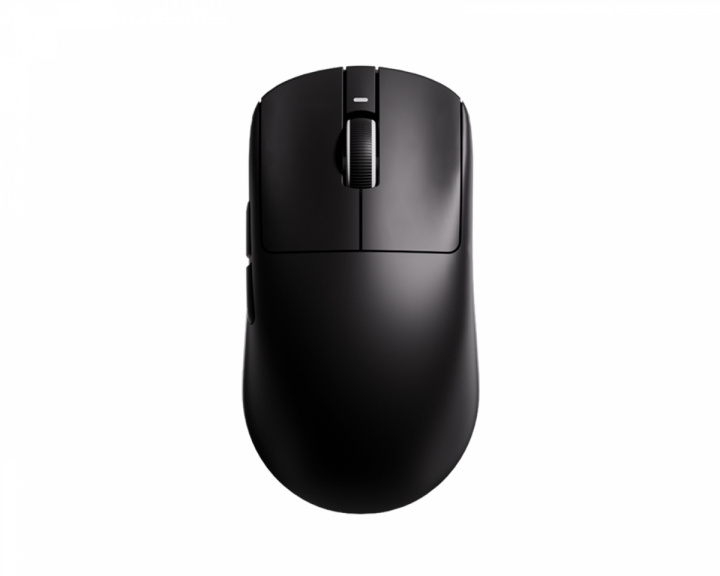
I think you're definitely right that the sensor specs are a wash now. Comfort for bigger hands is most important for me. I have an x2v2 mini right now, and it's ALMOST perfect, but creates a bit of a strain in the carpal area. I'm not really sure what it is as it feels pretty locked in and comfortable for me (I like that it's somewat close to my previous Viper Mini), but might be a touch too thin on the sides and I think it's pinching my median nerve the way I claw grip it (relaxed claw). I was debating a crazylight but I'm not sure now, as I feel like this shape is nice but long-term strain is saying otherwise. I think there's definitely something out there that I prefer, just haven't had the opportunity to test enough to say..and there are also mice like the pathfinder where you can kinda dial in exact grip.
Optical switches use the same mechanism as a mechanical switch.
However instead of reading the switch position with the electrical contacts, they use a laser beam to detect the position of the switch (by blocking the beam before it reaches the sensor).
On a piece of paper, optical is way better since you can disable debounce (the click-delay tuning that prevents double-clicking) which means you don't get no-regs when spamming the buttons.
However in reality, optical switches are usually very light, when for cps you usually want a heavier switch so you can get that nice rhythm going.
Not that optical switches can't be made to feel identical to a mechanical switch, just that they aren't (much like how HE switches in a keyboard don't have to be linear, but predominantly are) for marketing purposes.
Though you can just use opticals anyways, whole fam uses the Pulsar X2V2 mini which is a very early optical switch mouse. We all play spam-heavy games along with fps as well, sure the optical switches feel different, but you can adapt just fine. After which you'll be able to get higher cps out of an optical compared to a mechanical since opticals aren't limited by debounce.
Then again, mechanical switches also aren't supposed to debounce, the only reason they do is because of extremely chalked programming, but that's an entire different story.
If you want the superior feel of mechanical, get a Mad Cats mouse. They use the correct coding for detecting the switch position through the electrical contacts. Mad Catz mice don't double-click and have unrestricted cps just like in an optical switch.
So if adapting to an optical switch sounds like pain, Mad Catz is and always has been the king of cps and click latency (and never double-clicking, unless the circuit board itself is borked, or the switch itself is actually broken and not just worn).
Mad Catz has a few 3k polling mice (the Pro X and Pro S3, though I think there are a few others too) which are easily the top recommended mechanical switch mice as even their 10 year old 1k mice have comparable click latency and max cps to modern 4k optical mice. So a modern 3k Mad Catz mechanical mouse is kind of a no-brainer for maximum cps with the feel of a mechanical switch and the reliability of an optical switch.
Unfortunately that means a wired mouse, and a slightly heavier mouse. The shape is actually goated, but weight is equally important as shape when it comes to preventing wrist strain, the heavier and worse the shape the more you strain your carpal tunnel. However if you were already using a heavier mouse, and remember to stretch and exercise your wrist between rounds and when taking micro-breaks, you'll be perfectly fine (especially if you're under 20, your body will adapt and build muscle in your wrist to handle the weight of a mouse without ever experiencing strain, so the worry about the weight of the mouse is more for the older audience).
For Agro-claw you always want an egg.
Some ergo shapes are also good, though the Kysona Uranus Pro is the only exception to my personal distaste for full-size ergo mice, so I'm probably not the best to ask for them.
The "best" egg so far is the Zaopin Z1, yea it's small but with agro-claw size doesn't matter unless you're like the hulk or smth. Even then, I have a shape tester and have 18cm by 9cm hands and find that shape to be more secure comfortable for aggressive claw grip than the Mchose G3 shape, if that's any solace.
The Mchose G3 shape has "flat" sides in comparison to the Z1 (especially low down close to the base of the G3), so your fingers slip down the sides of the mouse towards your hand (better than the hourglass shape you're holding in this picture, but not as good as the Z1). Whereas the Z1 gets wider in the middle across it's entire height, making it incredibly secure, especially for aggressive grips.
That being said, there are many who hate the Z1 shape and love the G3, just as there are those who love the Z1 and hate the G3. Both big hands and small hands too. Fortunately, they're both incredibly cheap (technically knockoffs, but when the knockoff has better build quality, lower latency, longer battery life, a nicer coating, more colors, and is almost less than half the weight of the original, you can't really call it a knockoff anymore). So you can probably afford to just buy both and main the one you find works the best for you.
On the expensive end of the egg spectrum, the Arye RCC1 and the Lofree Hypace are also goated. Expensive, to the point where you probably shouldn't buy unless you know that egg mice are your niche (much like the Fenrir Asym being a niche within a niche, both of these expensive egg mice are hyper-specific niche-niche mice) as buyers remorse is strong with the micro-niche mice. Though if you already know that either of those mice are your niche, they're both actually peak and will easily be your endgame, so buy 2 as having a spare is so worth it in those cases.
Yeah I feel you there, same thing with me.
Hourglass shapes are amazing for fingertip grip, and MCP-claw (knuckle-claw, where you do still mostly fingertip, but also use your knuckles to stabilize the mouse). But with any other form of claw they absolutely suck and are the exact opposite of what you want.
I was fortunate and got the MayaX, X2 V2 mini, and later on the Kysona Uranus Pro.
However all 3 of those mice rely on a relaxed claw grip (my ring finger actually hooks around the front of the X2 mini, effectively turning it into an egg shape), with your ring finger right up at the front of the mouse.
Of course all 3 of these mice have a flat spot for your ring finger so it stays there (or it actually curves in towards the front like on the Uranus Pro, and technically the X2 mini since I put my ring finger so far forwards on that mouse). So a relaxed claw grip with extended fingers is natural and very secure and comfortable.
However, if an aggressive grip is what you want, then an egg is always going to be better. I prefer a relaxed grip (from all my practice as a Cellist and a Pianist, my hands like to hold a "proper" curved and relaxed shape) so I'm currently transitioning to pure fingertip grip, and maining the MayaX in the meantime. Though I'd get the Z1 in a heartbeat if an aggressive grip was my preference, and that would probably be my endgame.
If you actually do like a relaxed grip however (and your agro grip is only due to your current mouse being almost exclusively for fingertip due to it's hourglass shape), then the MayaX is a really good option too. It doesn't show up on camera, but where it's purple on the purple edition, the side of the mouse is flat (overhung for better grip when lifting the mouse, but squeezing the ring finger doesn't push the mouse forward or back) which gives you a really secure spot for your ring finger.
The MayaX is more of an MCP claw mouse though, the rear hump has a "V" shaped ridge on it (kinda like the forehead of a Klingon if a Klingon only had 1 ridge instead of 5 stacked on-top of each-other, draw a line from the outside edge of the main button to the middle rear of the mouse, and that's where those two ridges are) that slots in-between your ring and middle finger knuckles. Plus there's also a "dent" to the outside of the ridge that your ring and pinky knuckles rest inside of.
Very subtle details that don't show up on camera, but you can certainly feel them and they turn the rear hump into an auto-centering locating pin when usually a relaxed MCP-claw grip. However this does mean your palm makes zero contact with the mouse (the thumb part of your palm does a little though) and your pointy finger knuckle is also lifted off the mouse too, unlike most MCP mice where all 4 knuckles are touching the mouse.
It's also a good mouse for all other grip styles too of course, and although there is a portion of the mouse that does have an hourglass shape, it's very far forward (the "middle" of that hourglass is just before the mouse goes from black to purple on the purple edition, the transition from black to purple highlights where the side changes from an hourglass shape to a flat sided shape), it's only barely narrower than the flat side rest for your ring finger, and it's a very gentle curve so your pinky finger isn't constantly pulled to a specific spot on the side of the mouse but instead just stays where you left it.
However, it's definitely not an aggressive grip mouse, better than what you currently have sure, but compared to an egg, the MayaX definitely specializes in relaxed grips. The MayaX also punishes you for using poor grip tension and over-gripping the mouse, as it'll rotate around in your hand and throw off your aim if the tension in your hand becomes unbalanced. This did actually improve my aim dramatically and broke all my bad habits (and also reduced the pain and strain I'd get in my hand snd fingers from over-gripping, by teaching me to always keep a relaxed and balanced grip on the mouse). However that isn't a "feature" for many people and instead would be an instant turn-off. Plus is also does mean the MayaX with judge an aggressive grip with more scrutiny than a relaxed grip (I can grip it with an aggressive grip, and if I keep a balanced grip tension it's perfectly fine, but as soon as I over-tense my hand the mouse rotates and doesn't go back until I balance my grip tension again).
Egg shapes however don't really rotate at all. They're basically built for aggressive high-tension grip styles, and pretty much always hold a consistent position and angle no matter how much or little tension you use, or how balanced or unbalanced your tension is, or how amazing or terrible your grip technique is.
But I thought I'd just share that just incase you do prefer a relaxed MCP claw grip, and only use an agro claw grip because the mouse makes you do it.
I have similar hand size (19x10cm) and I just committed to pure fingertip and the spray control got better than with claw after some practice.
Don't have a pure fingertip mouse (yet) but have fingertiped the Kysona Uranus Pro (best full/size fingertip mouse, basically a Fenrir Asym but with the rest of the mouse and the buttons are higher up) and the Pulsar X2V2 (and the Maya X, I curl my fingers and the May X naturally scoots forward with my ring finger aligned with the sensor and pinky and thumb further back).
With pure fingertip, my aim was a bit off and unstable all-round at first, but now it's better than my MCP claw aim (though my horizontal flicks on MCP claw are still equal to my fingertip flicks, so I do still use MCP claw a fair bit).
However, depending on how you fingertip, the Beast Miao might be the better option for you (if you prefer a more relaxed straight-finger grip, then the Fenrir Asym defo isn't for you, but if you prefer a curled fingertip grip, then there's a decent chance the Fenrir Asym is the one mouse for you, however the Beast Miao and Fenrir Pro are still the safer options).
Same hand size but slightly different grip:
I like a more open grip, so my pinky is where your ring finger is and rung finger is farther forward on the mouse almost touching pinky finger.
For my grip style the Kysona Uranus Pro is absolutely locked-in. It has a little nubbin on the front right side that I hook and pull back on with my ring finger, and push forward on with my pinky finger.
However that won't work with how aggressively you like to curl your ring and pinky fingers (I've been training through years of Cello practice to always keep my fingers relaxed and slightly curled, so I find it incredibly uncomfortable to grip mice the way you do since I've developed different muscles in my hand).
If you're happy with a more open and relaxed grip however (hurts if you have a tendency to over-grip your mouse, though the pain will teach you to break that bad habit). Defo give that mouse a shot (or the Pulsar X2 mini, I do the same thing with hooking my ring finger around the front of the mouse).
The Maya X is either a carpal-tunnel claw mouse (not pincer claw) or a 1-3-1 pincer claw mouse (I rest my ring finger on the top of the lip next to the rmb, and push down with my ring finger since it's not actually pressing the rmb, actually extremely comfortable and absolutely locked in).
However when I try to grip the Maya X with curved fingers like you do, it actually feels extremely locked-in with perfect sensor angle alignment and it doesn't torque to the side if you over-grip the mouse.
Though I do find that uncomfortable of course, not sure if it's because I find curling my fingers like that uncomfortable, or if it's because the Maya X is uncomfortable to grip like that.
I do grip the ASUS Harpe 2 Ace in an almost identical fashion though. Still my fingers are a little more open and relaxed, however they're almost as curled in as yours are and I do actually find that incredibly comfortable on the Harpe 2 Ace. It has a deceptively long butt that means you grip it far enough back where the middle of the hourglass shape is far enough forwards to reach it without too aggressive of a finger curl.
So the Harpe 2 Ace might actually be right up your alley.
However, from all reviews online, and trying out 3D printed shape-testers:
The Mchose G3 series of mice might actually be perfect for you. Egg shapes (and the elusive diamond and cheese wedge shapes) accommodate claw-grip perfectly as they kick your pinky out farther than your ring finger, and also "snuggle" into the palm of your hand as you grip them. Unlike hour-glass shapes which scoot away from the palm of your hand, and also kick the ring finger out wider than the pinky.
Although I do like hourglass mice for fingertip grip, I don't like them for claw grip unless they have a feature I can use to counteract their anti-claw tendencies (like the Uranus Pro nubbin, X2 mini front corner, Maya X rmb ledge, or Hape 2 Ace's long butt). So I would definitely recommend looking into non-hourglass shapes for claw grip (especially pincer claw, carpal tunnel claw is less sensitive to hourglass shapes but pincer claw is very sensitive to hourglass shapes).
At this point, print up all the shapes in the 3D printed mouse shape-tester mega-pack first.
Even ordering that through a 3D printing service will be cheaper than continuously buying new mice.
Once you find your niche mouse, if Mchose, Zaopin, Attack-Shark, etc.... haven't made it, look online for a 3D printed shell mod kit for an existing mouse, order the shell mod kit and the mouse it modifies, and enjoy your new niche mouse.
Alternatively, keep using these current mice with new grip styles. I strongly recommend trying MCP-claw (a grip style I was heavily opposed to, until I tried it out, and discovered that it's actually amazingly comfortable) which is where you slot the top-side ridge of the mouse between the knuckles on your palm, and the only other part of your palm that touches the mouse is (sometimes) the thumb portion of your palm. For some mice they slot between your ring and pinky finger knuckle, for others your middle and ring finger knuckles (the Kysona Uranus Pro is a rare mouse for having a central ridge in the middle of the mouse to slot between your pointy and middle finger knuckles).
MCP claw is surprisingly stable, and since it doesn't really on palm contact, you basically have full freedom of motion with it. Not the same as fingertip, but more than any other claw grip.
The MayaX has one such ridge on it's rear hump specifically to slot between your pointy and ring knuckles, with a little indent on the side for your ring and pinky knuckles to rest in. They're very subtle details that you can't really see due to the matte coating, but they're very much there, so give it a try and see if you like it.
If you're a fingertip-main however, the X2 mini (crazylight non-medium, and the final release version of the X2F - current releases of the X2F are still beta and alpha products unfortunately), beast X mini (the beast Miao is effectively the same mouse but with the rear hump smushed so it stops touching your palm), and non-X Maya (soon a fingertip-only version will be announced, supposedly sometime around July according to the current teasers), are all goated fingertip shapes.
The Kysona Uranus Pro is also a goated fingertip shape (though the left mouse button is a bit on the tall side) that also happens to be a goated relaxed-carpal-claw shape as well.
And of course, the Gwolves HSK, Fenrir Asym, and Fenrir Pro, are the 3 respective kings of fingertip grip (which one is for you depends on your hand size, and grip style, some people find the Asym to be perfect and hate the HSK, others hate the Asym and find the HSK to be perfect, 3D print some shape testers or just a few flat cubes that match the side widths and angles so see if you want a wider mouse or a narrower mouse).
But otherwise yeah, either this is a case of the muscles in your hand are currently developing and nothing will feel good for about 6 months. After which everything will feel amazing for about 6 months. After which one specific mouse will feel even MORE amazing for years-life now that your muscles have finished toning up.
Or this is a case of, you meed the shape-tester mega-pack to find the obscure niche mouse that tickles your pickle in just the right way.
Edit: thought you meant fingertip only mice nevermind.
Gwolves might have some of the worst customer service out there.
But the HSK (and HSK2), Fenrir Pro, and Fenrir Asym are the perfect shape and size for small, medium, and large hands respectively.
There are a few other fingertip-only mice Gwolves makes, however they're a lot more niche and obscure so you'll instantly buy them no questions asked or go "huh!?!?!?" The second you look at them.
The software is meh, not as atrocious as Razer/Logi/Steelseries/Corsair/HyperX software, but also not as good as the new ASUS browser software (ASUS has had a glow-up from the worst of the worst software, to a brand new browser software that's actually better than Lamzu and Pulsar software).
The build quality is really good though, so fortunately the terrible customer service is usually avoided.
The owner/creator/founder is a mad-man. Good at making amazing and innovative mice, but at the expense of social decency unfortunately.
If you want a Gwolves alternative, you have:
WLmouse Miao.
Pulsar X2F (wait until V3, V1 has sensor issues, V2 is ok but significantly heavier than it needs to be).
Lamzu fingertip-mouse (unreleased, doesn't have a name, it's Lamzu so it'll be goated but damn it feels like we'll get GTA 6 before a new Lamzu release).
Kysona Uranus Pro (it's a bit tall for my liking, and a fullsize, but damn it's an amazing fingertip mouse and it's insanely cheap like just buy one and take a hacksaw to it and you're good in all honesty, I'm even currently procrastinating on making custom 3D printed shells for it cause it's so cheap but so amazing despite being cheaper than the budget hello-kitty mouse from my local stationary store).
If you want more info, here is a YT video and channel who is specifically a tiny fingertip mouse aficionado:
[https://youtu.be/c8ojtzn9H-8?si=n7znAoeI8WyVuOxb](https://youtu.be/c8ojtzn9H-8?si=n7znAoeI8WyVuOxb)
Zaopin Z1
ARYE RCC1
Pulsar X2 crazy-light (non-medium)
Lamzu Maya (non-X) and Atlantis Mini.
There are also a few Gwolves mice which fill this niche too.
Kysona Uranus Pro (honestly it's the most universal shape I've ever held, and the most goated shape I've ever held, I bought it cause it was cheap, easy to disassemble, and has a surprisingly good PCB that's also very compact, and then I never took it apart cause damn it's actually the goat and has no right being as insanely universally good as it is).
EXACTLY the same problems as myself.
I've tried a bunch of other shapes for my grip (pure fingertip/relaxed fingertip) like beast x mini, x2v2 mini, Atlantis mini, xlite v3 mini, and none came close to the feeling and aim potential the g305 gives me.
the only mouse that worked similarly so far is the zaopin z1 pro, which is the only one I didn't sell and been maining since I switched off the g305.
though, still waiting for a proper lightweight, good sensor and switches g305 clone (ATK please make one) so I can compare with the z1 pro.
Feels good. I tried the X2n and felt like the hump was a bit too aggressive for my grip. The v8 has enough to give me stability but I also feel like I have enough space for micro corrections
OP14K / PMM Pulse, Hitscan Hyperlight, ZA13-C / PMM FUSE 8K, GPX, GPX Dex, ASUS ROG Harpe Ace, DAV 3 Pro, PMM NEO 8K, Pulsar X2 / X2 Mini / X2H / X2H Mini / X2N Mini, Zowie U2-CW, Waizowl Cloud, LGG LA-1, Steelseries Prime Mini, Pwnage Stormbreaker Max CF, Vaxee NP01, Vaxee Outset AX (I went through all my mousemarket and hardwareswap listings to find this lol)
The XM2 was my second shape I had tried since I had gotten back into pc gaming in 2023, and I always ended up coming back to it. Owned an XM2we at first, and then eventually bought an XM2w 4K when they released. It just works well for my hands and my grip style, and I don't think any shape could replace it for me personally.
I don't recommend spending as much as I and many others have on finding "the perfect shape" as you will go down a very deep rabbit hole
OP14K / PMM Pulse, Hitscan Hyperlight, ZA13-C / PMM FUSE 8K, GPX, GPX Dex, ASUS ROG Harpe Ace, DAV 3 Pro, PMM NEO 8K, Pulsar X2 / X2 Mini / X2H / X2H Mini / X2N Mini, Zowie U2-CW, Waizowl Cloud, LGG LA-1, Steelseries Prime Mini, Pwnage Stormbreaker Max CF, Vaxee NP01, Vaxee Outset AX (I went through all my mousemarket and hardwareswap listings to find this lol)
The XM2 was my second shape I had tried since I had gotten back into pc gaming in 2023, and I always ended up coming back to it. Owned an XM2we at first, and then eventually bought an XM2w 4K when they released. It just works well for my hands and my grip style, and I don't think any shape could replace it for me personally.
I don't recommend spending as much as I and many others have on finding "the perfect shape" as you will go down a very deep rabbit hole
OP14K / PMM Pulse, Hitscan Hyperlight, ZA13-C / PMM FUSE 8K, GPX, GPX Dex, ASUS ROG Harpe Ace, DAV 3 Pro, PMM NEO 8K, Pulsar X2 / X2 Mini / X2H / X2H Mini / X2N Mini, Zowie U2-CW, Waizowl Cloud, LGG LA-1, Steelseries Prime Mini, Pwnage Stormbreaker Max CF, Vaxee NP01, Vaxee Outset AX (I went through all my mousemarket and hardwareswap listings to find this lol)
The XM2 was my second shape I had tried since I had gotten back into pc gaming in 2023, and I always ended up coming back to it. Owned an XM2we at first, and then eventually bought an XM2w 4K when they released. It just works well for my hands and my grip style, and I don't think any shape could replace it for me personally.
I don't recommend spending as much as I and many others have on finding "the perfect shape" as you will go down a very deep rabbit hole
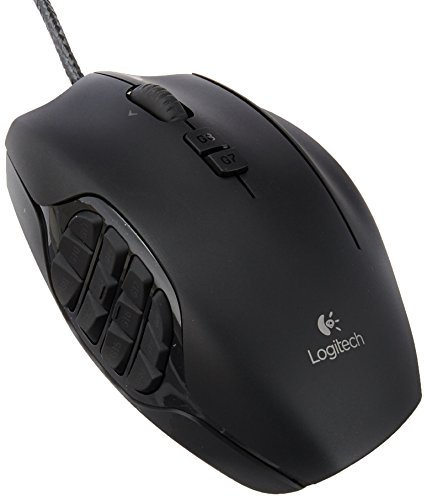
Top Gaming Mice on Reddit
1
Logitech G
G600 MMO Gaming Mouse
73% positive of 688 users
Customizable MMO workhorse, durable, but discontinued and pricey.


 Altruistic-Read-6792