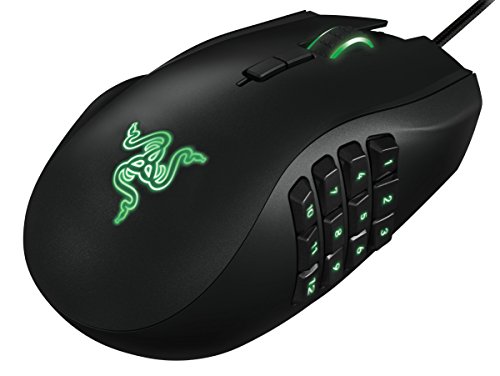
The reverse version of the Razer Naga MMO course might help you keep your right hand on the keyboard more
[https://www.razer.com/gaming-mice/razer-naga-left-handed-edition](https://www.razer.com/gaming-mice/razer-naga-left-handed-edition)
and you can remap buttons on that so you could use your thumb for more of the action
also kinda similar to the Azerons keypad, I use a razer tartarus pro because it just makes so much more sense to have the thumb doing WASD instead of using two or three fingers for that. Azeron's devices might be a better fit for you because of how the individual finger switches can be set to different heights, but the damn things look so delicate idk I just see the cats knocking it off of something and it breaking into a million pieces
Left handed razer naga with 12 buttons or a regular left handed mouse and just click your abilities. Holding both mouse buttons will make you walk forward then just rotate left and right while holding both buttons to steer.
Mice in order shown:
1. Razer Lachesis: 2007
2. Razer Ouroboros: 2012
3. Razer Lancehead: 2017
I’ve always used these moderately high ambidextrous mice from Razer since the Lachesis and have upgraded to the new rendition within this line as the old ones became worn but they seem to have dropped this style after the lancehead.
Heck, they’ve dropped anything left handed friendly with moderately high buttons entirely as far as new mice are concerned.
I’m on my 2nd lancehead right now and now that one is experiencing problems and there’s no more in stock anywhere or any mouse on the market that fills the same niche.
Why would they drop this layout entirely? First assumption would be poor sales on the lancehead but the market had to have existed to have 10 years of this layout.
I’m just bummed and needed to rant since as far as I can find, there’s no comparable mouse on the market that fills this same niche and there’s no lanceheads available new anywhere anymore.
Unfortunately I couldn’t get used to the naga keypad for every day use and their current ambidextrous offering like the viper is configured best for right handed use due to having side buttons only on the left which wouldn’t be worth it for my use case
I’m left-handed. You don’t choose that at birth, and roughly 10–12% of the world’s population is, too – around one in ten people. We’re not some weird anomaly, and we’re definitely not a tiny niche. We’re a pretty big minority, including in gaming.
Gaming has been my main hobby since I was a kid, and for years I never really felt like my “wrong” hand was a serious issue. Sure, most mice are designed for right-handed users, but the big brands – Razer included – used to have at least decent ambidextrous options. That was the unwritten deal: maybe I don’t get a full lineup built just for lefties, but at least I have proper, usable choices that don’t put me behind everyone else.
I’ve basically always used the same kind of mouse: ambidextrous shape, two side buttons on the left, two on the right, plus one or two buttons under the scroll wheel for DPI (depending on the model). All fully rebindable. That setup was perfect for my macros across different games. Over the years I’ve used SteelSeries, Mionix, and for the last ten years I’ve been with Razer: first the Diamondback, and for the last five or six years, the Lancehead Tournament Edition.
That Lancehead has been my main mouse for about half a decade. Not flawless, but it did exactly what I needed: truly ambidextrous shape, side buttons on both sides, and it fit nicely into the whole Razer ecosystem. Now, after all this time, the middle click on the scroll wheel is starting to go. That’s normal – hardware wears out. As a loyal customer, the obvious move is to look at Razer’s current lineup and find the “natural successor” to my mouse: same brand, same ecosystem, newer tech. That’s what anyone would do.
And that’s where everything starts to fall apart.
When I went to look for a new Razer mouse, I was honestly shocked at how few real ambidextrous options are left. Some models still *look* ambidextrous from the outside… but the side buttons on the right – exactly where my thumb is – are just gone. On paper the shell is symmetrical, but in actual use, the mouse is no longer truly ambidextrous.
Good examples are the Viper and the Cobra. Visually, they pass as ambidextrous mice. But for a left-handed player, they’re basically cut-down versions: the right-side buttons are completely missing. I don’t get the same level of control or functionality. It feels like the message is: “you can hold it with your left hand if you want, but don’t expect the same features as right-handed users.”
On top of that, the left-handed/ambidextrous side of the lineup feels clearly second-tier compared to the right-handed one. If you want the latest and greatest from Razer – top sensors, super low latency, wireless, premium everything – it’s all built around right-handed mice. If you want something ambidextrous, you’re suddenly forced into compromises. One of the biggest ones: no proper, up-to-date wireless option anymore, while the right-handed range is full of high-end wireless models.
And then there’s the Naga.
I play World of Warcraft, and I’ve seriously considered picking up a Naga more than once. It’s a very iconic mouse, heavily associated with MMOs and players like me. Right-handed users are now on the Naga V2 Pro: revisions, better sensors, wireless, all the bells and whistles. Meanwhile, the left-handed Naga is still the old wired version, with no modern refresh, no updated sensor, nothing to bring it in line with the rest of the family. It’s stuck in the past.
What makes it worse is the YouTube ad for the left-handed Naga. To me, it’s just… bad. The way it’s framed makes left-handed people look like some kind of “special case,” almost on the same level as people with disabilities. And with full respect to people who *do* live with disabilities: that comparison feels off and pretty disrespectful. We’re more than 10% of the population. We shouldn’t be treated like a rare charity project that deserves a “special edition” – we’re just part of the regular gaming audience.
I’m not asking Razer to build an entire mirror lineup with 1:1 left-handed versions of every single mouse. I’m not demanding fifteen different lefty-only models. What I don’t understand is how a company this big, with this much reach and this much marketing around “for gamers. by gamers.” can’t even maintain *one* truly modern, wireless, fully-featured ambidextrous mouse with side buttons on both sides.
Because yes, there *are* other big brands out there – I’m not going to name them here because I’m not trying to run an ad for anyone – that still provide a decent left-handed offering: genuinely ambidextrous designs with full side buttons, mirrored left/right versions of the same model, or at least a proper modern wireless option that doesn’t feel like a downgrade. And that honestly makes Razer’s situation look worse, because it proves this isn’t some impossible technical or economic problem. It’s just a choice.
So this post is aimed at both the community and, especially, at Razer:
* Is it really that hard for a company your size to keep at least one modern, wireless, truly ambidextrous mouse with working side buttons on both sides?
* Is the “Razer ecosystem” only meant to be complete if you’re right-handed?
* Is a proper, updated left-handed Naga really so unprofitable that it gets left behind while the right-handed version is already on V2 Pro?
I don’t *want* to be done with Razer. I’ve been buying your stuff for a decade. But right now you’re basically pushing me to go and spend my money somewhere else simply because, as a left-handed gamer, I no longer fit into your idea of what a “gamer” looks like. And to me, that’s a huge failure in design, respect, and long-term thinking.
We’re not a statistical glitch. We’re players, customers, and fans who’ve put time and money into your brand. The least we’re asking for is not to be treated like an afterthought because of the hand we use.
*On top of being left-handed, I’m also Spanish and don’t really speak English. I used ChatGPT to help translate my original message, so if anything sounds weird or off, I’m sorry about that.*
Thanks for taking the time to read my complaint.
Top Gaming Mice on Reddit
1
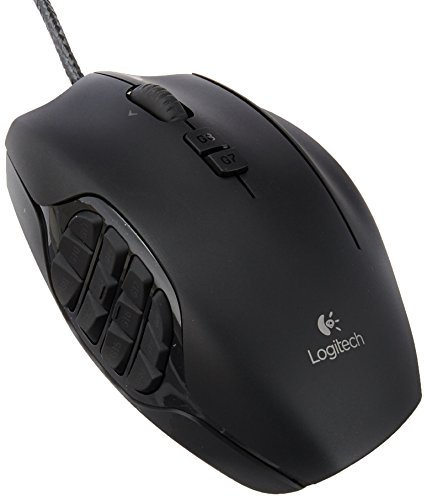
Logitech G
G600 MMO Gaming Mouse
73% positive of 688 users
Customizable MMO workhorse, durable, but discontinued and pricey.

 999_Seth