What is it about Synapse that makes it the worst for you? I recently switched to a Razer Naga V2 Hyperspeed but Synapse is way better than GHub in my experience. Creating new profiles and assigning them to games takes way fewer clicks than it does on GHub, for example.
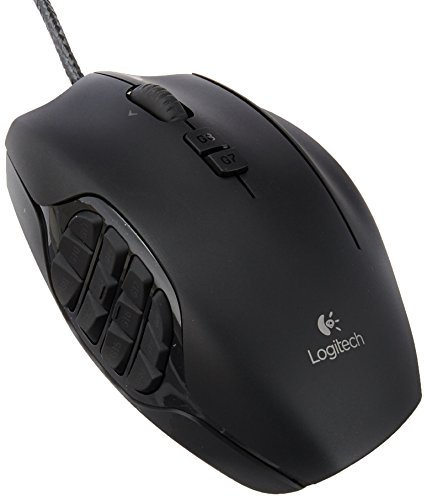
I don't remember how long it took me to get used to using a 12 button side panel on mice, as I think I started with the G600 over a decade ago. It was definitely more intuitive to learn than a keyboard based layout, as I could arrange all my class and utility skills on the mouse in a straight sequence that made more mental sense rather than them being scattered over the keyboard. But one thing is for sure - once I got used to it, I couldn't really play well without such a mouse feature anymore. For all my dislike of razer, I do like their naga v2 hyperspeed, and that's what I'm usingnow. Though be aware that (like most mice) they have a problem with switches eventually failing, especially middle click, and replacement costs are more than compared to a generic mouse, unless you know how to solder.
I really disliked the Razer Naga V2 Pro and the Razer Naga Trinity because the replaceable side-panel buttons feel bad. They don't feel like a Razer Naga or Razer Naga X.
The Razer Naga V2 HyperSpeed FEELS like a wireless (and all around better) Razer Naga X. The lockable/unlockable scroll wheel and side scrolling by tipping the scroll wheel are nice modern additions. This mouse is my new daily driver.
The buttons on the Razer Naga V2 HyperSpeed are quick clicks that feel more like left or right clicking than pressing a normal side button. You can easily hold two of these buttons at once. Remap them to anything. Only full support on Windows unfortunately, but you can remap using Windows and use most features on other machines. I'm on mac now.
I really disliked the Razer Naga V2 Pro and the Razer Naga Trinity because the replaceable side-panel buttons feel bad. They don't feel like a Razer Naga or Razer Naga X.
The Razer Naga V2 HyperSpeed FEELS like a wireless (and all around better) Razer Naga X. The lockable/unlockable scroll wheel and side scrolling by tipping the scroll wheel are nice modern additions. This mouse is my new daily driver.
The buttons on the Razer Naga V2 HyperSpeed are quick clicks that feel more like left or right clicking than pressing a normal side button. You can easily hold two of these buttons at once. Remap them to anything. Only full support on Windows unfortunately, but you can remap using Windows and use most features on other machines. I'm on mac now.
I have the Naga V2 Hyperspeed and I love it. I use my pinky for ctrl and shift, my thumb for alt and space, and my mouse does all the actual number pressing. So a typical button press for me looks like (Left hand->) Shift + 7 (<-Right hand)
However I do think this setup only works well because FF's gcd is so long. But it is petty intuitive for me and I don't really have to think about it.
I have the original wireless Basilisk and I have used it just about every day for my job and for gaming for the last three years. I have taken it with me to multiple different states and job sites loose in my backpack, dropped it more times than I can count, accidentally spilled water on it, and it still works like new. It has outlasted my Naga V2 Hyperspeed, which has developed scrolling issues after a year of use, so I definitely stand by the Basilisk for something affordable and reliable.
Top Gaming Mice on Reddit
1
Logitech G
G600 MMO Gaming Mouse
73% positive of 688 users
Customizable MMO workhorse, durable, but discontinued and pricey.


 1duEprocEss1