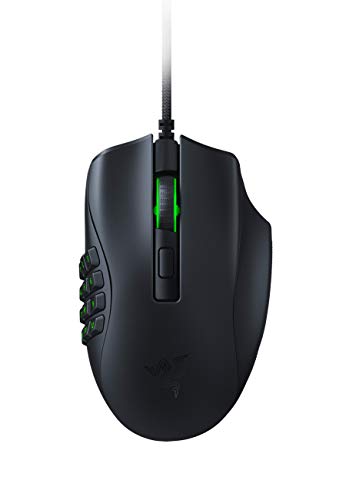
I really disliked the Razer Naga V2 Pro and the Razer Naga Trinity because the replaceable side-panel buttons feel bad. They don't feel like a Razer Naga or Razer Naga X.
The Razer Naga V2 HyperSpeed FEELS like a wireless (and all around better) Razer Naga X. The lockable/unlockable scroll wheel and side scrolling by tipping the scroll wheel are nice modern additions. This mouse is my new daily driver.
The buttons on the Razer Naga V2 HyperSpeed are quick clicks that feel more like left or right clicking than pressing a normal side button. You can easily hold two of these buttons at once. Remap them to anything. Only full support on Windows unfortunately, but you can remap using Windows and use most features on other machines. I'm on mac now.
I really disliked the Razer Naga V2 Pro and the Razer Naga Trinity because the replaceable side-panel buttons feel bad. They don't feel like a Razer Naga or Razer Naga X.
The Razer Naga V2 HyperSpeed FEELS like a wireless (and all around better) Razer Naga X. The lockable/unlockable scroll wheel and side scrolling by tipping the scroll wheel are nice modern additions. This mouse is my new daily driver.
The buttons on the Razer Naga V2 HyperSpeed are quick clicks that feel more like left or right clicking than pressing a normal side button. You can easily hold two of these buttons at once. Remap them to anything. Only full support on Windows unfortunately, but you can remap using Windows and use most features on other machines. I'm on mac now.
I appreciate it, I've used a Razer Naga X the past 8 years and hardly got any use out of the 12 side buttons (prolly because I have my hand further up on the mouse making them hard to access).
UPD: Most likely, someone tricked me or intentionally pranked me by saying that this is exactly what my grip type is. I decided I’d rather It's easier to cut off my own hand than try to find something that fits, because I hold the mouse like an idiot
About me - hand is 16 cm, short fingers, average width
~~Grip - ultra fingertip grip, so that my wrist rests completely on the table. In fact, when I’m not gaming, I usually move the mouse without lifting my wrist, lifting and controlling it exclusively with my fingertips (I’ll attach a photo if needed)~~
I’ve been using the Naga X for so long that it’s started to fall apart completely
I thought about just replacing it with the Naga V2 Wireless (because I’m not ready for batteries in the HyperSpeed), but I realized it’s a expensive yet rather mediocre mouse
So I ordered myself a Corsair Scimitar Pro Wireless.... And it didn’t work for me AT ALL
It’s heavy, it’s long, and my hand can’t rest comfortably on the table
I really liked the mouse itself, the software, the build quality, and everything else, but I can’t lift it easy; I played a couple of games and my hand actually started to hurt
I looked into the Aerox 9, but I realize with my grip style, I'll be pressing the main buttons where the holes are already in the body, and I won't be able to reach the back row of buttons no matter how hard I try
As for the side buttons - for gaming, I need about 3-4 buttons closer to the back of the mouse so I can press them with my thumb, but the Naga’s layout would be GREAT because for my work I constantly use that mini numpad as an... actual numpad, although I realize there are only three mice like that and, apparently, none of them work for me (as it turned out, in a very strange way - by pulling the mouse toward me with my index and middle fingers)
I’ve also used the Pulsefire Raid - the shape was good, but my pinky kept rubbing against the mouse pad, so I’d prefer a wider mouse rather than a bit narrow one/ringfinger rest
I don't know if I have any other requests, but I'd just like to ask for some advice on a good mouse for someone with a strange "back" grip and a relatively small hand with short fingers
Maybe I was misled by those who said I had this kind of grip (their argument was that if my wrist is completely lay on the table, it can’t be anything other than a fingertip grip)
But after your comment, I really started thinking about it and began paying much closer attention to the things I do automatically.
It turns out that my thumb is usually bent quite a bit and rests on the plastic near button 10 (the bottom-most and closest one) between the rows, and while gaming, I straighten it slightly to reach the two closest rows - whose bottom buttons I use in games. I physically can’t play and reach the top row or even button 9, I use buttons 7, 8, 10, 11, and 12
But at work, when I use all the buttons, my hand does something really strange - essentially pulling the mouse to me and turning it slightly to the SIDE to reach the “1” button
That is, I arch mi hand a bit it so it doesn’t touch the mouse at all (only fingertips, then use my index and middle fingers to pull the mouse into the space created, press the numbers I need, and use those same fingers to return it to its original position - while the cursor travels almost halfway across the screen (which I didn’t notice AT ALL)
Also, the mouse you sent me made it clear that I’M NOT a fingertip user - if this mouse is designed for fingertip use. Because I probably won’t be able to reach any of the buttons, and it definitely won’t be comfortable for me. Is there a type of grip where you hold the mouse by the back end, because I press the main buttons somewhere near the end of the scroll wheel or even between the scroll wheel and the DPI button - in other words, on the Aerox, I would be pressing the holes.
As a result, I have absolutely no idea what my issue is or what I should be looking for((
I’ve always looked for mice with lots of buttons - not to use them all, but so that they’d have thumb buttons positioned far enough back that I could use 2-3 of them
A good mouse can be a big upgrade but the Naga x is pretty shit lmao.
Id always advise people to play casually while casually consuming content on a subreddit or videos. You'll learn through osmosis and try things you see/read naturally.
If you want to actually get good you'll have to buckle down but nothing wrong with playing casually
a scientific study shows low weight gives better aim. Not as scientific but it was a published study. Naga is super heavy and in fps games where aim is super important, it's not great.
Top Gaming Mice on Reddit
1
Logitech G
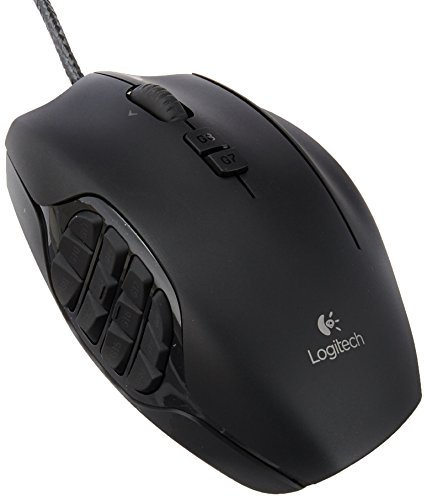
G600 MMO Gaming Mouse
73% positive of 688 users
Customizable MMO workhorse, durable, but discontinued and pricey.

 AdUnfair9248