Fnatic x Lamzu
Atlantis Mini Pro


Fnatic x Lamzu
Fnatic x Lamzu
Fnatic x Lamzu
![Fnatic x Lamzu ATLANTIS MINI [Champion Edition] Gaming Mouse](https://m.media-amazon.com/images/I/31yo6+SVbJL._SL500_.jpg)
No summary available.
 Apollo360xdx
Try the Lamzu Atlantis Mini, literally one of the best shapes and sort of have the same side curvature design kept in mind, but in my opinion a lot better.
benreviewshttps://preview.redd.it/ue0j7jqtpcvg1.jpg?width=1920&format=pjpg&auto=webp&s=1ee106334535901938c86d4503cb13ff8b2a016f **Introduction & Context** According to official sources, Lamzu was founded by peripheral enthusiasts in 2021. In 2022, they fully launched into the global market following the worldwide success of the original Atlantis. Since then, they have expanded their lineup with models such as the Inca, Maya, and Thorn. Among their entire catalog, the **Atlantis Mini Pro** caught my attention the most, which is why today we are putting it on the test bench for a comprehensive and extensive teardown and review. I'm Ben, a second-year robotics engineering student and still learning. My goal isn't just to tell you if the mouse is "pretty," but to attempt to audit its construction. Today, we're going to measure tolerances, verify if the long-term performance matches the initial specs, and check how the engineering actually holds up under scrutiny. **Important Context** * **Review Sample & Transparency:** This unit was provided directly by Lamzu for the purpose of a comprehensive analysis. However, my testing methodology remains strictly objective; my evaluation is completely unbiased, honest, and not influenced by the manufacturer in any way. Zero review bias. * **Sample Size & Condition:** I am analyzing a single unit of the **Atlantis Mini Pro**, which has been subjected to intensive daily use over the past week to accurately assess early signs of mechanical wear and structural integrity. * **Hand Size & Grip:** My hand measurements are **19x10cm**, and my primary grip style during this testing period was a hybrid palm/claw grip. * **Testing Baseline:** Unless otherwise specified, all sensor telemetry and stability benchmarks are conducted at a standard **1000Hz polling rate** to establish a reliable performance baseline. Additionally, while this mouse is compatible with a **4000Hz high-polling dongle**, this accessory was not provided for this review, so all tests will be strictly capped at 1000Hz. **TL;DR:** An exceptionally well-balanced, symmetrical gaming mouse weighing exactly **51.15 ± 0.01g** (with skates), highly optimized for claw grip. Powered by a **PAW3395** sensor and a **Nordic nRF52840 MCU**, it delivers rock-solid 1000Hz telemetry and very low CPI deviation. Featuring crispy **Huano Blue Shell Pink Dot** main switches, an 8mm TTC Gold encoder, and impressive structural integrity despite heavy weight-reduction cutouts. At **$91.99**, it is an outstanding piece of hardware, only slightly hindered by a rigid stock cable, noticeable post-travel on the triggers, and stock PTFE skates that require a strict break-in period. *(****Disclaimer****: I still have a lot to learn in this field. I am very open to constructive feedback, so if you spot any errors in my methodology or measurements, please let me know—I'm here to learn and improve!)* https://preview.redd.it/et4s41sdqcvg1.jpg?width=6279&format=pjpg&auto=webp&s=68e5c42563b5571bc1ea96d31b75511e4820d9b5 **Packaging & Unboxing** This Lamzu model arrives in a rectangular box, featuring a small cardboard slider on the left side. Front and center, we can see a render or image of the base of this peripheral. The bottom section displays some description, while the right side features subtle branding. Once the slider is removed, the box opens like a book. On the left side, we find accessories such as the cable, replacement skates, and the grips. On the right, we find the mouse and its small receiver. The mouse comes perfectly nested inside a solid pad, ensuring we don't have to worry about sudden movements during transport. The accessories are packed inside a thick fabric pouch, similar to something like "Alcantara". **Box Contents** Inside the box, we will find: * **1x** Lamzu Atlantis Mini Pro * **1x** 2.4GHz Receiver * **1x** Receiver Extension Adapter * **1x** USB-A to USB-C Cable * **1x** Replacement PTFE Skates * **1x** Grip Tape Set * **1x** Base Sticker **Hardware & Accessories Analysis** The included cable comes in a small paper bag, and in this case, it features a pastel blue colorway. Regarding its flexibility, it is completely solid; it has no softness or "give" at all. Subjectively speaking, it feels scratchy when rubbing against the mousepad, so it might not be ideal for tethered gameplay. On the Type-C side, instead of being a straight piece, it features a slight curve, which should help reduce friction against the mousepad. Additionally, it comes with a small silicone tie to adjust the length and roll it up. For the dongle extension adapter, Lamzu has decided to keep it simple but with a somewhat more striking design. It is a sort of blue crystal, featuring triangular shapes and a completely transparent shell. Regarding the grip tape set, these are provided for the main **M1** and **M2** buttons, the full side panels, and also the side buttons. Subjectively speaking, I find the design quite attractive; they feature a pattern of small clovers and small 8-point stars. As for their performance, they provide sufficient grip, and I don't see the need to purchase aftermarket alternatives unless it's due to wear. According to my digital calipers, their thickness is **0.3 ± 0.1mm**, and this is something noticeable just by touch; they are really thin. The sticker has an iridescent effect; depending on the viewing angle and how the light reflects, it will show one color or another, although a salmon-pink tone predominates. Its functionality is simple: it acts as a dust shield for the bottom plate. https://preview.redd.it/2pxoaz3jqcvg1.jpg?width=9503&format=pjpg&auto=webp&s=2be5322952f18532ec68db31ff1745bcaf9886f5 **Weight, Center of Mass & Dimensions** Regarding the weight, Lamzu claims **51 ± 2g**, although it is not specified whether this is measured with or without skates. The weighing process was performed five times, and the result is the mean of those measurements, with the goal of providing the most precise result possible. Furthermore, it was conducted using a precision scale. The results are: * With skates, the measured mass is **51.15 ± 0.01g**, resulting in a deviation of **0.29%**. Based on this weighing, we can assume that the officially provided data is with skates. * Without skates, the measured mass is **50.51 ± 0.01g**, resulting in a deviation of **0.96%** on the lighter side. With this data, we can confidently state that the tolerances are really low and expected in this price range, although it is always possible that our unit weighs either 53g or 49g, according to Lamzu's stated variance. **Center of Mass (CoM) Verification** As I always say, a mouse can feel front-heavy or rear-heavy depending on the distribution of its center of mass. Since calculating it with exact precision requires 3D modeling, we will rely on an empirical test utilized in my university laboratories. What we must do is use a fulcrum with the smallest possible surface area, in this case, a cylinder. We must position the object over this fulcrum until equilibrium is achieved. Once achieved, it is possible to affirm that the center of gravity is located somewhere within the area of that fulcrum. As it is possible to observe in the image, the center of mass is located at the rear of the area enclosing the sensor skate. Taking into account that in this mouse, the sensor is biased more towards the front than the rear, specifically parallel to the finger contact points, we can conclude that the weight distribution is balanced and, therefore, that the mouse will feel good in hand regarding mass balance. **Dimensional Audit & Hardware Tolerances** Moving on to the physical dimensions, Lamzu claims **37mm** in height, **63mm** in width, and **117mm** in length. It is important to emphasize that this is the Mini version of the original Atlantis, which featured **38mm** in height, **67mm** in width, and **123mm** in length, definitely a mouse for slightly larger hands and with curves quite different from this Mini Edition. Following the same methodology as for the weighing, the measured results are: * **Height:** **36.62 ± 0.1mm**, which means it is **1.02%** shorter than specified. * **Width:** **63.32 ± 0.1mm**, which means it is **0.50%** wider than specified. * **Length:** **116.62 ± 0.1mm**, which means it is **0.32%** shorter than specified. Once again, it is possible to see how there is no anomaly or extreme tolerance; everything falls within very normal and low ranges for mold tolerances. Some relevant metrics are the height of the front buttons, with a mean result of **11 ± 0.1mm** across all its areas, and an effective grip width of **57.47 ± 0.1mm**, so it is possible to see how there is a fairly aggressive taper from the rear to the front, which I will discuss in more detail in the next section because it is very interesting. **Shape Profile & Ergonomics** Regarding the shape, Lamzu has decided to go for a longitudinally symmetrical mouse. In this case, we can observe a really wide rear against a much narrower front in comparison. The detail—and this is something that, subjectively, I found very comfortable—is that the sides at the grip width taper inward much more than the front area. The shape transitions from a convex rear flare into a deeply concave contour at the grip area (resembling, let's say, the inside of a bowl), which makes it feel really locked-in and comfortable in hand. The maximum hump height is located slightly towards the rear, which provides really good support for players who use claw or palm grip. As a hybrid player, let's say, between palm and claw grip, I can say that this mouse indirectly encourages you to use a claw grip much more aggressively than on other peripherals. During the testing period, I have not experienced any discomfort or uneasiness regarding the shape and ergonomics of this Atlantis Mini; for me, personally, it has been very comfortable and provides a very good lateral grip shape, in addition to a good resting spot for the pinky finger, despite being the small version. https://preview.redd.it/hg2pmd67rcvg1.jpg?width=5910&format=pjpg&auto=webp&s=0472548bd7e7a116415d2dcecdd81922a43291cf **Visual Inspection, Build Quality & Clicks** **Panel Gaps & Main Button Geometry** Starting with the structural and visual analysis, we begin at the front as always. Here we find the main **M1 and M2** buttons, alongside the **Type-C port**, which is utilized for both battery charging and tethered operation. The Type-C port is perfectly centered and accommodates aftermarket cables, giving us the flexibility to use any preferred third-party cable if needed. Regarding the panel gaps on this front section, the lateral gaps are slightly wider than those at the rear, but they remain highly consistent along their entire seam. The trigger geometry is rectangular with a fairly aggressive cutout around the scroll wheel, abruptly ending to leave an open space right in front of it. Furthermore, they lack completely radiused edges; however, both the front and rear exhibit a distinct curvature. These main clicks feature absolutely zero **comfort grooves**, but subjectively speaking, I haven't found them uncomfortable at all during the testing period. Visually—since measuring this accurately without feeler gauges is exceptionally difficult—both triggers sit perfectly parallel and at the exact same height. **Scroll Wheel & M3 Actuation** The scroll wheel is navy blue, a direct nod to the "Atlantis" naming scheme. It features what I would describe as a double-ended hook texture. The scroll steps are exceptionally well-defined; at no point did I struggle to differentiate whether I was scrolling one or multiple steps. Subjectively, the **actuation force** feels medium, allowing for easy spamming. The **M3 button** (middle click) actuation is smooth and very clean, producing a refined and subtle acoustic profile, yet providing clear tactile feedback upon bottoming out. **Side Profile & Secondary Buttons** Examining the side profile, we can observe the secondary side buttons, also in blue. These protrude from the main chassis by approximately **1.6mm** (measuring this specific curve accurately with digital calipers is notoriously tricky, so consider this an approximation). These side buttons exhibit a very low amount of **pre-travel**, but noticeably more **post-travel** in comparison. If excessive force is applied, the section that protrudes the least will push slightly into the chassis; however, this is structurally unalarming and will absolutely never occur under normal use-case scenarios. From a lateral angle, we can clearly see the rearward-biased hump, which provides excellent palm support. Finally, there is some subtle Lamzu branding on the front lateral section. **Bottom Plate & Skate Layout** On the bottom plate, we find the **PTFE stock skates**. The front features two small corner skates; the rear mirrors this layout, and finally, there is an oval skate encircling the sensor ring. It is important to note a distinction here: the included replacement skates are full-width strips for both the front and rear, which obviously provide a larger friction surface area. Regarding the glide, it is crucial to mention that these skates require a significant **break-in period**. Out of the box, you might feel the texture of the mousepad a bit too much if you use a rough surface, such as my Aqua Control II. Once this break-in period is complete, they heavily remind me—visually, tactilely, and in raw glide performance—of aftermarket ESPTIGER ICE skates. I should add that these skates feature perfectly rounded edges with zero manufacturing anomalies; they arrived in pristine condition with a protective film that must be removed prior to use. This bottom plate features a truly curious design, as it is filled with cutouts that essentially form an 'X'—though I personally see it more as a butterfly due to the curves it makes. This design decision was made both to reduce weight and to add an aesthetic touch, which, in my opinion, looks incredibly beautiful. **Surface Finish & Coating** Discussing the **coating** of the Atlantis, it feels slightly chalky, but not overwhelmingly so. It is a surface finish that improves drastically once your hand warms up and introduces a bit of moisture/sweat—or at least, that is my personal experience, as this specific metric is highly subjective. Depending on your preference, you might find aftermarket grip tape necessary. Personally, when I first grip it cold, it feels slightly slippery, but as soon as the material warms up, the grip truly locks in. The coating application feels incredibly uniform and structurally stable across the entire chassis. https://preview.redd.it/h766qfysrcvg1.jpg?width=5074&format=pjpg&auto=webp&s=7900611cf5c6929fa08bda873fd62f4f23c53d4a **Structural Integrity & Tolerances** **Shell Flex & Creaking** Moving on to the physical integrity of the Atlantis, if we apply high pressure to the side panels, it exhibits some **flex**, but it is extremely minimal—a situation that will absolutely never occur in daily use, not even close. Applying pressure in a similar manner but to the hump and the bottom plate, a larger amount of flex is observed compared to the previous area. However, I must add that given the amount of cutouts on the base and such a complex structure, I was pleasantly surprised. Again, in this case, these flex situations will not occur during normal use, and if they did, I would state it without hesitation. Regarding **creaking**, when squeezing the lateral area—again with much more pressure than normal—a fairly occasional creaking can be heard; it doesn't always happen, but it's there. It is not an exaggerated or very loud creak, but it is audible without needing to bring your ear close. Once again, this is something I have not noticed during actual testing. Similarly, in the hump-to-base area, a slight creaking can also be heard, likely due to the base structure, but it is not noticeable. **Rattle & Lens Assembly** If we try to induce **rattle** by shaking it vigorously, absolutely nothing can be heard, neither close to nor far from the ear. With this, we can affirm that the sensor lens is well secured in place and that there is nothing loose inside the peripheral. **Main Clicks & Switch Performance** The main **M1** and **M2** buttons are powered by mechanical Huano switches, and we will try to identify them in the teardown. Their acoustic profile leans towards medium-loud, but they are **crispy** and quite well-defined. **Wobble, Pre-Travel & Post-Travel** If we try to test the **wobble**, as we get closer to the front of the trigger geometry, we can appreciate how the wobble increases; this is due to the mounting point being biased more towards the rear of these clicks. However, the wobble is truly minimal and consistent across both clicks. I must add to this section that the clicks are actuable even from their highest point, except slightly at the corners where actuation becomes much more difficult. Regarding **pre-travel**, these clicks exhibit a very low amount of pre-travel that is unremarkable in the test, and a larger amount of **post-travel** in comparison, exactly as it happened with the side buttons. *(****Note regarding audio****: Links to the audio test for the clicks are provided in the comments section for those interested in the acoustic profile.)* https://preview.redd.it/7ugws28yrcvg1.jpg?width=2560&format=pjpg&auto=webp&s=60f0a2158afc73b8c8847be8739d5a5dbbba24df https://preview.redd.it/z48abkiyrcvg1.jpg?width=2560&format=pjpg&auto=webp&s=bfe12d13f5abd3952732adf0aded08c1967e2899 **Software Utility & Web-Based Configuration (Lamzu Aurora)** Regarding the software, Lamzu has opted for a web-based implementation to avoid installing unnecessary bloatware on our systems. However, a standalone executable is available to download for those who prefer it. Before diving into the sensor benchmarks, let's briefly inspect this utility. Upon entering Lamzu Aurora, we are initially greeted with a render of the device, its current connection protocol (in this case, **2.4GHz**), colorway selection, and the firmware versions for both the receiver and the mouse itself. Once we click through, we reach the main interface, which efficiently compresses all necessary functions into a single, cohesive view. **Layout & Key Settings** Starting from left to right, we first find a **Macro** creator and sequence recorder. In the center, there is a battery indicator that updates in **5% increments**. It seems fairly reliable, though I have occasionally observed a strange anomaly where it jumps from 35% to 40% without the peripheral even being plugged in. I must also point out a notable discrepancy in the battery telemetry: when the mouse is tethered, the software might indicate a 65% charge level, yet immediately upon unplugging it, the reading drops to 45%. Consequently, we must approach this software battery indicator with a degree of caution. Just below this, we can select from various pre-defined onboard profiles. Clicking on the rendering of the Atlantis allows for full button remapping (assigning proprietary mouse functions, media keys, or CPI cycling). **Performance Parameters (Sensor Telemetry)** From here, we move into the actual hardware performance parameters: * **Motion Sync:** Synchronizes the sensor's SPI data reads with the MCU's polling events. This results in highly consistent polling intervals and an incredibly smooth tracking feel. However, this synchronization process inherently introduces a marginal motion delay penalty. * **High-Speed Mode:** Functionally similar to a 20K FPS Mode. This toggles the sensor's maximum frame rate capability (capturing 20,000 surface frames per second). Enabling this maximizes raw tracking consistency and minimizes input latency, though it marginally increases power consumption. * **Debounce Time:** Adjustable in **1ms increments**. It is highly recommended not to set this threshold too low, as it can artificially induce double-clicking (switch bouncing). * **CPI Configuration (labeled DPI):** Features 5 distinct CPI steps. These are adjustable in **100 CPI increments**, ranging from a minimum of **100** up to **26,000 CPI**. * **Polling Rate:** Selectable from **125Hz to 1000Hz**. The 4000Hz option is not visible without the separate 4K receiver. * **Dongle LED:** This function is inactive on this specific unit, as I assume it requires the 4K receiver to operate. * **Lift-Off Distance (LOD):** Selectable between **1mm and 2mm** tracking thresholds. * **Angle Snap:** An algorithm that predicts and artificially straightens out minor micro-jitters in your cursor path. While somewhat useful for desktop drawing or MS Paint, it should strictly remain **OFF** for competitive gaming, as it disrupts raw muscle memory and filters out micro-adjustments. * **Sleep Time:** Configurable idle timer ranging from **10s to 30min** for battery conservation. As observed, the Lamzu software remains simple yet well-designed and highly organized. It provides practically everything necessary for a mouse equipped with the **PAW3395** sensor—which, comparatively speaking, inherently lacks some of the hyper-granular customizability found on newer **PAW3950** implementations. The primary shortcoming lies in the battery telemetry readout, which fails to provide a strictly reliable representation of the remaining charge. [Without Angle Snapping](https://preview.redd.it/euimiutascvg1.png?width=2560&format=png&auto=webp&s=ed350fe74a815891b9c78dd91afaaf117d732603) [With Angle Snapping](https://preview.redd.it/8q7nzi2dscvg1.png?width=2560&format=png&auto=webp&s=fc3270d34b99375c3725116b21ea800035f5ee12) [786CPI 1000Hz](https://preview.redd.it/4u7juz1escvg1.png?width=2560&format=png&auto=webp&s=f2b96fbf01a1a4c33472db911bc06d7ff1c11d92) [1577CPI 1000Hz](https://preview.redd.it/h4x5gtuescvg1.png?width=2560&format=png&auto=webp&s=9d79c3ed609938e8e1c591dd513d27a880e609e8) [3169CPI 1000Hz](https://preview.redd.it/8bkzw7rfscvg1.png?width=2560&format=png&auto=webp&s=145b9057a2b4dcc70f9025b1da15b3e1b37cd9ad) [Raw Tracking](https://preview.redd.it/zmgczlsgscvg1.png?width=2560&format=png&auto=webp&s=c85807c42e1db4a01994517e194ea0d9a700944c) **Internal Hardware & Sensor Telemetry** Before diving into the benchmarks, let's discuss what this mouse packs internally. Regarding the sensor, Lamzu has decided to implement the **PAW3395**. While it is not the absolute top-of-the-line currently, it is still a highly capable and perfectly valid unit. The sensor's raw specifications boast a maximum sensitivity of **26,000 CPI**, a maximum tracking speed of **650 IPS**, and up to **50G** of acceleration. As for the **MCU**, they have implemented a standard **Nordic nRF52840**, which is more than sufficient to handle the additional 4KHz implementation while maintaining excellent battery management. *(****Note****: All tracking, polling, and CPI deviation tests were performed on an X-Raypad Aqua Control II surface to ensure physical testing consistency. Additionally, all telemetry was captured using MouseTester v1.6.1 - Amit's branch).* Unless explicitly stated otherwise, all auxiliary features such as Angle Snapping and Motion Sync were completely disabled during these tests. Additionally, the specific tests evaluating auxiliary features were conducted at a baseline 1000Hz polling rate. **CPI Deviation Benchmarks** To begin, as always, we will calculate the **CPI deviation** to establish the most reliable baseline data possible for the subsequent tests. To do this, we must move the mouse horizontally in a straight line for exactly 10 physical centimeters. To improve the accuracy of this test, it was repeated 5 times, and the result is the mean of those runs. The deviation was calculated across these three steps: * For a theoretical **800 CPI**, we yield an actual **786 CPI**, equivalent to a **1.75% deviation**. * For a theoretical **1600 CPI**, we yield an actual **1577 CPI**, equivalent to a **1.44% deviation**. * For a theoretical **3200 CPI**, we yield an actual **3169 CPI**, equivalent to a **0.97% deviation**. As observed, the deviations are genuinely low and fall well within standard manufacturing tolerances. It should be noted that the sensor is slightly "slower" than officially specified, based on the measured results. Furthermore, the steps are quite stable relative to each other, and it appears that as the CPI value increases, the deviation percentage decreases. **Angle Snapping Performance** Regarding **Angle Snapping**, as explained previously, it consists of an angle correction algorithm. These types of algorithms typically come into play at high CPI values. In order to test it, several pulses, staircases, diagonals, and straight lines were drawn at **3169 CPI**, both with and without the feature enabled. As seen in the graph without the function enabled, the diagonals and pulses—especially right angles—take on the natural shape created by the human hand; it will never be perfectly straight. However, with the feature enabled, we can visually notice a higher degree of linearity and stability when drawing straight lines and right angles. With this, we consider Lamzu's implementation of this feature to be fully functional. **Polling Rate Stability** We now move on to the **polling rate stability**. For this benchmark, all previously mentioned CPI steps were evaluated strictly at **1000Hz**, since I do not possess the 4000Hz receiver. The methodology is straightforward: the mouse must be moved in rapid, continuous circular motions. As observed, at **786 actual CPI** we have a highly stable trendline hovering around **1ms**, which is exactly the inverse of the frequency (the polling period). Moving to the next step, at **1577 actual CPI** we achieve a very similar result: a stable line at 1ms. Finally, at **3169 actual CPI**, we find the exact same outcome described above. With this, we conclude and affirm that Lamzu's firmware implementation is on point and highly stable. **Raw Tracking & Lift-Off Distance (LOD)** Finally, we will evaluate the **raw tracking**. The methodology for this test consists of very fast swipes along a single axis (either X or Y; in this case, it was performed on the X-axis). What we should see in the graphs are incredibly smooth curves, strictly avoiding any drastic drops or structural breaks in the plotting. The results of this test, as shown in the graph, are highly satisfactory. We are presented with smooth, well-aligned curves, completely free of severe drops or tracking loss (spin-outs). Regarding the **Lift-Off Distance (LOD)**, I do not yet have the precise equipment to determine it exactly (although I am planning to implement the CD stacking technique, which, while not totally exact, provides a valid measurement range). However, subjectively speaking, it is entirely possible to detect the difference between the 1mm and 2mm toggle, even if it's impossible for me to determine if it gets very close to or far from the specification. Looking back at all the compiled data, it is safe to affirm with certainty that Lamzu's implementation is entirely correct, valid, and stable. (***Note:*** *No notable differences were detected between the High-Speed mode and the Competitive mode within the Lamzu software, primarily because it is highly likely that this is simply the "20K FPS" mode mentioned previously).* (***Note regarding polling outliers:*** *Any isolated data points present above or below the main trendline in the polling graphs are typical OS-level USB interrupt delays / Windows background processing, rather than actual hardware or MCU dropouts).* https://preview.redd.it/aj5aq84qscvg1.jpg?width=2901&format=pjpg&auto=webp&s=a4fa8c928f255e353f26df907d3f576c5d7d28ab **Teardown & Internal Hardware Audit** **Disassembly Process** We begin with the teardown. To access the internals, the front and rear skates must be removed, as the screws are located beneath them. It is highly recommended to have replacement skates on hand, since in most cases, the stock PTFE feet are rendered completely useless after removal. Beneath them, we find two screws at the front and two at the rear, all standard Phillips head. As can be observed, there are cutouts even beneath the skates, implemented with the goal of further weight reduction. Once the screws are removed, we can use a pry tool (spudger) to apply slight leverage and disengage the strong retention clips, which consist of two on the sides and one on the rear. After that, we can separate the top shell without fear of tearing anything, as there is no ribbon cable tethering the shell to the bottom plate; all hardware is mounted directly on the base. https://preview.redd.it/lefsc6zvscvg1.jpg?width=2901&format=pjpg&auto=webp&s=d0aab0113a357500341594d167f50cfb94129701 **PCB Layout & Core Components** Once the parts are separated, we can inspect everything a bit more thoroughly. On the bottom plate, we find a dual-PCB layout: a main motherboard and a daughterboard mounted above it on standoffs, secured with 3 screws. A ribbon cable connects the main PCB to this secondary daughterboard to facilitate the operation of the side buttons. The battery is also mounted on this upper board. This effectively places the vertical center of gravity (Z-axis) at a perfectly balanced midpoint between the heavier front-end components and the rear-mounted battery. As can be observed, there are no heavy components at the extremities; the majority of the mass is concentrated in the center and is exceptionally well balanced. On the main PCB, we find the **PAW3395** sensor alongside the **Nordic nRF52840 MCU**, as mentioned previously. The battery also connects to this main board via a **1mm JST connector**. This PCB is anchored to the base with four screws. Inspecting the board reveals no sloppy soldering or remarkable anomalies. Furthermore, the thickness of this main PCB is precisely **0.8 ± 0.1mm**. https://preview.redd.it/kc3h81qxscvg1.jpg?width=4536&format=pjpg&auto=webp&s=683dd5871038721e5a9b44b5b37534579b2cbe28 **Switch & Encoder Implementation** Regarding the main switches, Lamzu has opted for **Huano Blue Shell Pink Dots**. This switch implementation is highly responsive and feels excellent. The scroll encoder is an **8mm TTC Gold (Dustproof)**. The **M3** (scroll wheel click) is actuated by a generic mechanical switch whose branding is impossible for me to read. The axle that actuates the wheel button comes lightly factory-lubed. https://preview.redd.it/8kvi0or0tcvg1.jpg?width=6804&format=pjpg&auto=webp&s=6985c813c7715c65dac746c3a5226d510ff8ecfd Looking at the daughterboard, it features numerous cutouts designed primarily for weight reduction. It also serves as the mounting platform for the battery, which rests on a slightly cushioned white foam pad. On this board, we find the continuation of the JST cable routing, as well as the secondary switches, which in this case are **Huano Black Shell White Dots**. The battery is a **250mAh** unit with a nominal voltage of **3.7V**, wrapped in a small white vinyl with Lamzu branding. This secondary PCB has a thickness of **0.7 ± 0.1mm**. https://preview.redd.it/rhunneb2tcvg1.jpg?width=5452&format=pjpg&auto=webp&s=5350d6efe639d80532154756a0bdffa5286ebd42 **Top Shell & Trigger Geometry** Moving to the top shell, we can observe its structural simplicity in this image. We find the trigger geometries that actuate the main switches, which are secured by a single screw and three auxiliary support posts. At the front, we can see the plungers that actuate the clicks, along with a small foam pad on the right click—the exact engineering purpose of which I cannot fully determine. At the rear, the shell thickness measures **1.3 ± 0.1mm**, while at the front—including a small reinforcement lip—we measure **1.5 ± 0.1mm**. From this, we can assume that, discounting the internal reinforcement lip, the shell thickness is highly uniform across its entire volume. https://preview.redd.it/04qc35w3tcvg1.jpg?width=5378&format=pjpg&auto=webp&s=bf08025ee15d6ed4b739c48ad4dd12ee3d8447dd From these images, we can also observe the trigger geometry. As mentioned earlier, the outer corners are not radiused, but both the front and rear edges are fully rounded. These triggers feature a small layer of foam padding at the front to dampen the bottom-out sound and prevent plastic-on-plastic friction upon full actuation. https://preview.redd.it/vhmcjht6tcvg1.jpg?width=1920&format=pjpg&auto=webp&s=30a2777e5815fa99d123ba4ab014a2c209c7e852 **Final Verdict & Pros/Cons** Considering everything discussed in this review and the official price of **$91.99** on Lamzu's website, I believe the Atlantis Mini Pro is a very good piece of peripheral hardware. Throughout this review, this has been extensively demonstrated. We have a highly solid implementation, quality build materials, and an ergonomic shape heavily focused on claw grip that is genuinely comfortable for it. Taking into account everything discussed in the review and remaining as objective as possible, we can establish the following list of advantages and disadvantages: **Pros:** * **Mass Distribution:** Excellent weight balance concentrated in the center of the dual-PCB layout, rather than the extremities. * **Sensor Telemetry:** Rock-solid 1000Hz polling stability and extremely low CPI deviations (e.g., 0.97% deviation at 3200 theoretical CPI). * **Main Switches:** The Huano Blue Shell Pink Dots offer a highly responsive, crispy acoustic profile with a very low amount of pre-travel. * **Ergonomics:** The aggressive inward lateral taper transitioning from a convex rear to a deeply concave grip area makes it incredibly secure for claw grip users. * **Software Utility:** Lamzu Aurora provides a clean, web-based configuration experience without forcing unnecessary bloatware onto your system. **Cons:** * **Stock Cable:** The included pastel blue cable is completely solid and scratchy against the mousepad, making it highly sub-optimal for tethered gameplay. * **Post-Travel:** Noticeably more post-travel is present on both the main M1/M2 triggers and the secondary side buttons. * **Skate Break-In:** The stock PTFE skates require a significant break-in period before smoothing out on textured surfaces like the Aqua Control II. **Final Buying Advice & Alternative Options** Finally, I must make a highly important note: there is the **Atlantis Mini Champion Edition** (although, as of today, it is currently sold out), which implements the newer **PAW3950** sensor while keeping the exact shape and weight of the Atlantis reviewed today completely intact. My personal recommendation is that for less than $10 more, it is possible to obtain this edition with the flagship sensor, although the 3395 edition is by no means bad. If you have made it this far, thank you for reading this extensive review. For those interested in examining the teardown and macro shots more closely, I have provided a link in the comments section containing all images in full, uncompressed resolution. If you have any doubts, questions, or have spotted any technical errors in my telemetry, please let me know in the comments or via DM. *(****Disclaimer****: As an engineering student continually refining my testing methodology, I am completely open to constructive criticism and genuinely eager to learn and improve my hardware analysis work).*
bigmansauce_Yeah, I get that. I started with the mz1 and now my mice all have the same hump at the back for claw grip (Atlantis mini, x2h). shape is king
BittStarI have the same size hand and grip, ordered the scyrox v8 for $44 from the 11.11 sale on aliexpress, my current mouse is a lamzu atlantis mini but the sensor is floaty at 2k hz and higher so im looking forward to the upgrade
catme0wcatI'm also a woman, although as other comments say your hands are smaller than normal for the average women, which is around 6.8 i believe. For reference, my hands are around 6.4 inches long from base of the hand to the middle finger tip, and I play valorant. I have two recommendations: the Darmoshark m3 micro, or the lamzu atlantis mini. **Darmoshark M3 Micro** It's a pretty small brand but I've had this mouse for a year with no issues so far. (not my main mouse though, used to constantly for around 3-4 months)I got it originally because my superlight was way to big to control properly with claw grip. this mouse was great for claw, but cramped my hands over time because of how small it is. my fingertips go around a cm over the top when I fully palm grip it, which sounds like it might be good for you. Clicks are pretty good, ever so slightly mushy on the post travel but not really noticable. Overall the mouse feels very sturdy but you can tell theres a difference when it comes to the click quality. 8k polling possible, good sensor, around $40 dollars, I definitely recoomend this for you its a gem. If you use fingertip/extreme claw, you could also try their M5 air potentially **Lamzu Atlantis Mini:** My current mouse. the hump is not very centered and more towards the back. After a year of almost continuous use I can feel the left click is a little more mushy but nothing major. This mouse fits my claw/palm grip almost perfectly, but it might feel a little too wide for you. Personally I really like the shape, I think you should definitely give it a try if the m3 micro is too small. good luck!
DidjTerminatorEdit: thought you meant fingertip only mice nevermind. Gwolves might have some of the worst customer service out there. But the HSK (and HSK2), Fenrir Pro, and Fenrir Asym are the perfect shape and size for small, medium, and large hands respectively. There are a few other fingertip-only mice Gwolves makes, however they're a lot more niche and obscure so you'll instantly buy them no questions asked or go "huh!?!?!?" The second you look at them. The software is meh, not as atrocious as Razer/Logi/Steelseries/Corsair/HyperX software, but also not as good as the new ASUS browser software (ASUS has had a glow-up from the worst of the worst software, to a brand new browser software that's actually better than Lamzu and Pulsar software). The build quality is really good though, so fortunately the terrible customer service is usually avoided. The owner/creator/founder is a mad-man. Good at making amazing and innovative mice, but at the expense of social decency unfortunately. If you want a Gwolves alternative, you have: WLmouse Miao. Pulsar X2F (wait until V3, V1 has sensor issues, V2 is ok but significantly heavier than it needs to be). Lamzu fingertip-mouse (unreleased, doesn't have a name, it's Lamzu so it'll be goated but damn it feels like we'll get GTA 6 before a new Lamzu release). Kysona Uranus Pro (it's a bit tall for my liking, and a fullsize, but damn it's an amazing fingertip mouse and it's insanely cheap like just buy one and take a hacksaw to it and you're good in all honesty, I'm even currently procrastinating on making custom 3D printed shells for it cause it's so cheap but so amazing despite being cheaper than the budget hello-kitty mouse from my local stationary store). If you want more info, here is a YT video and channel who is specifically a tiny fingertip mouse aficionado: [https://youtu.be/c8ojtzn9H-8?si=n7znAoeI8WyVuOxb](https://youtu.be/c8ojtzn9H-8?si=n7znAoeI8WyVuOxb)
Zaopin Z1 ARYE RCC1 Pulsar X2 crazy-light (non-medium) Lamzu Maya (non-X) and Atlantis Mini. There are also a few Gwolves mice which fill this niche too. Kysona Uranus Pro (honestly it's the most universal shape I've ever held, and the most goated shape I've ever held, I bought it cause it was cheap, easy to disassemble, and has a surprisingly good PCB that's also very compact, and then I never took it apart cause damn it's actually the goat and has no right being as insanely universally good as it is).
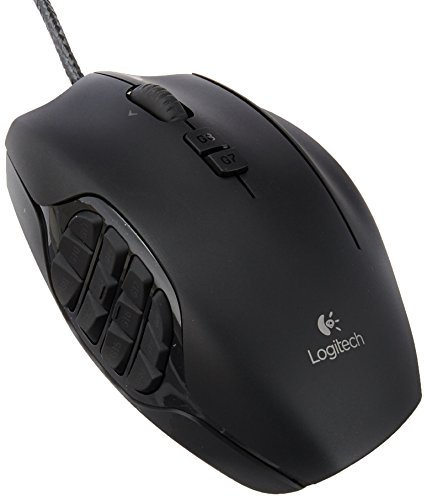
Logitech G
G600 MMO Gaming Mouse
Customizable MMO workhorse, durable, but discontinued and pricey.
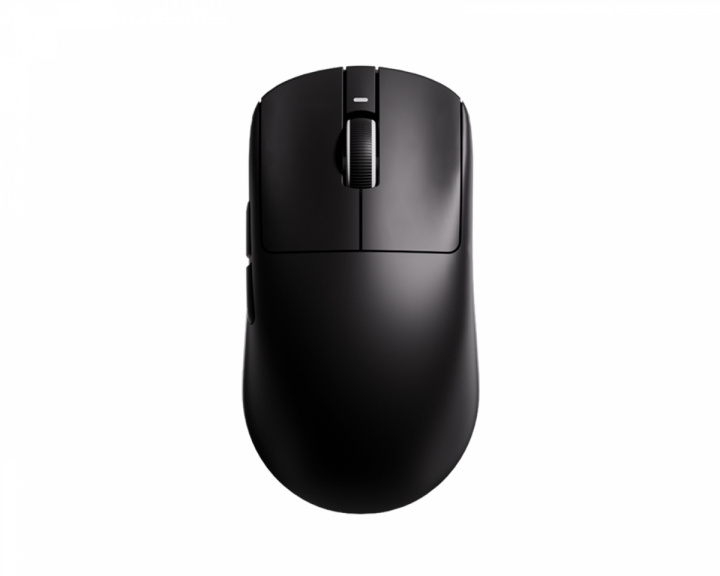
VXE
R1 Series
Budget king: lightweight, great value, long battery life.

Hitscan
Hyperlight
Ultra-light (39g) for small hands; sensor is outdated.

Razer
Viper V3 Pro
Adaptable shape, optical clicks, but scroll wheel malfunctions.

Logitech G
G502 HERO High Performance Gaming Mouse
Durable, heavy workhorse with free-spin scroll; prone to double-clicking.
Ranked #1
Hitscan - Hyperlight

Ranked #1
Teevolution - Terra

Ranked #1
Razer - Viper Ultimate

Ranked #1
ROCCAT (Turtle Beach) - Kone Pro
Ranked #1
Logitech G - G600 MMO Gaming Mouse

Ranked #1
Razer - Naga Trinity


