TP-Link XE200 user right here
Could not be happier with the lighting fast performance and stability
Obviously now they have Wi-Fi7 you NEED to do more research as with old tech you can and will make Wi-Fi7 unstable to a certain extent
**It's not the product people don't like**
People are creatures of habit, even though TP-Link's customer based asked for a simpler way to setup.....the ones complaining are the ones who loved the WebUI interface
I have 6x XE200's and yes the change to the Deco App was a big one but it straight up works and I have access to all the features, just in a different way :)
Deco and Archer are not compatible mesh systems......they do not work cohesively. So yes you did buy two incompatible systems.
You can still use them like that but one will need to be router and another AP
Happy New Year fellow Sonos addicts! I’m older and probably the most tech-challenged participant on this sub. Even still, I stumbled across something yesterday that might be helpful for other Sonos lovers, particularly those like me that shop for electronics and have absolutely no idea what they are doing.
BLUF: When shopping for Mesh WiFi systems you may want to check to see if the ones you’re considering provide the capability to manually change the channel selection (i.e. 2.4, 5, or 6 GHz).
I was very surprised to learn yesterday that they don’t all have this capability. For example, EERO has automatic channel steering but has no way to manually select the channel. I found three that do provide the manual channel selection: TP Link, Orbi and ASUS. I’m sure there are others.
So why post about this?: The Sonos app has always worked perfectly for me but I’ve had mind-numbing connection issues that turned out to be my WIFi (imagine that). Namely three Sub Minis and two Move 2s that on initial setup my TP Link Deco 6e WiFi mesh system automatically steered to the 5 GHz channel. All the other components were on 2.4 GHz. The fix was just a matter of going into the Deco app and changing the components from AUTO (RECOMMENDED) to 2.4GHz.
The Move 2s I mentioned above worked great on the 5GHz but I couldn’t group them with other rooms on the 2.4 GHz. Switching to 2.4 GHz resolved the issue.
One of our fellow Sonos sub participants owns an EERO system and is grappling with this “channel steering” issue right now. If they read this post I hope they will chime in and share their solution.
Hopefully this will be useful.
👍 That’s great and I certainly hope you never do! It took me forever to figure what was happening with my first Sub Mini problem. It was actually Sonos Support that figured out the cause. From there it was easy because of the Deco app. I could tell from the person’s posts yesterday that they were exasperated with troubleshooting their issue.
It’s just a “happy accident” that I have a TP Link Deco system. I just bought a Deco 7 for a second home we own.
Aha! Now I’m tracking!
Deco is just the name of the TP Link mesh WiFi system. Within that system each WiFi or hardwired component is called a “client”. For each of the WiFi clients there is a section called Connection Preferences. You can do several things in that section and one is manually change the WiFi band. The screenshot I posted is that area within Connection Preferences to choose the preferred WiFi band: Auto (Recommended) or the 2.4, 5, 6 GHz bands.
When I had the Sonos connection problems, the Sub Mini’s “client” setting in the Deco app was Auto and the system selected the 5 GHz band. I just changed that setting to 2.4 and it resolved the problem.
What I learned yesterday is that many of the mesh WiFi brands don’t provide a way to change the WiFi band. I accidentally bought one with this capability and it’s come in handy five times. The point of my original post was to spread the word. With Sonos gear we need all the advantages we can get! .
Sorry for using “channel steering” in the wrong way.
Thanks again for your response and helpful advice! All the best in ‘26!!
https://preview.redd.it/4iuha0dr52bg1.jpeg?width=1125&format=pjpg&auto=webp&s=1820043ffcdcc6be34dc833d4cfaaba55402f336
I have eero 7 / no major issues but all three satellites are wired to the modem. Without that WiFi 7 is horrid in my brick/plaster house despite it being small. The only gripe I have with it is not being able to specify which satellite devices should connect to if I want something to not roam nodes. Some devices just don’t work well on mesh - especially devices on very secure VPNs (eg my work devices). I was having a lot of issues with calls dropping on WiFi calling to if I walked around - satellite hopping can cause dropped calls but I was able to fix that with some setting changes.
I switched to this from a tplink 6e mesh system that was exceptionally bad.
Def do your research on if WiFi 7 is worth it. I don’t think it is right now.
I used 2 wifi extenders with my old Motorola modem/router before I upgraded to a TP Wifi 6E mesh router. Best decision I made and wish I done it years ago.
Your problem is simple. The router Spectrum gave you is weak, and it is sitting too far from your room. You do not need Ethernet in every room, and you do not need to touch the coax ports at all. Ignore the video you saw. You also do not want a “wifi extender.” Those cut your speed in half because they repeat the signal instead of creating a real network.
Here is the easy path:
1. Buy a two pack mesh system. One unit replaces the Spectrum router and plugs into the Spectrum modem with the same cable the old router used. The second unit goes in the hallway or living room halfway between the modem and your bedroom. You only need power for the second unit. No coax. No Ethernet.
2. Set them up using the app that comes with the system. It takes five minutes. The mesh units talk to each other wirelessly and create one strong network. Your bedroom will get full signal because the second unit is right down the hall instead of across the whole house.
3. For brands, eero 6 or TP-Link Deco 6 are fine. They cost about 100 to 150 dollars for a two or three pack. Put it on your Christmas list. Either one will be miles better than what Spectrum gave you.
4. Do not overthink MoCA or powerline. They work in some houses and fail in others. Mesh is the least headache and works in almost every small house.
If you do those steps your PS5 will stay online and you can stop fighting with the signal.
I replaced an older Netgear Orbi system a few years ago with a TP-Link Deco to get WiFi 6 and outdoor APs.
It worked great for a few years and then because extremely unreliable. We switched about 6 months ago to a Firewalla AP7 WiFi system powered by a Firewalla Gold SE. I absolutely love the performance and reliability but it was the robust security is what drove the decision.
Ubiquity was the other option we considered. They’re very compelling but we already had the Firewalla Gold SE router.
Top Mesh Wifi Systems on Reddit
1
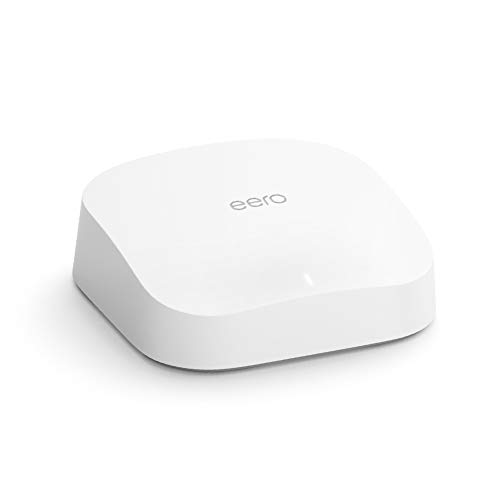
eero
Pro 6 Series
82% positive of 175 users
Easy, reliable, smart home ready; but paid features.


 Illustrious-Car-3797





