
UniFi Express
Running these analyses costs money. Buy through my links to help keep lights on! I may get a small commission.
Top Pros
Top Cons
Reddit Reviews
 Blindbatts 1.0
Fwiw, unifi can also do mesh. I have a temporary setup in our new home until I can pull wires which has an ac 6 pro wired to my router, and a 6 long-range in our bedroom and nano ap in the garage wifi meshed. They just each have a Poe ac adapter powering them but they are meshed to the 6 pro. Prior house each was hardwired cat6, and house prior to that I had only 2 of them but used coax moca 2.5gbps to the second one. All setups worked great.
Compucaretx 1.0I would return the dream router get the Unifi express series either the regular or the 7s. put one in the cupboard and put another in the house they mesh.
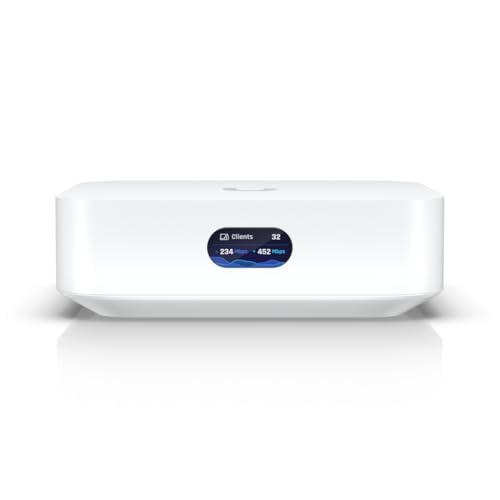
The express is designed to mesh with other expresses. Ive installed a few for people that wiring is not an option.
Yes they can he was asking about a router. The expresses are meant to be meshed together like the tplink decos.
LeoAlioth 1.0Things like unify express are about 200 a pop. You get one of those and then standalone access points like i7 pro. And for wired devices you add some 2.5 gbe or 10 gbe switches.
bohlenlabs 0.2Can confirm. Last week I decided to connect a smart TV, an Apple TV, and a satellite VCR to a UniFi Express with a wireless uplink to an U7LR in the same room. Only because all those devices are on a movable piece of furniture so I didn’t want to use a cable. Works like charm.
Caos1980 0.2Wired mesh like UniFi was a game changer for me some 7/8 years ago. The ability to move throughout my house, jumping for AP to AP while having a video call is life changing.
Downtown-Reindeer-53 0.2Mesh will have a potentially hard time with the concrete, wifi simply doesn't penetrate - so mesh will be problematic - placement would be key, the satellites need to have a good signal from the base to work well. You might get away with it by placing them near doorways etc. Many people use ethernet along the base of the walls, over doorway frames etc. and wire access points. Mesh systems do have the advantage of a central controller for the access points, so if you can wire them, your wifi experience would be a lot better. I am not a fan of Netgear, TP-Link Deco is popular in this sub, as is Eero (but there's the fact that it's Amazon and has a semi-subscription model. If you want to be a little more spendy, Ubiquiti UniFi has a great interface and good quality that should last. The UniFi Express models have a built in AP and can be meshed. The Cloud Gateway Ultras would be ideal with multiple access points placed around. (I am a UniFi fan) Asus is also mostly well thought of. I think the TP-Link Deco line would be the most affordable choice.
>I want them to be connected in to a seamless mesh network for seamless roaming. So, "mesh" has become an obtuse word in home networking. It's really just wirelessly uplinking to access points when cable can't or won't be used. Seamless roaming is built into wifi, it's not something that is only available in mesh systems - marketing hype has steered the understanding that way. You could set up three access points independently, with the same parameters (SSID, passphrase, security method) and your clients will roam amongst them as needed, seamlessly (meaning, no intervention required by the client to move). What mesh systems do bring is a unified management of access points which allows for certain enhancements to improve roaming (sometimes known as "fast roaming"). It's not super beneficial to home networks, but it's there. So if you're not buying a mesh system, using Ubiquiti UniFi or Omada - which both have a central "controller" - will provide those same features (and arguably better in some ways). Both of these are "prosumer" - a large step up in quality and features. Avoiding "the cloud" is maybe a good thing or maybe bad. With UniFi, you can set up access points standalone with an app that communicates directly with the hardware. Or, for a better setup, you would need the controller which allows more control and statistics. You also need to set up a userid with them, but you do not have to manage your network via, or have it connected to them - you can run it standalone. There are some benefits to the cloud access such as remote access to your controller. I run a full UniFi stack and it's been super reliable and easy to work with. I have a Dream Machine Pro, 5 switches and 4 APs. Since you mentioned PoE also, that's the way to go. I have my setup on a UPS, and everything is powered by a 16-port PoE switch. If the power goes out, everything keeps working off the UPS. The remote switches are also PoE powered, which is quite nice. Edit: spelling and some minor clarification
Just so you know, mesh doesn't bring roaming to wifi - any APs set up with the same authetication configuration (SSID, passphrase, security method) will allow wifi clients to roam amongst them as needed. Mesh uses what setups like Ubiquiti UniFi and commercial networking hardware use to allow *faster* roaming. UniFi would be my recommendation. It doesn't matter what your brother in law thinks.
UniFi - reliability, self-hosted, no cloud, no subscriptions etc.
UniFi has all the blocking and other features that you'd want. I have not tried it but it now also has ad blocking. At this point, I would never change. It's easy to maintain and upgrade etc. If something does fail, it's pretty simple to replace the component and keep moving. It's got a lot of enterprise type features that I like.
In consumer world - Asus and TP-Link are the better choices. Eero is great hardware has a subscription model for some needed (IMO) features. I would avoid Netgear, D-Link and Linksys - they are not what they once were and have subscription models, sometimes poor support, and varying reliability and quality. You could also consider gl.Inet Flint devices if you're looking for an all-in-one router, they have gained a very good reputation. I agree that a better choice than any of the above would be Ubiquiti UniFi and TP-Link Omada is also decent - it's different than the consumer gear. Reliability is one of the major points of these prosumer setups. I've been running UniFi for 7 years, it's great.
Royal_Cranberry_8419 0.2I believe most routers will handle 30 odd clients/devices if theyre in range. If you need more range in different areas ideally you would have multiple access points. Eg a mesh system. Multiple access points with a wired backhaul (feed back to main) is the best as its not sharing bandwidth with itself. I run a unifi system myself but that is more prosumer grade. If you want a more basic solution they have those as well. If your internet connection is not very fast a better router wont help. What internet connection do you have?
Whats your budget? Unifi is good in that you can combine the network and cameras. Ie with UCG Fiber, or UDM Pro if you have a rack.
Well it depends haha. UDM Pro is good if you have space for it. It can run protect for your cameras and storage will be on a single HDD. UCG Fiber is good in that it outperforms the UDM Pro (if your internet is fast enough) BUT storage for camera footage is limited to a single NVMe SSD and usually cost as large ssds are expensive. Whereas you can get fairly large 3.5" hdds which are more suited for repeated writes. Then you got the others like the UCG Max which is like a lesser version of the ucg fiber. UCG Ultra will only run the network side no protect app to run cameras. Then theres always UCG Fiber and UNVR Instant to run the cameras. Unifi will adopt Onvif cameras but you wont get any motion detection without an Ai port. If you already have your own NVR then you can just get whichever router can sustain your internet speed. How fast is your internet speed? Are you able to have wired ethernet to the access points?
I personally would get the UCG Fiber and the U7 Pro XG (or even the U7 Pro Max) the Pro XG has a 10gbe connection but without a 10gbe switch its not fully utilised. The U7 pro max has a 2.5gbe interface which would mate well to the USW flex 2.5 8 port poe switch. Even then the U7 aps might be too much if you dont plan to be using all that much bandwidth.
S2Nice 0.2Would really depend on the condition of your wiring, but PowerLine networking / HomePlugAV devices are pretty good for getting a network connection across your house without running any cabling. To that, you plug in another WiFi access point and set up your network. You could use the same network as the main one, even, so that you don't have to manually go through and add the new network to all your devices. Or, if you're using the plastic all-in-one from your ISP, you could turn off the wifi on that, and use a better router for your home network. Ubiquiti's Dream Router and Express models would cover your 1800sqft home very well. If you still had trouble with that one spot, you could enable mesh and add a U6 Lite near the problem area. It doesn't take many radios to cover a space that size. My 1700sqft home and 2.5 acre wooded property are covered completely in fast wifi from 2 access points in my home (U6 Lite and U6+).
Impressive_Returns 0.1Ubiquity is the best way to go. I installed Ubiquity in my home and in 3 family members homes. Has been rock solid for over 7 years now. The range and coverage is very good. I used 2 or APs for a 3,500 sq ft home and 3 for a 5,000 sq ft. Don’t mess with range extenders, total crap.
mirdragon 0.1Not needed but I switch to Ubiquiti as wanted vlan support, ability to configure port forwarding and security and all same network equipment as easier to manage