
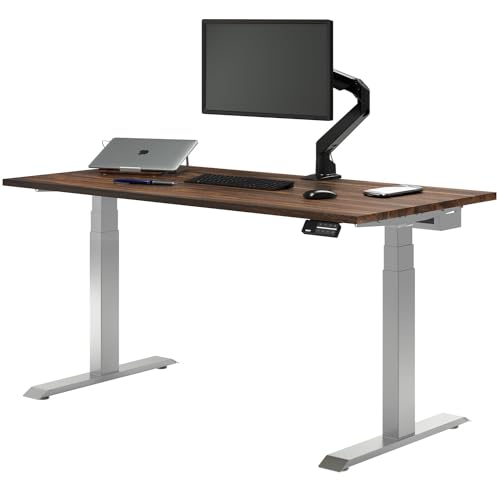
Dual Hardwood Standing Desk with Drawer
Running these analyses costs money. Buy through my links to help keep lights on! I may get a small commission.
Reddit Reviews
 Aless-dc 1.0
I got that desky model with the hardwood top. But its the same dual motor etc. Its fantastic, had it for a year so far at least. Cable management is great, great size. No complaints at all.
_JustWorkDamnYou_ 1.0I'm using an [Uplift Standing Desk V2](https://www.upliftdesk.com/2-leg-standing-desk/?4275=4865&4276=4654&4279=3821&27944=20608&4280=11390&10958=8704&14905=11667) with the C frame. When I got it they were still reasonably priced, but I'd say if it's in budget they make good stuff. I recently helped a friend with their [Desky](https://desky.com/) and the quality seemed really good and their customer service team was really good. They were also one of the few that could get a L shaped desk with a low enough setting for her shorter seated height. Both Uplift and Desky also were some of the few that hard a deep enough desktop, 24in deep seems to be pretty standard but we both wanted 30in. Whichever desk you end up with, I'd recommend splurging on a control pod that has preset one touch memory options. Having to hold the button down, even on a preset, for the entire time the desk is in motion gets wearisome. It sounds trivial (and yeah it kinda is), but if you're constantly changing the height of the desktop it will be something you have to deal with each and every time. My work supplied desk is like that and it drives me nuts. I can't say I use the standing desk at home or in the office for standing as much as I do seated, tho it does get moved in to that position from time to time. Really my main reason was getting it so that my seat height was correct for me. I always found desk heights to either be a too high or too low situation and being able to customize the height to a just right level was a god send. After having to get carpal surgery on both wrists, I really started paying a lot more attention to ergonomics and do not regret the cost of a proper desk, chair, monitor arms and keyboard one bit after the fact.
kgskippy10 1.0I was in the same position and pulled the trigger on the same desk, just without the drawer and monitor stand. Really liking it so far.
Nextgibbon 1.0I’ve been using a Desky dual hardwood sit/stand setup for a while now and honestly one of the most solid desks I’ve owned. No wobble at all at my preferred height to stand and I have a ton of things in the desk. The build quality and cable management options are very nice too. Would 100% recommend Desky
PedalMonk 1.0I love my Desky setup. I've had zero issues with build quality other than a slight sag in the cable tray. I go sit/stand at least once a day, sometimes more. I've only had it for a few weeks now, but very happy.
My wife uses the Uplift. She told me she has zero complaints about the desk. She doesn't notice wobble, she loves the fake walnut wood grain, loves the USB/plugs on the desk, the up/down is superfast, and the wires are hidden well. My 2 cents. It's a little bit more wobbly than my Desky. I was actually surprised to see that because I thought for sure the Uplift with the C-frame (T-frame on Desky) and crossbar would be more stable, but it's not. To be clear, it's not terrible by any means, and every sit/stand desk will have some wobble if you get the two leg version. The up/down is really fast, impressive, really. It's definitely faster than the Desky, but at the end of the day, does it really matter? I mean, we are talking a few seconds at most between the two. Regarding the grommet holes. Uplift has them and Desky does not. This was almost a deal breaker for me. Being able to run wires in the grommets and also having 4 pop-up plugs and USB A/C on the desk, is a bonus, for sure. Desky does not have that option and I thought for sure I'd be drilling holes into my Desky and adding my own, but after getting the desk and the monitor riser(which I am not using it for the monitor, just for more space), I found that I liked the clean desk look better and I've started mounting components under the riser, which I love! I add my DAC and AMP under the riser and I am getting a real walnut wood 4-port USB hub to put under there as well. 60" vs. 72". My wife's desk is 60", where mine is 72". All I can say is, if you have the room and the money, get the larger desk. Afte using my desk and then going into my wife's office, the desk feels cramped and small, but that could be because she doesn't have any monitor arms and uses an AIO PC from work and a second monitor. I will see if she wnats me to get monitor arms. She typically doesn't care about this kind of stuff, but let's see. Regarding the frames. Uplift frame appears to be a little bit more solid, but Desky is no slouch. Ultimately, after using the desky for a week or so now, I have no issues with the frame. The wheels: The locks on the Uplift are way easier to use. The locks on the Desky are like tanks. I actually had to use a hammer the other day to unlock it! WTF! They are extremely hard to lock and unlock. Annoying so. Uplift is plastic locks and Desky is metal. Cable management: Although I prefer the cable tray on the Desky compared to the Uplift, there are some cons on the Desky side. The power strips that snap into the cable tray, which is awesome, are made of plastic. The Uplift 8 port power strip is metal. The power strips plug into this weird mechanism, and then you plug it into the wall. It takes up room in the cable tray, and it seems there could be a better way to daisy-chain the power strips together. The cable tray itself sags a bit in the middle at the almost 6ft length. I bought a strap that I will mount to the underside of the desk to hold it up better. It's not terrible, it just annoys me lol. I feel like they need to make something under the desk to hold up the middle. The Uplift tray is small and the power strip mounts to the frame, but we had to relocate once because things can get in the way of the strip. I think you can put it in 4 or more places. They also sell a cord pouch. It's just a giant puch that attaches to the back of the desk, and you shove all your cables in there. It works well, but it's ugly, IMHO. I don't like the pouch hanging down. Uplift does a better job hiding the motor cables and electronics under the desk, but Desky does better hiding cables overall. I also like that all power plugs are front facing on Desky. The drawers. The Uplift drawer is a fucking tank! It's crazy heavy and solid metal. I was actually nervous to mount it under the desk, but it comes with 6 self-tapping screws, so it can handle the weight. The Desky is also metal, but smaller and lighter. It only has 4 screws. I also got the matching wood face for it, which I love! The keypad: They are similar, but the Desky supports BT and has an app. I probably won't use it to control the up/down, but it's nice for changing settings compared to using the keypad. It also has a timer, to remind you to sit/stand. It also has RGB lights if that is your thing. The warranty: Uplift wins there. 15 year vs. 10 year. The maximum weight. Uplift wins here too, it can hold more weight on the desk. I think mine is 308lbs, which is probably more than enough for most people. Shipping: Uplift wins here, everything came together and fast (I think two days). Desky was two days for some pieces but 5+ days for others. Instructions: Uplift wins here too. It's not a huge difference, but I definitely felt more comfortable with the Uplift instructions. I bought a wood/resin Desky top. It's amazing looking, and you can't compare to MDF, so I won't. You know which one is better :) But I wish that Desky had more information about drilling into the resin and best practices. I had to email support to find out because my under desk drawer needed to partially go into the resin. Luckily, you just need to pre-drill holes, and you are good, but it would have been good to know that ahead of time. Ultimately, I don't think you can go wrong on either desk. For me, I bought the Desky because it had more wood/resin top options and I didn't like the Uplift version (they only have one option). I also felt I would be happier with the cable management of the Desky, and I was right. I thought I would really miss the grommet holes, but I am actually glad they aren't there now. Both are solid options, it just comes down to some minor details that might matter to you more. Hope this helps some of you. If I missed anything you have questions about, let me know.
I'm very happy with my Desky. Zero issues. Uplift is similar. I can't comment on the other two, but the one time I purchased something from Wayfair (bookshelf), I was extremely disappointed in the quality. I sent it back and had to pay to ship it back. Also, I have the pheasantwood from Desky. Not sure where you heard it's hard to maintain, but there are no issues. It just wipes clean. It's really hard wood, so it withstands a lot. MDF is not really a great choice for a desktop, IMHO.
I_Has_6_Cats 0.280Kg weight capacity and 70-120cm height range. This looks like a single sit stand desk, before you bite the bullet, make sure your sitting height is 70cm or more. Otherwise itll be a pain the butt and not ergonomic at all. I got my Dual sit stand from Desky, it was a little more than a single, but they will probably have a black friday sale.
tricksbyjulius 0.2Autonomous Desks have good build qualities, I think. They also have heavier frames. Magnus Pros are also good. Motors are quiet. This one has a 5 year warranty, which is shorter, but it holds up. Just know the desktop is not very deep. Desky's Alpha Dual goes down to 23.6" so you would actually get your feet flat. Runs $679 with their current discount code. Dual motor setup, same kind of stability you would get from the others. What's great about a lot of these Desky Desks is that they have a 10 year warranty. I think all of them have good cable management too, but you would have to look at video reviews or pictures if you like the look of the cable management.
Whatever you're choosing make sure the frame is stiff and won’t wobble at full height, because that’s the part that's a deal breaker. The more weight, the higher the desk, the more the wobble, so a sturdier dual-motor frame is usually the fix. You’ll never get zero movement if you push it, it’s kind of inevitable, but a good frame shouldn’t feel sketchy during normal use. If you’re replacing it anyway, Desky’s dual motor sit stand desks are one of the options that tend to stay planted at standing height.
dallascodeferd 0.2With that budget, I can recommend the Desky Single Sit Stand Desk for $600 AUD and if you can add $50 more, either the Desky Dual Ergo or the Desky Dual Mini Sit Stand desks. For the single motor ones, the memory buttons can get used daily and you can just tap one for sitting, standing, or walking pad height instead of holding the button down. It does get a bit wobbly at max height if you're really pushing on it, but that's pretty typical for this price range. Motor's quiet and the cable tray underneath keeps things clean. If you can wait for tax time and want something like an Omni or UpDown, those are bulletproof. But the Retail Display Direct one you mentioned sounds fine too since they supply offices. Either way, getting off that desktop riser is going to be a massive upgrade with two screens.
Ramzes888 0.2If you want a simple way to judge build quality and stability, check the frame weight. Pictures might look similar, but a heavier frame usually means thicker, sturdier legs and overall construction, means better build quality and stability. For reference, the Desky Dual frame weighs 66.5 lbs, while the E7 is 69 lbs.
If you want a simple way to judge build quality and stability, check the frame weight. Pictures might look similar, but a heavier frame usually means thicker, sturdier legs and overall construction, means better build quality and stability. For reference, the Desky Dual frame weighs 66.5 lbs, while the E7 is 69 lbs.
Traditional-Swan-130 0.2Yeah, the Magnus definitely wins for sleekness, but once you’ve packed that rear compartment, it’s a pain to access. Uplift’s kit is nice, but the metal tray bends a bit under heavy power bricks. I’d take a modular setup like Desky’s if you care about future upgrades.
Secretlab Magnus Pro and Desky Dual Ergo Edge both do cable management well, but in different ways. The Magnus Pro hides everything inside a deep rear channel with built-in routing, which gives a very clean look but limits flexibility once it’s full. Desky’s approach is more modular, with trays and grommets that let you separate power from data lines and reconfigure later. If you move things around often or have multiple monitors, the Desky system is easier to live with long-term.