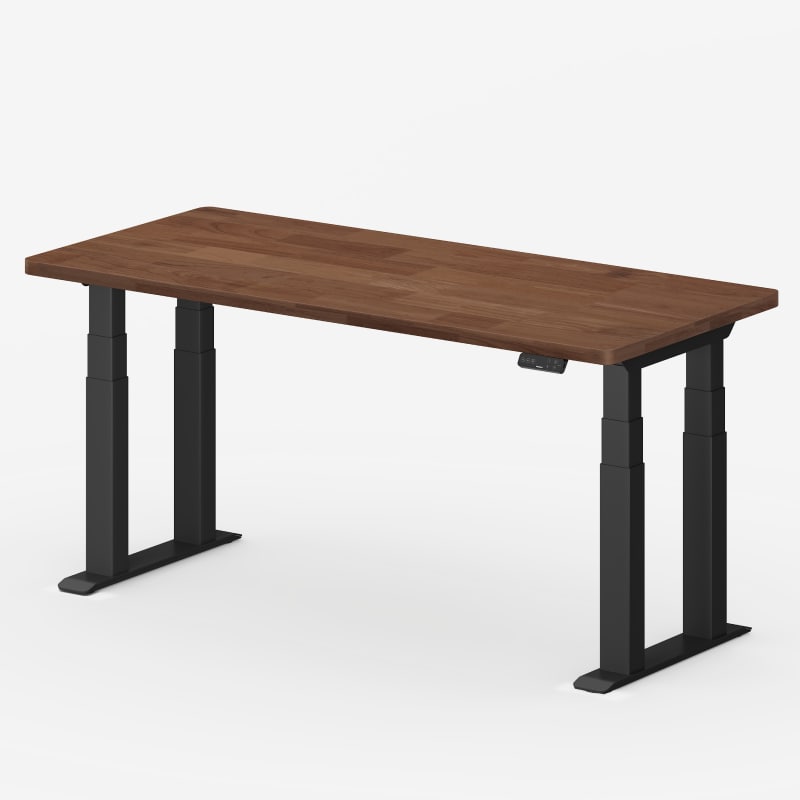
I bought a Flexispot E7 Plus (four legs) and it does not move at all, whether at sitting (26.0 in) or standing (41 in). I have two laptops, speakers, a heavy-duty monitor arm and accessories on the desk.
I think that’s too expensive in my opinion. I mean you get what you pay for so I’m pretty sure it’s good but I ended up going with the cheaper flex spot E7+
The downside with that Desk though is that you do have to drill your own holes into the table top. It came with pre-drilled holes and all of them were in the wrong locations… But, after dealing with drilling your own holes, it’s a good sturdy desk with almost no wobble whatsoever
4 legs is definitely the way to go. I've been extremely happy with mine. I got just the frame as I was given a 73 x 30 office work surface from my work. I have been extremely pleased with mine.
I have a 73" x 30" cherry red work surface for mine. Thing is crazy heavy. I also have 2 monitors mounted offset behind the left leg. I am 6'1-6'2 so it goes up quite a bit. There is minimal wobble when at height. For general browsing or working it's great. In the lowered seated position it's extremely solid. I play video games at a somewhat competitive level and the wobble was extremely important to me and there is none when seated.
i’d recommend this desk. just a little more expensive but it’ll last you much longer. it’s so stable if a nuke was dropped near the desk, it would not budge at all. [desk](https://www.flexispot.com/flexispot-4-leg-standing-desk-e7plus)
Agreed. In my experience you’ll want a 4-leg desk if you’re putting a 3d printer on it. A two motor option like [Flexispot’s E7+](https://www.flexispot.com/flexispot-4-leg-standing-desk-e7plus) or [our Elite desk](https://ergodriven.com/products/the-ergodriven-standing-desk) would be fine!
Here’s how I see the standing desk market right now, in January 2026.
**“Amazon Specials” like Claiks, ErGear, HUANUO etc. - Primary consideration: Budget.** These are frankly total trash, probably even worse than the cardboard boxes I used for my first few years of standing.
**Flexispot - Primary consideration: Value.** Buy here if your first consideration is budget but you don’t want garbage. Stick to E7 and above.
**Secretlab - Primary consideration: Cable Management.** Buy here if you’re a gamer and/or you just can’t stand to see a cord.
**Uplift - Primary consideration: Corporate Sales.** Buy here if you’re a purchasing manager (at work or at home). No one ever got fired for buying IBM.
**DeskHaus - Primary consideration: Stability.** Buy here if you want to absolutely annihilate any and all wobble or sway, or if you need to support a massive desktop.
**Branch - Primary consideration: Apartment Chic.** Buy here if your home office is also your living room.
And where we think we fit in:
**Ergodriven - Primary consideration: Ergonomics.** Buy here if you actually want to use your standing desk.
That’s the need we identified. While these brands have innovated around the edges, no one has actually improved the ergonomics of standing desks in 10+ years.
We all know the true benefit of standing desks isn’t just standing - it’s movement - both while you’re standing, and in changing positions throughout the day. Experts recommend switching between sitting and standing 20+ times per day. For example, the human ergonomics program at Cornell recommends the 20-8-2 rule: in every 30 minute period, sit 20 mins, stand 8 mins, and move/stretch for 2 mins. That is a lot to manage, especially when you have work to focus on.
It’s 2026. You shouldn’t be relying on willpower or setting phone timers to remember to use your expensive desk for its only purpose.
**Your desk should monitor your presence and position, and automatically move for you.**
That's what we think anyway. So that’s exactly what our Tempo Desk does. It’s the only standing desk you’re guaranteed actually to use!
And so far people love it! You can see reviews on [this page](https://ergodriven.com/products/the-ergodriven-standing-desk).
BTW if you already have one of those desks above (or have your heart set on them for the totally valid reasons I listed), you can still get our [Tempo controller](https://ergodriven.com/products/tempo-smart-controller-for-standing-desks) and just swap out your controllers in a few minutes (Tempo is compatible with all the brands above - and many others - except the “Amazon Specials”).
I think two leg is definitely enough for most people. But if you really hate any and all wobble or you have an extra heavy set up the E7 plus is a very nice desk
BTW in case you’re interested our [Tempo Controller](https://ergodriven.com/products/tempo-smart-controller-for-standing-desks) works with v2, v3, e7 and e7+
If your doctor is telling you to do it, you should get one you'll actually use! :) That said, I think the Flexispot E7+ is a great choice.
But since you're curious, as someone who works in the industry, here's a quick explainer on brands (in my opinion):
**“Amazon Specials” like Claiks, ErGear, HUANUO etc.** - Primary consideration: Budget. These are frankly total trash, probably even worse than the cardboard boxes I used for my first few years of standing.
**[Flexispot](https://www.flexispot.com) - Primary consideration: Value.** Buy here if your first consideration is budget but you don’t want garbage. Stick to E7 and above.
**[Secretlab](https://secretlab.co) - Primary consideration: Cable Management.** Buy here if you’re a gamer and/or you just can’t stand to see a cord.
**[Uplift](https://www.upliftdesk.com) - Primary consideration: Corporate Sales.** Buy here if you’re a purchasing manager (at work or at home). No one ever got fired for buying IBM.
**[DeskHaus](https://desk.haus) - Primary consideration: Stability.** Buy here if you want to absolutely annihilate any and all wobble or sway, or if you need to support a massive desktop.
**[Branch](https://www.branchfurniture.com) - Primary consideration: Apartment Chic.** Buy here if your home office is also your living room.
And where we think we fit in:
**[Ergodriven](https://ergodriven.com) - Primary consideration: Ergonomics.** Buy here if you actually want to use your standing desk, because [the Tempo desk](https://ergodriven.com/products/the-ergodriven-standing-desk) monitors your presence and position and automatically moves your desk for you before you end up stuck in one position too long.
FYI if you end up picking up one of those desks above for the totally valid reasons I listed, you can still get a [Tempo controller](https://ergodriven.com/products/tempo-smart-controller-for-standing-desks) and just swap out your controllers in a few minutes (Tempo is compatible with all the brands above - and many others - except the “Amazon Specials”).
Yes, you can cancel a suggested move by hitting any button, or toggling the body of the controller (the whole thing is a paddle switch).
The "standard way of interacting with Tempo is what we call "Cruise Control".
You pick a standing duration / interval (say 40/60 minutes). Then let's say, you start standing up.
After ~40 minutes of you being actually present at the desk, Tempo's screen will turn on and start a 15 second countdown timer: "Sitting in 15 .... 14 .... 13"
When it hits 8 seconds remaining, it will "pulse" your desk a bit to let you know a move is coming in case you didn't notice the screen light up.
At any point in the 15 second countdown, hitting any button will cancel the move. You can also stop a move that's in progress and manually move the desk to any height or send to a preset.
You can also always double click the paddle down to pause cruise control, or add time to an existing pause. Double clicking up cancels the pause.
Back to our example, if you don't stop the move, it will move to your sitting preset. Then ~20 minutes later, it will start counting down for a move back to your standing preset and the cycle repeats!
There's lots of other cool stuff you can do, but that's the main flow!
Of those options, E7+ would be most stable. But if stability is your #1 concern, go with deskhaus, that’s their thing.
Btw the [Tempo Controller](https://ergodriven.com/products/tempo-smart-controller-for-standing-desks) works with all those options except vernal, which we’re adding soon!
IMO Jarvis is about 10% nicer and typically waaaaay more expensive.
E7 is still plenty quiet, fast, and stable, and is the right pick between the two for most people.
BTW in case you’re interested our [Tempo Controller](https://ergodriven.com/products/tempo-smart-controller-for-standing-desks) works with v2, v3, e7 and e7+
When I hear “cozy corner” and “living room”, I tend to think of Branch, that’s kind of their vibe.
As someone who works in the industry, here's my opinion of the top standing desk brands and who should buy from each one:
**“Amazon Specials” like Claiks, ErGear, HUANUO etc.** - Primary consideration: Budget. These are frankly total trash, probably even worse than the cardboard boxes I used for my first few years of standing.
**[Flexispot](https://www.flexispot.com) - Primary consideration: Value.** Buy here if your first consideration is budget but you don’t want garbage. Stick to E7 and above.
**[Secretlab](https://secretlab.co) - Primary consideration: Cable Management.** Buy here if you’re a gamer and/or you just can’t stand to see a cord.
**[Uplift](https://www.upliftdesk.com) - Primary consideration: Corporate Sales.** Buy here if you’re a purchasing manager (at work or at home). No one ever got fired for buying IBM.
**[DeskHaus](https://desk.haus) - Primary consideration: Stability.** Buy here if you want to absolutely annihilate any and all wobble or sway, or if you need to support a massive desktop.
**[Branch](https://www.branchfurniture.com) - Primary consideration: Apartment Chic.** Buy here if your home office is also your living room.
And where we think we fit in:
**[Ergodriven](https://ergodriven.com) - Primary consideration: Ergonomics.** Buy here if you actually want to use your standing desk, because [the Tempo desk](https://ergodriven.com/products/the-ergodriven-standing-desk) monitors your presence and position and automatically moves your desk for you before you end up stuck in one position too long.
FYI if you end up picking up one of those other desks above for the totally valid reasons I listed, you can still get a [Tempo controller](https://ergodriven.com/products/tempo-smart-controller-for-standing-desks) and just swap out your controllers in a few minutes (Tempo is compatible with all the brands above - and many others - except the “Amazon Specials”).
As someone who works in the industry, here's my opinion of the top standing desk brands and who should buy from each one:
**“Amazon Specials” like Claiks, ErGear, HUANUO etc.** - Primary consideration: Budget. These are frankly total trash, probably even worse than the cardboard boxes I used for my first few years of standing.
**[Flexispot](https://www.flexispot.com) - Primary consideration: Value.** Buy here if your first consideration is budget but you don’t want garbage. Stick to E7 and above.
**[Secretlab](https://secretlab.co) - Primary consideration: Cable Management.** Buy here if you’re a gamer and/or you just can’t stand to see a cord.
**[Uplift](https://www.upliftdesk.com) - Primary consideration: Corporate Sales.** Buy here if you’re a purchasing manager (at work or at home). No one ever got fired for buying IBM.
**[DeskHaus](https://desk.haus) - Primary consideration: Stability.** Buy here if you want to absolutely annihilate any and all wobble or sway, or if you need to support a massive desktop.
**[Branch](https://www.branchfurniture.com) - Primary consideration: Apartment Chic.** Buy here if your home office is also your living room.
And where we think we fit in:
**[Ergodriven](https://ergodriven.com) - Primary consideration: Ergonomics.** Buy here if you actually want to use your standing desk, because [the Tempo desk](https://ergodriven.com/products/the-ergodriven-standing-desk) monitors your presence and position and automatically moves your desk for you before you end up stuck in one position too long.
FYI if you end up picking up one of those other desks above for the totally valid reasons I listed, you can still get a [Tempo controller](https://ergodriven.com/products/tempo-smart-controller-for-standing-desks) and just swap out your controllers in a few minutes (Tempo is compatible with all the brands above - and many others - except the “Amazon Specials”).
Also I've posted this in a few threads now, just realized we should make this more comprehensive, maybe as a page on our site, so we'll work on that.
Top Standing Desks on Reddit
1
Flexispot
E7 Pro
93% positive of 96 users
Affordable and stable, but assembly can be confusing.

.jpg)
 adamlklein