
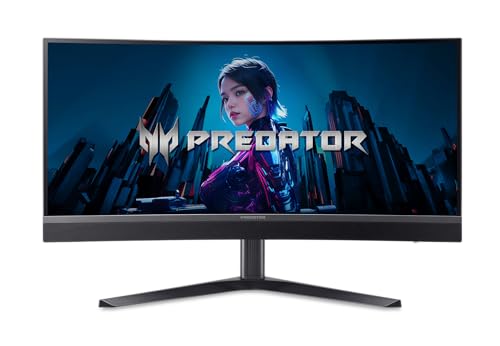
Acer - Predator X34 X0bmiiphux VA
Running these analyses costs money. Buy through my links to support the site! I may get a small commission for some links, and it doesn't cost you anything. Thank you!
Reddit Reviews:
Filter by Topic:
Based on 1 year's data from Mar 28, 2026 How it works
 account1-2 1.0
I was in the same boat as you and then learned about this monitor that met all of my needs: https://www.amazon.com/dp/B0FSBW8F96?ref=ppx_yo2ov_dt_b_fed_asin_title Mini LED with 1000+ zones, HDR 1000 certification, Fast IPS panel, 200hz (at 8-bit color, 144hz for 10-bit color), and G-sync support. I've only had it for about a week but it has been excellent. Mini LED is absolutely worth the upgrade over standard IPS for HDR gaming. And there's no risk of burn in so you can use it for office work all day!
Their product page says otherwise: https://www.acer.com/us-en/predator/monitors/x34
I ordered from that Amazon link and got the 1900r ag-ips version. The same one with the sound bar below the screen.
Where do you see it listed as a VA monitor?
That's a bummer. Though I will say that I haven't noticed any ghosting or any other issues typically seen with VA panels at high refresh rates
estelblade88 1.0Acer had a predator ultrawide Va miniLED. I liked it a lot but it still had all the VA woes. I get the hesitancy for going OLED with that use case. Are two panels out of the option?
I’m in the oddball camp that thinks if your going for HDR over motion clarity that miniLED is the way to do it I had an issue with color fringing on my QD-OLED that had a color vibration effect for me. Which induced headaches and eye strain. I linked the 3440x1440 miniLED I had and I really liked it. It was blurry in motion being a VA but still has great HDR performance. GW2….found times. The only MMO that I didn’t quit after a month. Good combat. Fun exploration.
fire-goal 1.0Get this if in US: [https://www.amazon.com/dp/B0FSBW8F96/](https://www.amazon.com/dp/B0FSBW8F96/) However, it's 1500r which I prefer at this 34" size, 3440x1440, VA miniled, 1152 dimming zones, 200hz, HDR1000, 99%dci-p3, comes with factory calibration report (very accurate). This monitor is so good, just got it, super bright scenes, vivid colors, great contrast, fast response VA, no black smearing in gaming. This is the best 34" HDR gaming monitor in US currently IMO. The only oled monitor that gets close to as bright in peaks and sustained brightness has to be the newer tandem oled. Bright scenes look muted on most oled monitors. Also, I don't believe there are currently any tandem oled in 34" 3440x1440. It's worth saving for HDR gaming especially if you play single player games, so I would delay purchase if you can't afford yet.
Very happy with it, HDR looks very good super bright, good contrast, don't notice blooming with HDR content, colors pop, accurate color calibration comes with a certificate, minimal black smearing only seen in UFO test and not in gaming, good response time without ghosting, 1500r curve is just right for 34" in my opinion. I don't think most gamers will notice the black smearing while actually playing games. Very very minimal. Unless this malfunctions or I see a major issue while I continue gaming on it, I'm keeping it. I'm leaving static content while on HDR, it's so much better liveability compared to oled. No more hiding taskbar. Also the brights on this is way better than my 42 LG C4.
It's matte but not too heavy, so it's fine. Backlight bloom is very minimal thanks to VA and the dimming algorithm is fantastic in HDR gaming. Resident Evil 2 is jaw dropping. That oled is not the newer tandem so in bright scenes it will look muted. This is the best HDR gaming 34" currently available IMO.
I set it up, happy with my initial impressions. Far from done testing. Housing is well ventilated, vents all on top can see through to the bottom speakers. I like this as overheating kills electronics. I thought it had KVM and USB ports, it has none. 3440x1440 200hz confirmed for USB c, display port 1.4 connection. I think it has HDMI 2.0 because it caps refresh rate at 100hz. It has auto HDR which turns local dining on and off with Windows 11 HDR. 10 bit color works only with 144hz, not with 200hz. I couldn't tell the difference with HDR YouTube videos so I'm leaving it at 200hz for now. Overdrive has 3 settings, middle one is good on UFO testing. It looks smooth with only minimal black trails, I'm happy with this. I've seen much worse on VA. Extreme setting has too much ghosting. The bright peaks look great on HDR video, I think VA is a good choice as dark scenes still look good without too much noticeable blooming. No dead pixels found. Right now I'm leaning towards keeping it but way more testing to do.
Another thing I forgot to mention. It came with a color calibration factory report. Measurement result: Gamma curve 2.2 Color Temp 6493K Avg Delta E of 0.40 Max Delta E of 1.36 This looks like a great result. Under Delta 1.0 is imperceptible, Gamma and Color Temp is spot on. Color accuracy is very good on this.
New-Insect-4954 1.0So far so good. I’m on a gtx1070 , when I get home I’ll get an older game to play at higher fps to see if black smearing is an issue. Any recs? I played abiotic factor and dayz just to test out and it was very nice I’m waiting for build a 5070ti rig in next week or so to really stress it Right now I’m pleasantly surprised. If there’s specific things ppl want me to test I can try my best. I’m a casual gamer
SlamCake01 1.0Got this recently and like it a lot. If VA is ok, then I’d check out miniled. Does have blooming when using HDR or the active dimming on desktop/web browsing. Ive never noticed in games/video and just switch back to SDR and no dimming when not gaming. I bought it to have high SDR brightness and no burn in risk as its 90% used for work, but still get good contrast and HDR 1000 for games. Seems kind of unique as I didn’t see any other mini led while shopping. Pricey for a VA, but if you’re ok with a bit more ghosting inherent to VA, the miniled makes a pretty big difference for games. Perfect for my use case and price range. Acer Predator, x34 X0bmiiphux miniled https://www.amazon.com/dp/B0FSBW8F96?ref=cm_sw_r_cso_cp_apin_dp_7ZP7J05SA68JMDSV7HYK&ref_=cm_sw_r_cso_cp_apin_dp_7ZP7J05SA68JMDSV7HYK&social_share=cm_sw_r_cso_cp_apin_dp_7ZP7J05SA68JMDSV7HYK&titleSource=true
TragicBruh 1.0Am currently in the same boat. Found this newly released (?) Acer. 34”, 21:9, 200hz, 0.5ms, mini led VA with almost no footprint online: https://a.co/d/e4YuIpr Figured I’d bite the bullet and can always return via Amazon if it’s crap
This is a VA panel
I purchased using that exact link and received the VA panel, model X0bmiiphux
Yeah the few hours I’ve used it, I was very satisfied. The giant sound bar attached to the bottom is really my only issue with it.
TrueAxeon 1.0It seems this monitor is somewhat of a unicorn in the US, and just about the only non-OLED option with proper Mini LED based HDR in this form factor. It's not often that I write detailed reviews, but considering that (at the time of writing) there are only 3 other reviews for it on Amazon - looks like this is the time to write one. Let me also preface this review by saying that I am upgrading from the original Acer Predator X34, a monitor that I had for almost a decade, and all my impressions will be comparing it to that monitor. I have also been specifically looking for a non-OLED upgrade, since burn-in is definitely still not a solved problem for very long-term ownership. I have been daily driving this monitor for a few days now, and I think I've figured out most of its quirks by now and dialed it to where I want it. Not everything about it is as "no-compromise" as the original X34 was at the time, though I feel like that can be said about just about any modern monitor, since there are now so many options out there for every niche use case. With that said, I think this monitor comes about as close to a do-it-all workhorse as you can get in a 34" ultrawide form factor these days. **Before we get to the good and bad, here's how I ended up setting my monitor through the OSD, because you will probably need to make a few adjustments too to get it looking its best**. * For SDR - Standard mode with sRGB color space, brightness at 75, Adaptive Dimming off (don't worry, it will turn itself back on in HDR automatically, but in regular SDR desktop use it just looks bad with all the blooming), Super Sharpness off (don't know why it was on by default, it's just ugly). * For HDR - HDR mode (duh), and it pretty much takes care of the rest. However, DO NOT stay in this mode for SDR content, even with Windows HDR turned off - it forces HDR color space in this mode (which I think is BT.2020, but I may be wrong), which makes everything oversaturated in SDR. **Now for pros and cons. Let me get the bad out of the way first, because most of these are relatively minor.** * Coming from an amazing IPS panel to a VA has definitely been... an adjustment. I knew beforehand that the viewing angles wouldn't be on par with an IPS just by the nature of the technology, but it was still jarring at first. This won't be an issue to anyone already used to VAs, and the picture quality when viewing straight-on is actually very good (more on that later). * Another inherent flaw of VA panels is VRR flicker. At first I was so taken aback by it that I thought there was something wrong with my panel, but apparently it's just a VA thing. The good news is that in actual games (assuming your framerate is at least remotely stable) it's hardly noticeable - I thought I would end up turning VRR off altogether, and I haven't tested enough games yet to confidently say that I won't do that later, but so far during gameplay it wasn't nearly as pervasive and distracting as, say, during loading screens where framerate fluctuates wildly. On a related note - this monitor does get recognized as G-Sync compatible, but you do have to manually enable that in the NVIDIA App. * You can't get it to automatically switch from Standard mode with sRGB color space to HDR mode with HDR color space, you have to do that manually. And you will want to do that, since as I said earlier - HDR mode doesn't use the calibrated sRGB color space for an SDR signal, and trying to change it just throws you back to the Standard mode. Thankfully it's just a couple of clicks in the OSD to switch profiles, but it's still mildly annoying. * Some product pictures are flat out wrong - there are no USB ports in the back at all, just display inputs (and Type-C for DP Alt input). It doesn't actually advertise having them in the product description though, so I can't really call it false advertising. Just something to be aware of. **Some things that are neither here nor there.** * The built-in speakers are... fine? They're very prominent in the design and get the job done if you want to play something in the room, and are definitely better than the ones in the original X34, but let's be real - with this caliber of monitors you're probably already either using good headphones or proper standalone speakers. If we're talking cost-saving measures - I'd much rather this monitor had USB connectivity with KVM functionality and cheaped out on speakers that the other way around. * The stand looks to be quite robust, but I put mine directly on a VESA arm so I can't say too much about it. Also, this monitor is surprisingly light compared to the absolute unit that was the original X34, so handling it should be easy. * 1500R curve is right at the edge of what I'd consider comfortable for prolonged use. The original X34 was 1800R which I quite liked, but this one isn't bad either. I don't tend to sit too close to the screen, so anything beyond 1500R I find more distracting than helpful. **Now let's finally get to the good parts, because there's a lot to love about this display!** * Getting back to this being a VA panel - since it's not an OLED, you don't have to worry about burn-in at all. Throw all the static content you want on it at max brightness and it couldn't care less. It's also extremely accurate (in standard sRGB mode) and comes with a factory calibration report. Text clarity is also not an issue. Ghosting and smearing aren't nearly as big of an issue as I thought they'd be after reading people complain about VA panels in general. * And speaking of brightness, this thing gets **bright**! Even in SDR I had to set the brightness to 75, because otherwise even the white web pages get just uncomfortably bright to look at. But if you really want to, beyond setting the brightness to 100 you can also toggle Max Brightness on to get a truly eye-searing level of brightness. Can't say I'd recommend doing something this ridiculous, obviously, but the option is there. * This brings me nicely to the main selling feature of this display - its Mini LED DisplayHDR 1000 capability. My perception may be a bit skewed coming from an SDR monitor, but **DEAR GOD** this is an eye-opening experience! The blooming of individual dimming zones is basically nonexistent in actual HDR-enabled games and content, and the brightness of the highlights and OLED-level blacks is just something that can't be described and needs to be experienced. I know I certainly was skeptical of the hype before playing some HDR content on this monitor for the first time. * 200Hz refresh rate might not be all that impressive these days, but it certainly was for me coming from a 100Hz display. **Conclusion time.** This is certainly not a be-all-end-all monitor that the original X34 positioned itself as at the time, mostly because there are more options now that fulfill different roles - OLEDs have much better contrast and responsiveness due to the nature of self-emissive pixels but come with a trade-off of text clarity and inevitable eventual burn-in, IPSs are still kings of viewing angles and general easiness on the eyes but come with a trade-off of the notorious "IPS glow" that can be reduced on high-end panels but never eliminated, TNs... well, they've been delegated to the low-end bargain bin for a while, so those don't count. This monitor feels like a solid middle ground between all those options, and the things it does well - it does REALLY well. Plus as an aside - I don't think we'll be getting another truly no-compromise monitor until either MicroLED technology matures enough to become feasible to use in consumer displays (probably won't happen for at least another decade), or OLEDs become resilient enough to the point where the panel would outlast the rest of display components without the need to actively think about static content on screen (also probably many years away). Oh, and have I mentioned that it's currently $480 on what looks to be a somewhat permanent discount? At that price, the value this monitor brings is nigh unbeatable, since it undercuts even the cheapest comparable QD-OLED (the Alienware one) by a significant margin. So unless you do literally nothing but gaming and content consumption on your monitor, getting this one over the Alienware is basically a no-brainer.
Callivan 0.4So far for me the sweet spot was 34'' 3440x1440 with my acer predator UW. But I am happy to be proven wrong if I get to try the 5k2k 45''.
Acquire16 0.3I had a 34 inch (acer x34) ultrawide for a few years and always thought it was too small. When the first 38 inch (Acer x38) ultrawides released I got one. It was a significant upgrade. This is the sweet spot for a 21:9 screen. It practically fully covers my field of view without losing detail from it being too big. I've been waiting for 5 years for something worthwhile to upgrade to and I don't see it coming. 45 inches is just too much. I also don't like the aggressive curves on them.
DeeHawk 0.3You’re not bothered by the fringing? I can’t decide if I’m waiting for the 39”, or just go with the 45” now. I’m in your situation now. My OG x34 predator is going to the wife. Do you have a 4090/5090 for it?