After buying a few of the ones others suggested, I ended up biting the bullet and buying a [Logitech C920S PRO HD](https://www.logitech.com/en-us/shop/p/c920s-pro-hd-webcam.960-001257) directly from their site. The other ones (including the main WGU suggested one at the time) didn't have large enough field of view (to cover my head, hands, keyboard, mouse, monitor) or they couldn't focus on my ID during the checks.
This is the one I use after going through a few other cheaper options. It got old trying to fit everything into frame without a larger desk and having to take cell phone pics on my DL so I could zoom in on the details I needed.
Strange but effective. No matter what I tried (different brightness and color temperatures, open/closed window blinds at different times of day, camera brightness boost, meeting brightness boost, etc.), I always looked pale-to-grayish on camera. Out of frustration I bought a ring light and suddenly I looked like myself! Maybe it was just my Logitech C920S HD Pro webcam, but the ring light improvement was not subtle. My PM even complimented me on the difference.
Working remotely. people definitely respond to us - and trust what we’re saying - based in part on how we look. As a manager, I need to be as effective as possible in meetings for my team to succeed. I consider the ring light to be an excellent career investment.
I've tried the Insta Link 2, the obsbot tiny2 AND the obsbot meet2. All have enough of a latency issue that I find it distracting.
really loved that the insta link 2 had a desk view feature that I could trigger with a hotkey. Unfortunately it seems that any similar webcam is also going to be chalk full of useless ai features...
dont spend on a 4k for video conferencing... most dont support over 1080p. Cheap and cheerful has been the logi c920s but they kinda suck in low light. the newer logi brio 500's are great.
if you're solving for audio, webcams generally arent the best. I use a speaker dock instead. the logi dock is suprisngly pretty good for as a conf speaker, music speaker, and a dock for most setups.
[https://www.logitech.com/en-us/products/personal-workspaces/logi-dock.986-000031.html](https://www.logitech.com/en-us/products/personal-workspaces/logi-dock.986-000031.html)
Hello there,
I am looking for a camera to record talking head videos. The camera will be mounted on my desk permanently. It will record directly to my PC.
The requirement is the quality should be crisp. And I should be able to turn it on via the pc.
I currently do have a old Nikon D3300 DSLR that I use with a capture card. It works nice, but it is a hassle to turn it on as it has to be switched on manually and then recharge the battery every few hours.
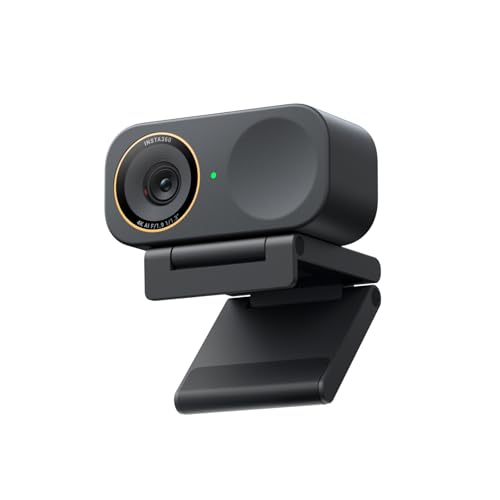
I looked at the insta 360 link 2c. It is a webcam, and the sensor size is small hence I am hesitant to buy it.
Do let me know is there a plug and play camera with big sensor ?
Also, is insta 360 link 2c a good option?
Do let me know your thoughts thanks.
did you change your camera? which one did you get? Are webcams any good these days? Have an old c920 and the image quality is very milky and soft. Probably due to its limitations.
Hello there,
I have a light box and the light is mostly sufficient. My older c920 does the job but the image looks soft. If i use a DSLR then the image is very sharp.
I do not want to mount my DSLR as a webcam hence I am looking for a webcam.
I narrowed my search to
1. OBSBOT meet 2
2. insta 360 link 2c
3. emeet s600l
Out of which I have removed the obsbot as many people have reported heating issues.
My primary use is talking head videos. NO motion tracking, NO gesture control, No AI.
I just want a sharp image quality.
So between insta 360 lnk 2c vs emeet s600l, both have a 1/2 inch sensor. But emeet is significantly cheaper.
which one is better.
There are not a lot of videos out there doing this comparison and most videos of insta 360 link 2c seem paid UGC content.
Is insta 360 link 2c worth the high price?
Do let me know which one should I get?
Thanks



 chewedgummiebears