I’ve got a Virgin Hub 3 in my living room (Virgin M350), and in the living room everything is fine ,*no issues*. But in my bedroom, which is only about 4–5 metres away, there are spots with no WiFi at all.
I even tried a used Virgin mesh device, but it made *zero difference*.
I’ve been looking at a couple of recommended second-hand routers on eBay like the ASUS RT-AX56U and ASUS RT-AC68U which are very cheap used. But I’m not sure if they’re still good or just too old / dated.
What do you folks think? Are those decent picks to pair with the Hub 3 + Virgin M350, or is there something better I should go for? (preferably under £150)
Thanks for the info! Well, that’s a bit of a bummer, because the TP Link’s arriving today and I’ve got to put the Virgin Hub into modem mode. Admittedly I’m not that experienced with routers and modems, but anything that could end up being a security risk is a no go for me.
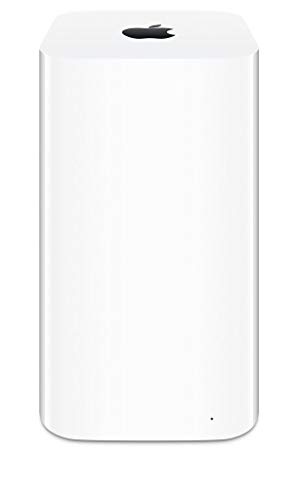
I think I’ll give the Apple AirPort Extreme A1521 a try it's around £30. Theoretical speeds are up to 450 Mbps on 2.4 GHz and up to 1300 Mbps on the 5 GHz band, and I’ve read that in the real world you can get around 600 Mbps on 5 GHz and about 450 Mbps on 2.4 GHz.
Should be more than enough for my connection. If it doesn’t cut it, I’ll just bite the bullet and grab a new £150ish router.
Just grabbed an Apple AirPort Extreme A1521 for £30 from CEX and put the Virgin Hub in modem mode. So far it’s working a treat ,getting the full 350 Mbps in my bedroom, which has thick old walls and used to barely hit 100–120 Mbps (some days it was a total Wi-Fi dead zone), even with the Virgin Mesh plug.
Honestly, for a decade old router, it’s ridiculously powerful. Don’t think the lack of 6 GHz matters at all for my 350 Mbps package. Really happy with it so far!
Here are the options I would suggest:
- [UniFi Express 7](https://uk.store.ui.com/uk/en/category/cloud-gateways-wifi-integrated/products/ux7) (£190)
The Unifi Express 7 is above £150 by a bit, however it will probably outlast your existing and future networking needs, even if you were to jump to a 2.5Gig plan.
- [UniFi Express 6](https://www.broadbandbuyer.com/products/50562-ubiquiti-ux/) (£123)
The UniFi Express 6 is more in line with what I would recommend, rather than just suggest. It's fully within your budget, and still still currently receives software updates from Ubiquiti. The UniFi Express 6 should be able to support speeds of around 300Mbps
- [Apple AirPort Extreme (6th gen)](https://uk.webuy.com/product-detail/?id=SNETAPPAPEXA1521) (£30)
The Apple AirPort Extreme is not something I would recommend, as it hasn't been receiving software updates for a long time now, but it's antenna setup can punch through walls pretty easily and it's also now very cheap. You will need an iPhone or computer (Mac or Windows) to set up the AirPort, as it requires it's own software instead of just being configured through a browser. The AirPort should be capable of about around 230Mbps.
I would be hesitent about buying access points that are no longer supported. Both TP-Link and D-Link specifically have a bad track record regarding the security of their products. I would advise against their equipment if you aren't reflashing them with more trustworthy firmware like OpenWRT or FreshTomato.
I would suggest against mesh access points, as even the expensive ones tend to be poor quality. If your house is semi-modern or has had a rewiring, I'd give powerline adapters a go. I use a powerline adapter to connect up my own access point and get a fairly consistent 140Mbps, which is enough for my wireless needs.
I'd recommend doing a good amount of research before buying an access point so that you're familiar with how to set it up prior to ordering. Not every access point is configured in the same way, and some may not be as user friendly as others.
You won't need to enable modem mode on your VM Hub just to add a new access point. You just need to configure your TP-Link wireless router to just be an access point, instead of a router & access point, which is what it'll want to do by default. [TP-Link has a page on their site for doing this](https://www.tp-link.com/uk/support/faq/1384/).
> I think I’ll give the Apple AirPort Extreme A1521 a try it's around £30. Theoretical speeds are up to 450 Mbps on 2.4 GHz and up to 1300 Mbps on the 5 GHz band, and I’ve read that in the real world you can get around 600 Mbps on 5 GHz and about 450 Mbps on 2.4 GHz.
Theoretical speeds are theoretical, real speeds will depend a lot on what wireless traffic is nearby your access point. If you've got more than 10 other Wi-Fi networks nearby, your 2.4Ghz won't be anywhere near 400Mbps, closer to 100Mbps or even 50Mbps.
Apples AirPort Extreme routers were BULLETPROOF I swear to GOD! Unifi APs were also bulletproof at one point, I finally had a 10 year old AC Pro die. Their firmware was buggy wifi 6 and 7 but they are light years more reliable then any Eero mesh system
Don’t let them talk you into another brand…. I went from AirPort to Linksys (because that’s what Apple sold after the AirPort) with Netgear and TP also. Ubiquiti’s Unifi software can’t be beat.
Dream Router Ubiquity, not the cheapest not the most expensive has every feature I can think of and getting notifications of when it’s down or back online is huge.
Runner up, the AirPort Extreme I bought for my grandparents. Took me 10 minutes to set it up and it’s still working without issue for them.
Top WiFi Routers on Reddit
1
GL.iNet
GL-MT6000 (Flint 2)
91% positive of 197 users
OpenWrt enthusiast's choice; good value, but lacks 6GHz.


 One_Visual_4090





