If you don’t want to pay and arm and a leg for ubiquiti, Asus does pretty damn well in this regard. I’ve been rocking an a86u for years now, and their ET9s 3 pack go for sale for 100 regularly, and have had zero issues. The ET9s support the 6.0 band so be sure to buy a primary router that supports that if you want it. I keep my 2.4 and 5.0 separate snd only really use the 2.4 for IOT.
Yes, as long as you can connect them together via ethernet, the ET9 system will work fine for you. And it is WiFi 6E so that meets your requirements too.
Another note to make: ASUS is going to be one of the few choices for you, if you are against a subscription model for security features. Eero, TP-Link, Netgear all charge you a monthy fee for additional security features. ASUS includes them all when you buy the router or mesh system. I don’t know about Ubiquiti, maybe someone could educate us on whether they require a subscription fee for security features.
I have the ASUS XT8 (WiFi 6) system, the prior generation mesh system. You could consider it the big brother (older tech) to the ET9. I’ve been very happy with the XT8.
**TL;DR:** Get another ASUS AiMesh-compatible router. It does not need to be an ET8 (which is WiFi 6E). Not sure why, but it's difficult to find affordably priced brand-new WiFi 6E ASUS equipment right now. You'll need to check the secondary market, like eBay. There you can get a used ET8 with power supply for about $100. Another option is the ASUS RT-AXE7800 (can find used on eBay in US for $150 or less). But for aesthetics and to just have everything match, getting another ET8 would probably be the best option. If you MUST have a brand new unit and don't care about WiFi 6E, you can get any ASUS AiMesh WiFi 6 router and just add that to the mesh, connected via ethernet. A good option on Amazon (WiFi 6) is the ASUS RT-AX3000S for about $90. Even if you have WiFi 6E clients, they'll still use WiFi 6 and work quite well. But in the basement, where the WiFi 6 router is, there won't be any 6ghz network signal (WiFi 6E), unless it is accessible from the upstairs ET8. So to reduce complication and make everything more uniform, if I were in your shoes I'd buy a used ET8 from eBay for about $100 and add it to the mesh. Then you'd have WiFi 6E throughout the home, on every level, with full fast client handoff support between mesh units.
**One Warning:** The ASUS mesh network will only support in the GUI/mesh infrastructure the highest WiFi standards supported by the mesh router. Example: You have an ET8 as the router. That means you can only go as high as WiFi 6E for support/manageability in the ASUS router GUI or mobile app. If you buy a WiFi 7 ASUS AiMesh router and add it to your mesh, ASUS will only see the router's WiFi 5/WiFi 6/WiFi 6E components. It won't see WiFi 7. This is the way the software works unfortunately.
**More details:** Nice job, you have ethernet so you could use any router, as you don't have a dependency on wireless backhaul to the mesh. Depending on your use case(s)/scenario, you may or may not want to get another ASUS.
To explain further: If you get an ASUS AiMesh compatible router, you can add it to your existing mesh in an "AiMesh" configuration, then set it up with wired backhaul (in the ASUS GUI you can set it to "prefer WAN/ethernet backhaul", I don't remember the exact phrasing). I recommend buying another AiMesh compatible ASUS router and setting up in wired backhaul, in this way, as it gives you the following benefits: (1) Can manage all routers/mesh nodes in the same ecosystem with a single piece of software (ASUS router GUI on web browser, or the mobile client); and (2) You get the benefit of quick mesh node hand-off for the clients. Example - a mobile phone is used in basement, the person using the phone goes upstairs, and the client (the phone) automatically switches to use another ET8 mesh node upstairs (due to it having a stronger signal).
Another option is to buy any old router, and just add it in the basement (via wired ethernet) to your existing network as an Access Point. Be sure the router can be configured as an Access Point. Most of them can, but it is something you need to verify before purchase (just check the manual first). If you go this route, you won't be able to manage the router in the ASUS app. Instead, you'd have to manage that router with its own software (typically a separate mobile app or web interface/web browser GUI). And fast client hand-off may not work as cleanly (depends on how well it is supported by that router). Since the cost savings of buying any router versus an ASUS AiMesh router is negligible (only costs about $100 for a used ET8), I'd just get a used ET8 off eBay. Good luck!
In an apartment situation, you likely only need one router.
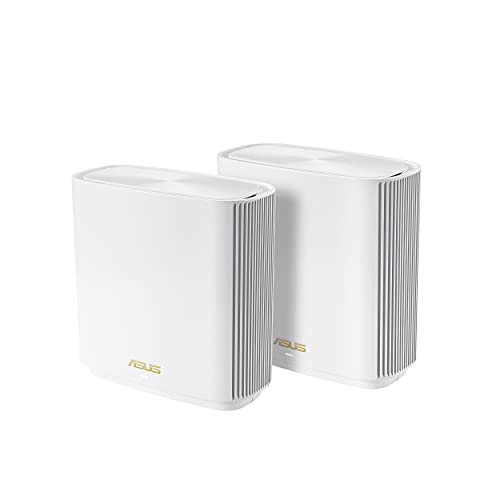
However, and because of sale price, my suggestion would be to consider the ASUS ZenWiFi ET9. It comes in a 2-pack, features 2.5GB WAN ports, 802.11AXE (WiFi 6E) and the new un-congested 6Ghz Band. You’ll want 6Ghz band while living in an apartment complex and over time, upgrade to newer phones, laptops, and devices to support the new band.
Asus’ price of $99 for two is amazing. I wonder if a local company would price match— it’s $200 virtually everywhere even at BestBuy…
My experience is that the Asus software and multicore processors perform faster than Nighthawk and Orbi options, introduce less latency. Asus adds a lot of options for security, dns over tls, vpn including WireGuard.
It’s sold in a set of two because it supports Asus AIMesh technology. Each device can function separately as a router or participate in a mesh network.
Unlike most mesh devices, Asus allows either unit to be configured to standalone router mode or function as a mesh satellite. Most manufacturers require specific models to perform as a satellite or a router. With Asus you just tell the unit it’s on a mesh and the software self-configures once it finds the master unit.
If your not using mesh (probably won’t need it because your in an apartment) You could give the extra to family or a friend because each device would function in standalone mode.
The ZenWifi ET9 doesn’t have a ton of packet optimization features you may find on gaming-specific routers but comespretty close.
You’ll see a performance gain from your 6900 with anything WiFi 6, 6E or 7.
I also transitioned from the google wifi pucks back in dec/jan - the first gen ones.
I've been enjoying my Asus ET9's. I use them in AP mode with wired backhaul. Excellent speed, and the 6ghz band is damn near lossless, as far as I can tell.
I get gigabit internet that fluctuates around 900mbps. The 6ghz wifi tested at 875. I was shocked. I was sitting about 8ft away.
There may be better units out there, but I couldn't pass up the deal that Asus had back in January - a 2 pack for 100 bucks. Bought 2 sets (4 units) for less than the price of one at retail. No problems so far.
Regardless of what you buy, don't throw them out. Before I saw the deal on Asus.com, I bought from best buy (and later returned to buy direct). If you buy from best buy, they frequently have a special where they'll give you 15% your networking purchase if you "recycle" one networking device. Of the 3 pucks I had, I gave them one, and saved the 2 others in case I ever wanted to buy more/something else.
I was actually leaning toward Asus, and actually bought one of the zenwifi units for my mom's house a couple years ago. but saw a lot of people reporting issues that I don't recall seeing back when I bought it last time, which led me to posting this for advice lol
Yeah I like the ASUS approach as well. Mine just works, and it is so easy to add another node anytime I want since their stuff is all interoperable with the AiMesh setup.
if you insist on wifi i personally love asus ai mesh. i’ve had nothing but great experiences with it so far. speeds are consistent through my entire house. eero on the other hand i personally have had very, very bad luck with. Devices that don’t roam properly across the nodes correctly, hit or miss connection drops during hand offs, poor speeds on satellite nodes (even with the pro models with tri band) and half of the good features being behind a stupid paywall. i personally wouldn’t ever touch eero again.
Top WiFi Routers on Reddit
1
GL.iNet
GL-MT6000 (Flint 2)
91% positive of 197 users
OpenWrt enthusiast's choice; good value, but lacks 6GHz.


 steveholtbluth





