
ROG Rapture GT-AX6000
Running these analyses costs money. Buy through my links to help keep lights on! I may get a small commission.
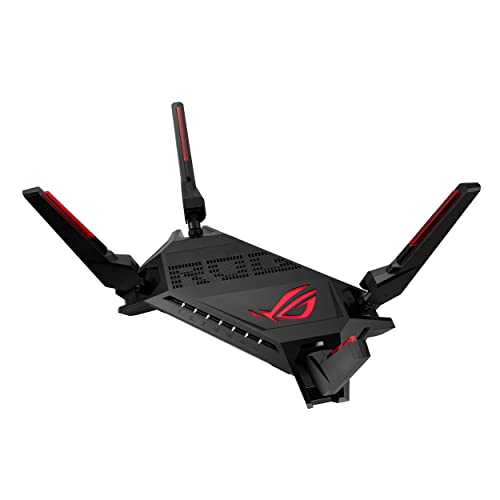
Top Pros
Top Cons
No summary available.
Reddit Reviews
 Ace_310 1.0
Currently you have wifi5 asus router. If you get a wifi6/7 asus router as your main remember that you will be running a slower mesh. If I understand it correctly, aimesh runs at the lowest speed of all the nodes in mesh. So choose wisely. I currently have gt-ax6000 and it's been rock solid. The coverage is excellent. I have a 2 storey 175sqm house and it covers almost everything. I would look into xd6, ax86u or gt-ax6000 or something else.
Your main problem is that both routers are in a cupboard. They reduced the range significantly. Even if you get better router but hide them in closet you will be disappointed. I have ont inside pantry where initially I had my router. That would only cover half of my house (185sqm 2 storey). I got electrician to fish out conduit from the ont cabinet in pantry to outside above the door along with a power point installed. Got a normal shelf above and got my asus gt-ax6000 router outside. Now it covers the whole house without any issues. All rooms are wired and I could have added more mesh to make it work easily. Ont cabinet was too small to install a switch and put the router inside.
anangrypudge 1.0I've had zero problems with M1 for many years. Only went down once, and that was for scheduled maintenance in the middle of the night. Also, it's not just your internet plan that could be the cause of any issues. If your router isn't good enough, or is in a terrible position, or is overheating, or the bomb shelter is between your laptop and the router, you are gonna have issues no matter what plan you have. I have a standard 1Gbps plan but an Asus gaming router with ethernet cables going to the 3 heaviest users in the home – PS5, living TV and bedroom TV. I also set up a second router using Asus AImesh to provide wifi signal to one of the further corners of the house.
Same, been with M1 for the past 3 years since moving into my new place. Never had to call them a single time, except to renew my plan. I chose a router bundle (Asus ROG Rapture GT-AX6000) with a 1Gbps plan initially, then upgraded to 3Gbps cos it was cheap. The router comes with a gaming ethernet port that prioritizes traffic through that port, so that's where my PS5 goes.
CryptographerItchy53 1.0hola yo lo tengo desde hace 3 años, es excelente el router, puedes configurar muchas cosas, ademas tiene el servicio gamer, donde puedes decirle que computadora tendra esa caracteristica, por si solo el router tiene una couta de horas al mes pero es suficiente para poder jugar partidas que requieran una estabilidad muy buena a la hora de jugar, ademas puedes configurar vpns, asi como aislar puertos de manera sencilla, yo ocupo varias de estas funciones, lo que apenas estuve descubriendo es que si tienes ip dinamica asus te puede dar un servicio similar al no-ip donde redirige a tu ip dinamica el trafico para poder salir a web u otros servicios como ftp o apis, o algun servicio de nube que necesites, tambien tiene puerto usb para poder crear un storage, aunque eso creo que es lo unico que no me ha gustado ya que solo soporta fat32 y eso quiere decir que tiene limitante con respecto a los gigas, pero lo puedes resolver con un NAS o una raspberry conectado a un HDD o SSD, o usar un lector de discos duros que tenga configuracion raid, la verdad si esta chido xD, y pues tambien depende que velocidad de internet tienes ya que bueno aqui en Mexico pues velocidades de 650mb lo soporta por mucho, mi iphone en wifi 5G da el maximo de velocidad igualmente mi pc de escritorio en wifi aprovecha toda la banda ancha, ha durado bastante, jejeje bueno me salio mejor que mi TENDA, y eso que que mi TENDA no estaba nada mas pero tenia menos formas de configuracio y personalizacion.
kubo777 1.0I've had various Asus routers over the last few years, currently GT-AX6000. 25 devices, (20) wifi and (5) lan right now. 3 different vlans, 3 ssids. Rock solid since i bought it. Every few years I buy a new one, move the older one to basement to connect via wired mesh. Coverage inside and outside of my house.
Ludo_IE 1.0I use an Asus GT-AX6000. I'm delighted with it. No lag.
mcace007 1.0I also wonder about this, recently had my sub and 100's surrounds stop working with my Arc. Move and playbar still work fine though. From what I've discovered sonos doesn't like my Asus GT-AX6000 router that I recently upgraded to. Worked fine for a while but started giving me hell this weekend.
MotoChooch 1.0Before I upgraded to a Firewalla Gold Plus and TP-Link Omada EAP670v2 WAP, I was using an Asus ROG Rapture AX6000 and I swore by that thing. Highly recommended. Used to love the TP-Link Archer series too. This dude has some good info on options. https://dongknows.com/
MrDoh 1.0Close to $200 and works really well, the Asus GT-AX6000. Using one right now, gives me full house wireless coverage in our 2000 sq.ft. 2-story house. Has a couple of 2.5Gbps ports as well. Nice piece of hardware. Highly recommended.
Asus GT-AX6000 or RT-AX88U Pro. I have a 2000 sq. ft. home, and don't need a mesh with the GT-AX6000. The RT-AX88U Pro is the same hardware, but may be better on the spousal acceptance factor :-). At any rate, I get great coverage in my house with this single router. And it has some really good monitoring tools, QoS, and a system log. You also have the choice of third-party firmware (RMerlin) if you're looking for that. Won't use up your entire budget, though, only running around $260 on Amazon.
Couple of Asus router recommendations. There's the GT-AX6000 or RT-AX88U Pro, two different wifi 6 routers that have virtually the same electronics inside. If you want to stick your toe in the water with wifi 7, there's the RT-BE96U,, which has been on sale a lot. Both of these routers have given me great service, stable and full wireless coverage at my home. They also both have a 2.5Gbps WAN port, as well as at least one 2.5Gbps LAN port. Currently using wifi 7 Asus routers for our wireless, and it's been up since I set it up, about 5 weeks ago, no problems. Very fast and, as I said, great wireless coverage. Using the Asus ZenWiFi BT10 mesh as my AP, with a wired Asus router. Because the BT10 mesh uses MLO wireless backhaul, I get almost my ISP's provisioned speed all over the house.
I've been reading about the RT-BE92U, and from what I've read I don't think that I'd go that way. Too many firmware problems. Yes, I'd have to say that the GT-AX6000 or RT-AX88U is a better option than the RT-BE92U. If I was going to go for wifi 7, I'd go for the RT-BE96U, as I said before. Must be over your budget, though. Home networking is kind of a hobby of mine, so I allow myself to spend some money on it. For me the only thing holding back wifi 7 is the lack of wifi 7 clients, assuming that you make a careful router selection. Couldn't get an Apple wifi 7 desktop or laptop last time I looked. However, wifi 7 clients are compatible with wifi 6, so you're fine staying with wifi 6 until you feel that wifi 7 is stable enough for you.
ONE_BIG_LOAD 1.0I love my rapture gt ax-6000 with Merlin + ax55 in mesh with wired back haul setup
PAHoarderHelp 1.0I have this one, which I believe has the exact same hardware inside as the AX88U https://www.amazon.com/ASUS-Rapture-Gaming-Router-GT-AX6000/dp/B09L8PCTPT/ref=dp_fod_d_sccl_2/134-6384048-2410800?pd_rd_w=d37Ux&content-id=amzn1.sym.9cf17164-13e4-4652-96f9-f76b8f33fec0&pf_rd_p=9cf17164-13e4-4652-96f9-f76b8f33fec0&pf_rd_r=FJN381FBZ6WY0AVXXWA9&pd_rd_wg=64eqW&pd_rd_r=6954200d-f887-4200-a091-4b105230e9d4&pd_rd_i=B09L8PCTPT&psc=1 It looks like a head crab. But: it runs cool, has never crashed or locked up on me (one work from home, one gamer, TVs/rokus, Apple/Windows/game consoles/iPads/phones/Samsung tablet, etc: no problems. You can turn off the game light thing (I have the lights off.) It was about $400 when it launched, about half that now. If you have a spot for it and your significant other would be OK with the box, I do recommend it highly. Runs Merlin. Just got one for a family member who is getting google fiber, has two work from homers.