
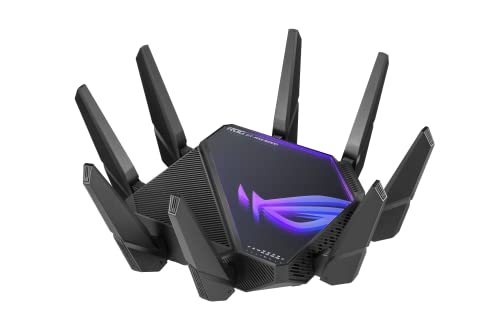
ROG Rapture GT-AXE16000
Running these analyses costs money. Buy through my links to help keep lights on! I may get a small commission.
Top Pros
Top Cons
Reddit Reviews
 620neofaction 1.0
I do this the same. I have a 16000 and run the Merlin FW. I also have it configured in an AI Mesh with another router on the other side of my house. I use the 2.5GB in but I currently am not using the 10GB port. Its been a solid router for me for a couple of years now.
blaze20511 1.0flint 2 is better , flint3 seems like a down grade, i personally had the ax86u and just now use it as a node, main is axe16000 https://preview.redd.it/1pg79cu7xcvf1.jpeg?width=1200&format=pjpg&auto=webp&s=8ad53ab8bca885e17aea6787c810fbc85c93254d
Downtown_Progress197 1.0I’ve always had Asus routers with my recent being the AXE 16000. As a result it seemed logical for me if I wanted a mesh system to go the AImesh route. I purchased an extra couple of ASUS routers and to be honest found the speeds to be disappointing and found that the extra routers were often disconnecting. As a result I moved to a TP link Deco system and have been incredibly impressed particularly with maintaining my internets full gigabit speeds between nodes. I know some people go on about how managing the system is app only but personally I actually find that more convenient, but then maybe I don’t tinker enough with the system to require more access than that, apart from changing a few DNS settings.
Dreams-Visions 1.0Sure but Wifi 6E has been pretty trash, it's true. And sure Wifi 7 is fine if you're close to the router, but put a wall between it and it becomes awful. Your devices aren't connecting via wifi7 and giving you 1Gbps through the house, but you knew that already. That's the other bands being reasonably strong. The AXE16000 is a QUAD bad router, so if you have been enjoying tri-band, imagine the performance and consistency 4x bands offers. And just FYI: the BE550 is a 2x2 (2x antennas), which offers considerably less overall bandwidth than something like this Rapture. Your router has at least 50% less bandwidth than this AXE16000. The gap is likely wider than that. Only matters for internal data transfers, of course, but is also not something to ignore if you plan on doing just that.
hocuspocus4201 1.0For a single Wifi 6E router, you can't do any better than Asus GT-AXE16000.
PkmnRedux 1.0I have this router and can confirm it is indeed a router. Does one need a router this expensive? No, will a cheaper router perform almost identically? Yes It’s a nice router though, nice features, app is intuitive and easy to use, Quad band is nice. Really no reason not to buy it unless price is a concern for you, if not then I would not hesitate to buy one of these again
SirKronan 1.0https://a.co/d/fw7bOw4 This bad boy is amazing for the money. $285 with coupon right now if you're in the US.
Skywise 1.0I've got this one. FYI - the 6g band is great but has very limited range and any relatively solid wall will block the signal. I ended up moving mine to the living room from the computer room (by a short 5 ft) which allowed the 6g to reach all the rooms. Also recommend using Merlin's firmware - it's an enhancement of Asus' firmware that also includes some addons like an ad blocker (which supports a lot more Asus' routers than this one) https://sourceforge.net/projects/asuswrt-merlin/files/ https://www.snbforums.com/forums/asuswrt-merlin-addons.60/
Teenage_techboy1234 1.0I honestly cannot recommend Asus products anymore. I spent over a month with the GT-AXE16000. Absolutely amazing hardware, but the firmware was definitely a bit buggy. Random latency spikes and drops everywhere, AI mesh is fucking atrocious and doesn't work properly at all, And if you mess with the network too much taking it down and putting it back up multiple times or even sometimes just one time it fucking knocks some of your shit off. In all fairness, I did pair the router with an Aris SB6183, but I have heard that that modem is pretty good so I'm surprised that I had issues, we get 90 Mb down and 10 MB up so it's not our speed that was a problem either. We switched to a Tp-Link Deco system with three nodes and the improvement is noticeable.
I have no experience with Eero or Orby, and no experience with the Asus BQ 16 pro (I live in the US so that's the one available here), but I do use an Asus gaming router. The one I use is the GT-AXE16000, why not the GT-BE98 Pro? Because it was almost twice the price and we only have one device, my dad's iPhone 16 Pro, that has Wi-Fi seven Support with only two more devices, my mom's 15 Pro and my M4 MacBook Air, that have Wi-Fi 6E. The rest of our stuff is either Wi-Fi six, Wi-Fi five, or Wi-Fi four. But overall it has been pretty stable, not quite as stable as I hoped but if you are prioritizing customization over absolute reliability and stability, I'd recommend it. What I would not recommend doing, however, is dropping $1200 on a mesh Wi-Fi system when your house may only need a single crazy powerful router. In addition, I would go with the BT10 over the BQ16 Pro unless you are going to use that second 5 GHz band as your backhall. I seriously though would recommend saving the $400 and getting your house wired with ethernet, then getting a BT10.
Definitely wouldn't be my first choice, I had the GT-AXE16000 and it just gave me more issues than it solved.
I'm glad that you've had great experiences with Asus routers. Personally, I had the ROG GT-AXE16000. Not sure if it was the fault of the modem I was using, Aris SB6183, but my ping would randomly jump around, there was one or two times when the network didn't fully go down but where it buffered for a minute, AI Mesh did not properly transfer my band settings although I was not using hardware with the same amount of bands (shouldn't have to), three of our devices following the first time I reboot of the router and the second time a bunch of reconfiguration of the Wi-Fi settings would stay online until a single command was sent to them, then would drop back off line, and I'm blind and the web interface was atrocious for accessibility. Asus Support said that the AI Mesh problem most likely stemmed from the current running firmware version and the cached firmware version of the router being different, 3.0.0.6.102 for the running firmware version vs 3.0.0.4.388 for the cached firmware version. Why didn't that change when I updated the router? We switched to a Tp-Link Deco BE63 and it performs much better, though in all fairness to rule out any modem issues we also switched the modem to a Hitron CODA56.
TroubledSoul79 1.0Our house is just over 5 years old, kcom was reluctant to install my ONT in the back bedroom upstairs, telling me it's best in the living room. They did however end up installing the ONT in the location I wanted after I refused telling them everything downstairs was going to be mainly wifi and the heavy lifting / gaming was being done upstairs. Edit: I also ditched their router and stuck with my Asus ROG Rapture GT-AXE16000.