
RT-AX86U Pro (AX5700)
Running these analyses costs money. Buy through my links to help keep lights on! I may get a small commission.
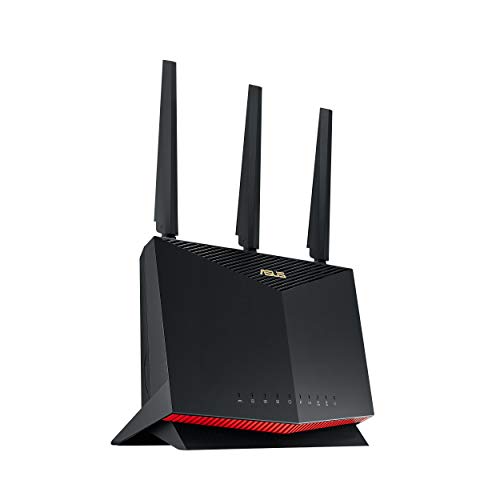
Top Pros
Top Cons
Reddit Reviews
 abrreddit 1.0
Yes, other routers have much more functionality than yours. I use Asus routers with Asuswrt-Merlin, and it's incredibly powerful. I can set up three "guest networks" each for 2.4GHz and 5GHz. I have one set up for cameras and IoT devices - they can reach my Home Assistant server and DVR, but they can't call home to China. Devices can be renamed with nicknames, and those nicknames stick. https://preview.redd.it/qmrbq1l1eihg1.png?width=1123&format=png&auto=webp&s=9a8f349c48c67694104eee86f751d5139ee26d35 There's no direct way to schedule a guest network to turn off at night, but you can do it with a cron job (because it's a Linux computer you can SSH to) or add parental controls to Junior's devices, which seems easier. My router is the ASUS RT-AX86U, which is a few years old. The newer equivalent with Wi-Fi 7 is the ASUS RT-BE86U, and is just over $200. Amazingly, my old router sells refurb for just a few dollars less.
basement-thug 1.0A quality wifi 6 or 6e router, I'd suggest an Asus RT-AX86U Pro from experience, will greatly increase wireless performance IF the devices are also wifi 6 or 6e capable. But if you're only getting 50-150mbps it sounds like you have a very old router. I can saturate my 400 symmetrical fiber connection from my router to my S24 Ultra for instance. What model router do you have now and what kinds of devices do you have? Also, too close to a wireless router is a thing. You usually want to be at least a few feet away from the router.
A quality wifi 6 or 6e router, I'd suggest an Asus RT-AX86U Pro from experience, will greatly increase wireless performance IF the devices are also wifi 6 or 6e capable. But if you're only getting 50-150mbps it sounds like you have a very old router. I can saturate my 400 symmetrical fiber connection from my router to my S24 Ultra for instance. What model router do you have now and what kinds of devices do you have? Also, too close to a wireless router is a thing. You usually want to be at least a few feet away from the router.
Get a new router and a Rpi 4 or 5 to install Pihole. My Asus RT-AX86U Pro has been really solid as one option that has a lot of support outside of Asus via Merlins custom firmware.
My Asus routers, not the cheap ones... but you know, an RT-AX86U Pro or a RT-BE92U, like $200 new router are super reliable. You don't need to go UniFi to get reliability. You just don't need to buy the $99 special at Walmart.
Basic_Platform_5001 1.0You could do BOTH! I looked at the Asus ROG routers, but got an Asus RT-AX86U Pro router since my cable modem also has a 2.5 Gbps port. Plenty of performance for wired or wi-fi. You can use Asus' AI Mesh software to add another device - I could get an Asus Zen or other device if I need more coverage. However, you could also run cables and connect cameras to a switch. If you can centrally locate a device like an Asus RT-AX86U Pro router in a 1200 ft ranch, you likely will have no coverage issues unless your garage has all concrete walls. When I did my research, I found out that most (if not all) "mesh" systems can use wired or wireless backhaul. Wired performs better that wireless, wireless is easier to install. Whatever you do, get all the tech specs of your cameras first and make sure that the network will support them. PoE doesn't work over wi-fi.
So, what's the rest of the setup? Fibre is great and all, but what did your ISP provide as the ONT? How old is the router? Did the ISP provide, or is it your own? Here's what I did. I'm Xfinity, coax, 1 Gbps plan with an Arris S33v3 modem and an Asus RT-AX86U Pro wi-fi router. Why? These devices each have a 2.5 Gbps port for the uplink. I just ran a speed test to my phone and got 613 Mbps. Not too shabby. That router would work with a fiber ONT. Even without wi-fi 6, you're so much faster with fibre vs DSL. I also always buy quality cables, such as Monoprice Flexboot Cat 6, pure bare copper, 550 MHz, and a little bit longer than I need. Also, if you hold a phone or laptop too close to your wi-fi router, you might be in the "donut," i.e. if you're too close, it's can be just as bad as being too far away.
So, what's the rest of the setup? Fibre is great and all, but what did your ISP provide as the ONT? How old is the router? Did the ISP provide, or is it your own? Here's what I did. I'm Xfinity, coax, 1 Gbps plan with an Arris S33v3 modem and an Asus RT-AX86U Pro wi-fi router. Why? These devices each have a 2.5 Gbps port for the uplink. I just ran a speed test to my phone and got 613 Mbps. Not too shabby. That router would work with a fiber ONT. Even without wi-fi 6, you're so much faster with fibre vs DSL. I also always buy quality cables, such as Monoprice Flexboot Cat 6, pure bare copper, 550 MHz, and a little bit longer than I need. Also, if you hold a phone or laptop too close to your wi-fi router, you might be in the "donut," i.e. if you're too close, it's can be just as bad as being too far away.
First, make sure the router is on your ISP's approved or recommended list. I've been happy with Asus AX5700 RT-AX86U Pro. It's part of their AiMesh Extendable Router lineup, so I can connect it to anything else in their AiMesh lineup with either a wired or wireless backhaul. If I need more coverage, I'd probably get the ZenWiFi BD5 Outdoor.
I like Asus since you don't have to go all-in with mesh on day one. Wireless backhaul is an issue with every mesh system. I started with an AiMesh Extendable Router and I can add anything from the Asus line-up if I need better coverage. And, yeah, that RT-AX86U Pro is pretty nice with its 2.5 Gbps port connecting to my Arris cable modem. This computer is wired to a LAN port and works very well, and the wi-fi around the house is very reliable.
I like Asus since you don't have to go all-in with mesh on day one. Wireless backhaul is an issue with every mesh system. I started with an AiMesh Extendable Router and I can add anything from the Asus line-up if I need better coverage. And, yeah, that RT-AX86U Pro is pretty nice with its 2.5 Gbps port connecting to my Arris cable modem. This computer is wired to a LAN port and works very well, and the wi-fi around the house is very reliable.
If you're in the USA, I recommend starting here: [https://broadbandmap.fcc.gov/home](https://broadbandmap.fcc.gov/home) For a modem, I went from my ISP's recommended list and got an Arris S33. I've been happy with the Asus RT-AX86U Pro for the wireless router since I've got it centered in the house. I can get another Asus device if I want to extend my network. If I were to do it all over again, I'd set aside a weekday so I can call support. I'm glad I got things in writing from my ISP first & I had a laptop with an Ethernet port to test things. First, the modem, I had to call the ISP before their system recognized it. That took about an hour with the laptop connected directly to the modem. I next had to call Arris support. After I could ping google, I connected a good (no flat cables, no CCA) Cat 6 cable between the modem and router on their 2.5 Gbps ports, I also called Asus. The first start-up took about 10 minutes and it needed a software/firmware update. After another half hour of making sure the settings made sense, everything was up.
I like the ASUS AiMesh line. I've got the RT-AX86U Pro & it meets similar needs at my house. If I buy another ASUS AiMesh product, it would likely be the ASUS ZenWiFi BD5 Outdoor - wired or wireless backhaul.
I have that same model Asus and love it. I bought it for the decent price and I connect it to my modem since it also has a 2.5 Gbps port. Also, if I need more range, I could get an ASUS ZenWiFi BD5 Outdoor - same AiMesh Extendable Router family. No, I don't work for Asus, but my PC has an Asus mobo.
Check out the Asus Extendable Routers and AiMesh. I've been really happy with the Asus RT-AX86U Pro - that doesn't do Wi-Fi 7, but I don't live in a big brick house. For your situation, requirements, and budget, consider the RT-BE55. Then if you need more, check out other AiMesh-compatible ASUS routers. Also, use Ethernet cables to connect the network devices - it will always outperform wi-fi backhaul.
I've got an Asus RT-AX86U-Pro mounted near the center of the house & have good coverage.
With a kiddo on the way - congratulations! I ditched my Xfinity gateway & DVR to save on the monthly rental. I also transitioned to streaming & saved even more. Before I did that, I bought an Arris modem and Asus RT-AX86U-Pro router. If that closet is in a decent spot to provide some wi-fi coverage, I'd keep it there. The idea to run a line from the router to where you need it makes sense. You could get a PoE switch and an Asus AP and you'll probably be fine. You should be able to manage both Asus devices on the same app. So, if the Xfinity gateway is in a bad place for wi-fi coverage, you could move it first. I did that years ago when I had AT&T & the equipment was in the basement.
I'm happy with my ASUS RT-AX86U Pro (AX5700), but that may be overkill for your plan.
First, we don't know what you have or how old it is. Do you have a single unit or 2? If it's more than 5 years old, then consider a replacement. It sounds like coverage isn't an issue, so if you have 1 unit, stick with that. The newer Google Nest Wifi - AC2200 single unit is in your price range. Nearly everything says "mesh" nowadays even if they only ship one unit. All that means is that you can add on another unit without running a cable. While that's simple to do, running a cable with ALWAYS offers improved performance. Spend a little more and get the newer Google unit with a router and a point if you like the platform and need the coverage. If you buy used or open box, you may price yourself out of a quick support call. I've been happy with the ASUS RT-AX86U Pro (AX5700). This is the Wi-Fi 6 flavor, and the ASUS RT-BE86U BE6800 has Wi-Fi 7. Wi-Fi 7 wont' help congestion you have devices that use it, although nothing ever hurt with a bit of future-proofing. The smart money is on setting up 2 SSIDs as you've already done with your guest network - just make sure all your "smart" devices are on the guest network using 2.4 GHz and that typically reserves the 5 GHz band for your good stuff. So, yeah, the ASUS is a little out of your price range, but I don't thing a sub $100 router is going to accomplish all your networking goals. Last, but not least, if you use Apple stuff, they prefer to connect to the first network it sees and that is typically the 2.4 GHz. If it were me, I'd use 2 different SSIDs, each with different credentials to enforce your Apple devices always joining your main network and not the Guest.
blaze20511 1.0all asus routers that i had run hot, so new all my asus routers have cooling fan or cooling pad
flint 2 is better , flint3 seems like a down grade, i personally had the ax86u and just now use it as a node, main is axe16000 https://preview.redd.it/1pg79cu7xcvf1.jpeg?width=1200&format=pjpg&auto=webp&s=8ad53ab8bca885e17aea6787c810fbc85c93254d
Budget-Celebration-1 1.0I love the asus, for the price its great. I had no issues saving a few bucks going used.
buttbait 1.0Yeah, routers with stronger CPUs like Asus or GL.iNet handle VPNs way better.
You might want to look into routers with stronger CPUs like Asus models that support WireGuard natively. TP-Link routers tend to struggle with VPN speeds. Asus RT-AX86U or GL.iNet Flint 2 are great for handling Surfshark easily.
can0w66 1.0You are limited to your quest with ± 1200 Mbps over 5ghz. Im using rt ax55 and ax86u in mesh works great.
ccycling 1.0Asus RT-AX86U pro. I switched from an orbi system back to this single router and it has been great so far. It can either be plug n play or you can tinker with some settings to personalize it. I had an asus router in the past that I didn’t like, but I gave them another try after reading reviews on Dong knows tech.
csimon2 1.0Why not use the 7490 as a repeater and the AX86U as the router (i.e. just swap the hw)? If the landlord’s WiFi signal is WiFi 5-only, then using a WiFi 6 device to receive is just wasteful. Even if the landlord has a WiFi 6 capable router, WiFi 5 may still be a stronger and more stable connection depending on the location of that router and where you can place your repeater
emancj 1.0I cured my WIFI issues when I invested in a ASUS AiMesh setup with a RT-AX86U Pro as main and 2 RT-AC66U as nodes with wired backhaul. Mesh is the best way to provide better coverage in a multi floor home. The nice thing about this setup is that I can have wired connections on each floor. The Home Theater is in the basement and has a 8 port switch attached to its Node. You gain much flexibility with a Mesh.
I feel the same about my RT-AX86U Pro.