
RT-AX88U PRO
Running these analyses costs money. Buy through my links to help keep lights on! I may get a small commission.
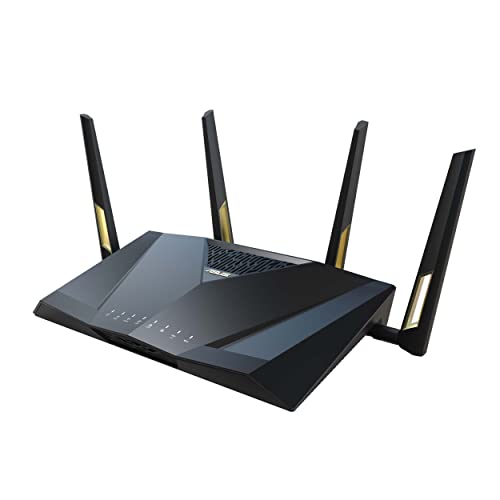
Top Pros
Top Cons
Reddit Reviews
 Bmic31 1.0
2nd this. Have one running my home. Everything works all the time, plus 2.5gb ports for future speed upgrades.
No issues. I use some ax1800s for wired mesh points but the 88 is my main router still.
chrisf60526 1.0I sold my asus 68 and went eero. Sold the eero and a month later went to a asus 88 rx pro. For me and my old house, the single asus had better range and perf than the mesh. So my single asus that hasn’t had a firmware release in like 6 months continues to chug along. Maybe we are getting to the point now where upgrading doesn’t get you much
CompleteCellist867 1.0Top options are the ASUS RT-AX88U Pro for strong performance, the Netgear Nighthawk RAX120 for reliability, and the Synology RT6600ax for good features. These offer solid coverage and handle multiple devices well without huge speed drops.
drm200 1.0That router is a good router. It is essentially the same as the slightly newer RT-AX88U Pro. Both can use the Merlin firmware, which I highly recommend. https://dongknows.com/asus-rt-ax88u-pro-vs-gt-ax6000-matchup/
fakemanhk 1.0Your Asus should be setup as WDS bridge, since you are not WiFi signal out of reach on the other end of house, WDS bridge is to use the router's WiFi to get the signal from source and then allow the ethernet network behind to join as the same network. If you run in repeater mode you are generating another WiFi signal in short distance which might interfere original signal if channel setting not correct. By using WDS bridge, your Asus AX88U Pro can connect using all 4 antennae to form a much faster wireless backhaul without interfering others (it's operating as client) [https://www.asus.com/support/faq/109839/](https://www.asus.com/support/faq/109839/)
FluffyPhunky 1.0I went to help a family friend set up their wifi mesh, brought 3 RT AX88s, they could not be linked. It seems that some old houses have used it for structural purposes and it really blocks the signals
heysoundude 1.0You must have a very large home with lots of metal in the walls, or lots of concrete/brick: I’ve a 2500+ sqft multilevel home and my rt-ax88pro blasts throughout my home and well past my yard, into the neighbourhood. My car connects to it before I’m in my driveway. So I ask, is your wifi coverage lacking from poor router positioning or is it related to the construction of the house?
So your budget is around $300 and you want to learn some networking… https://mikrotik.com/product/hex_s_2025 And A ubiquiti u6+ (download the ubiquiti app portal to see pricing in your area direct from them) You *should* be able to take the fibre out of the AT&T machine, stick it into an appropriate SFP carrier, and then into the hex for routing. The hex should pass enough PoE to power the Ubiquiti AP. And then, as they say, Bob’s your uncle, and under budget. Even with a Cat6 cable to connect them. Solid little combo that will treat you well for many years to come. And easy to upgrade components as required. You might consider the U7 Long Range if wifi 7 and maxing the budget are priorities and you don’t want to address things for 5+ years (the hex has enough PoE power to run this one too) I’ve an ax88pro from Asus. I regret not knowing this when I had to upgrade, and also not having enough time to properly research and acquire kit like this. But I also only have 120Mbps cable, so wifi7 and a fibre router are a bit over the top in my world.
Do not overbuy now for a place you haven’t bought yet. I’m going start there. I say this because technology will inevitably improve between now and then, and there’s no way to predict how up to speed what you buy now will be at that time. So- buy what you need now (and that’s a current AX router like the 86 or 88 pro from Asus). It will be able to take 2nd fiddle to a BE router in either Mesh or AP or even Media bridge modes, and that BE router will be less expensive than current models because that’s how it works.
They’ll be supported longest.
I would suggest bridging your “modem” and set up a wifi router with a wifi Access point. Placement matters for coverage, so if you can get the router up on the 2nd (top) floor, and then run an ethernet cable down to wherever you *need* to place the access point for coverage of dead spots. Choose your wifi equipment by the client devices- wifi6/wireless AX is probably the most common modern standard (wifi 7 is coming though…), but if they’re older and still working, and have no expectation of replacing them with newer ones in the near future, wifi 5/wireless AC is very affordable and effective with package speeds at 1Gbps and lower. That said, I’ve a multilevel home that’s about the same square footage as yours, and my Asus RT-AX88Pro covers the house very well, and the yard, and my car and phone connect a couple of houses away. Overkill for my 120/10 isp plan, but higher speeds are getting cheaper in my neck of the woods, so I’m ready internally if my connection goes to 1Gbps+ for the same price or less than I’m paying now. Also only 2 of us, and no more than 10 devices both wired and wireless…I try to go wired over wireless so that the devices that really need it don’t have to cut through noise or fight for bandwidth. (My new iPad seems to want to connect at a link speed over 1Gbps to it 30’ away through a plaster wall…) Contact your ISP to bridge your modem. YouTube will show you how to set up your router (Asus or otherwise) to it.
I’ve an Asus rt-ax88pro that covers my multi-level home a hair smaller than yours, as well as my yard, and my phone can connect a few houses away well enough to stream podcasts. The trick location/positioning: Mine sits on top a tall cabinet almost at the ceiling of the main level. If you can put one on the top level of your home, as high above everything as possible, and wire it as an AP to the Verizon machine, you’ll get similar results.
HWTechGuy 1.0Their modem and my own Asus RT-AX88U Pro router.
Their modem and my own Asus RT-AX88U Pro router.
I'm running an Asus RT-AX88U Pro with Merlin firmware and two Pi-holes. DNS Director in the Merlin firmware is awesome.
I run the Asus RT-AX88U Pro. It has 2.5 GbE ports for WAN and LAN.
jekewa 1.0I use an ASUS RT-AX88U for my main WiFi with a couple ASUS APs to extend my WiFi through my 2500 square foot home, from basement to the second floor, and across the yard to a detached garage. The garage AP uses a WiFi backhaul and the other is connected via Ethernet. The router is in the basement, and still gives a good signal through the whole place, but the APs hit the edges and extend to the far side of the garage, where the 88 doesn’t reach. You can use 2 routers, although you’ll probably turn one into an AP, passing the network handling through to the main gateway router. Or you get to play with private address routing, handle DHCP, DNS and other services on each, and maybe put up with double-NAT. Or a second internet connection, I suppose.
Just_Cupcake_4669 1.0Personally, I don't think the privacy fair is a big deal in the Asus. You don't actually have to use the AI protection (which is the trend micro part) and honestly you probably don't need to, given what you're describing. However, there may be sometime better: "Not looking for poweruser/enterprise solutions, just something that works out of the box for heavy normie use." Your use case is literally what Eero is made for. It's now owned by Amazon and just works out of the box--and works really well. The downside? You can't do very much power user/Enterprise things. I have been struggling with Asus Wi-Fi for a few years and bought the Eero's on a black Friday sale to try. I get great signal strength everywhere I need it, and then some. I'm only frustrated with it, because I do need/want power user features. However I am debating just letting it be, because it works so well. You'll probably be ok with just one Eero unit, but you can always add super easily down the road, if you need to. With one LAN device, you're covered with one Eero. Any more on top of that, and you'll also need a cheap switch to add ports. Look at either the Eero 7 or Eero 7 Pro. Good luck!