
Running these analyses costs money. Buy through my links to help keep lights on! I may get a small commission.
Top Pros
Top Cons
Reddit Reviews
 ResolutionCandid3901 1.0
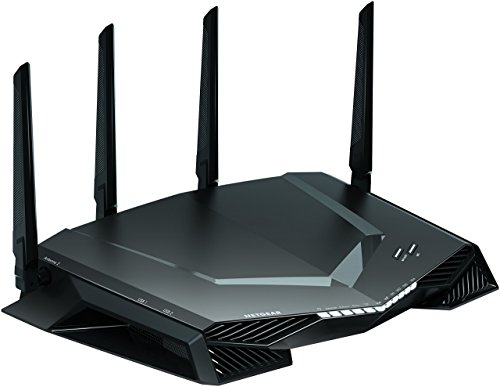
Netgear R7800 or Netgear Nighthawk XR500 -- almost same hardware!
Twigzywik 1.0Have the XR500, you can't run open-wrt on it, at least easily. It runs 2 OS's and is very frustrating.
Interesting, this is new. Says February, cool that it finally made it onto the XR500. However it runs 2 operating systems at once, so I imagine bricking it must be a lot easier. Is there an install guide even for something like this? And if I’m not mistaken, possible WiFi issues?
Well this is good to hear, also I did misspeak I meant dual firmwares. For some reason I thought OS’s. Here’s a [link](https://forum.netduma.com/topic/25324-openwrt-on-the-xr500/) to a moderator that commented so on a forum. Regardless if there’s no issues I may go ahead with it! Thank you.
I flashed it, all went well, however I went from 1gbps to 500 mb/s on the lane lol. Will haft see what happened. Thanks for posting, saved me some $$
whoooocaaarreees 1.0Is your isp on this list? https://pon.wiki If so you could get any number of routers that have an sfp/sfp+ port, and a semi custom module and delete the Ont from the arch. It’s very unclear what you are doing now. Did you take a computer that previously was wifi and you ran cable to it and were surprised it was a lot faster than wifi? Failing that, put the Ont into bridge mode if you haven’t. The select gear from your favorite people like ubiquiti, Mikrotik, …etc and get rolling with wired and wireless stuff. Edit: your netgear xr500 is wifi 5. That’s pretty old wifi as far as standards and speed go.
randomguy9731 0.6Not an expert but sharing my very recent experience. I had an old nighthawk Netgear router from 2018 that started to act up, so I got a newer WiFi 7 router from Netgear (RS90) and it was even worse than the old one. After hours on the phone with tech support they couldn’t do much, so I returned it and went with a TP-Link WiFi 6 mesh (Deco X55 AX3000) and it has been working great.
boshbosh92 0.5yeah I stopped buying gaming routers 4 years ago. I was on my 3rd nighthawk - they would no joke die consistently 2-3 months after their warranty expired. 3 of them in a row, like clockwork. I went with a mesh system and I am very pleased with it. it allows me to have solid fast wifi in my detached garage, which wasn't possible with the gaming router. and I have overall way better signal on the other stories of my house. I get close to 1 gig on wifi now. the mesh system, which includes 4 routers, was also cheaper than my nighthawk. never going back tbh
tazman137 0.5Netgear nighthawk. Spend what you can afford for the coverage you need.
Nighthawk, I’ve got a rs700 but the 500 is good too. I wanted the best I could get so I went with a refurb 700. Love it.
PatientA00 0.2I use eeros for my mesh wifi and it works great with my OPNSense setup. I just dropped it into bridge mode. I physically segregate my LAN / Home WIFinetwork from my Guest and IoT via a 4 port nic and Firewall rules. My IoT stuff runns off a Nighthawk and the Guest also runs off another Nighthawk. BOth running OpenWRT firmware since stock is garbage and insecure.
RonaldHarding 0.2With a descent router wireless is nearly as good as wired these days. I speak as someone who was once a 'wired network' purist for the same reasons as you, and also someone who works from home. A good router, set in a centralized place will probably be a cheaper and simpler solution than wiring everything together. I use one of those nighthawk routers with four antenna. Alternatively, doing data cabling runs throughout your house can be in DIY territory. It would be much cheaper than hiring a contractor and you could be done with it in about a day depending on how many rooms you want patched in and how much you care about wire enclosures being visible. Lots of people just put cable mounts in the corner near the ceiling and run them outside the wall.
With a descent router wireless is nearly as good as wired these days. I speak as someone who was once a 'wired network' purist for the same reasons as you, and also someone who works from home. A good router, set in a centralized place will probably be a cheaper and simpler solution than wiring everything together. I use one of those nighthawk routers with four antenna. Alternatively, doing data cabling runs throughout your house can be in DIY territory. It would be much cheaper than hiring a contractor and you could be done with it in about a day depending on how many rooms you want patched in and how much you care about wire enclosures being visible. Lots of people just put cable mounts in the corner near the ceiling and run them outside the wall.
promaster9500 0.0I dont know about this model but fuck Netgeat Nighthawk. I owned a different one few years ago that was supposed to be a a high spec version, and it caused me infinite problems, which all disappeared when I bought a different one.
Academic-Swimming919 0.0I agree. I have tried numerous Netgear products, going back to a PCMCIA card, and all of them have had problems. The last Nighthawk I had constantly resulted in "Connected, No internet" for too many devices.