
Nighthawk R7000 AC1900 Smart WiFi Dual Band Gigabit Router
Running these analyses costs money. Buy through my links to help keep lights on! I may get a small commission.
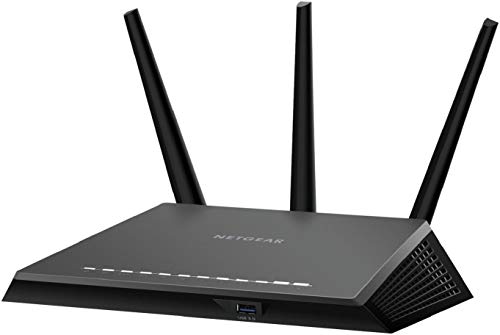
Top Pros
Top Cons
Reddit Reviews
 Fantastic-Buddy2069 1.0
I have a UCG Fiber gateway and U7 Pro Max, best investment since testing Eero max 7, that Netgear nighthawk 700s thing and even the ASUS BE-98 pro. Yes you can get a POE injector and power up the AP and place where you want it to go. You will need to adopt it initially, but after that, it will use mesh if it cannot get a wired connection. Highly highly recommend UniFi over consumer overpriced junk. I love ASUS, but it’s often expensive and overkill, and offers no huge benefits.
iFrog42 1.0Well, that's why I got the RT-AX86U after hearing about the potential TP-Link ban. After the airport went out of support, my first router was a Nighthawk R7000, and Netgear's firmware was so buggy I put DD-WRT on it, and then eventually got a Tp-Link to try. That's when I found out about the lack of firmware updates, and quit using it the first one which was a tri-band WiFi 5 model, I got a WiFi 6 one, and that was better with updates, but then I heard about the potential ban, so I got rid all TP-Link routers and got the Asus as AsusWRT is a lot like DD-WRT, which I really like. Anyway, I found out after I got things set that I didn't need all the extras Asus offers, and that was close to around the time I thought the RT-AX86U was done with support, and nothing official came the TP-Link ban talk. First, I got the Asus BE92U, and used it for about almost a year and it developed issues I couldn't resolved with it well known issues, and that's when I decided to just go simple again, and got the BE9300 from TP-Link. That brings you up to date.e. So this process is throughout many years, not all at once. So like I said, the only reason I brought the topic up again is because posts on Reddit are starting again, about a Tp-Link ban. As already mentioned, my plan now is to stick with the TP-link until I have problems, or they are banned, and go back to the Asus as my backup, unless I really need a WiFi 7 router sometime in the future.
LofinkLabs 1.0Yeah the R7000 was one of the rare high-end WiFi 5 routers that could push 400–500 Mbps over 5GHz. Most of the older Netgear models below that tier (like the R6xxx/WNR series) max out around 90–120 Mbps because they only had Fast Ethernet ports or budget 2.4GHz radios. So it depends heavily on the exact model.
mcmellenhead 1.0I had tomato on my r7000 after the Netgear firmware just straight up stopped enabling the wifi radios. It was solid for ~4 years after that. I only upgraded to get wifi 6. Now I have an rax-80 in AP mode because I upgraded to opnsense as my router. No complaints on the AP mode nighthawk
Mcpoopz1064 1.0That's what I'm leaning towards I think. Any suggestions on router? I currently have the nighthawk r7000, or something like that. It's a decade old. I've heard to avoid netgear now, should I look into tplink?
Pinsir929 1.0I’ve had the net gear R7000 for idk how long at this point and it hasn’t failed me ever.
sunrisebreeze 1.0Based on your post I think the TP-Link Deco BE63 would be good for a WiFi 7 upgrade. It has 2.5gb WAN and 2.5gb LAN ports, This should work well with internet speeds up to 2.5gbps. If you have faster internet then this system will throttle (reduce/limit) your speed to 2.5gbps max and you should consider something with 10gb WAN and LAN ports (which would of course be more expensive). I don’t think most folks need internet speeds over 1gbps, but that’s just my opinion. The BE68 is substantially more expensive but I think it is a partial solution. It only has a single 10gb WAN port on each device, then 2.5gb LAN and gigabit LAN port. So even if you had 5gb fiber internet and hooked that up to the 10gb LAN port, you’d still be throttled to 2.5gb on the LAN. So I suggest the BE63 for your use case. The mesh BE63 3-pack kit is on sale at Amazon as I write this. Instead of $499.99 it’s $419.99 with a coupon (shown on the Amazon product listing page). I know you stated you’re looking for something affordable, but this is about the price you could expect to pay for tri-band WiFi 7 mesh technology. If you wanted to save a bit you could opt for WiFi 6E instead (still gives you 2.4/5/6ghz bands), but you won’t get multi link operation and some other WiFi 7 only featues. You can’t take advantage of MLO for example on WiFi 7 unless your client devices support it, so I think WiFi 6E is a good system to purchase today. Still a bit early to get WiFi 7, as the tech is still improving and prices will continue to fall. If you want to buy WiFi 7 today, you will pay more. Meanwhile prices for WiFi 6E and WiFi 6 routers/mesh systems are very reasonable in comparison. A good TP-Link 6E mesh system to consider would be the Deco XE70 Pro. 2.5gb WAN and two one-gigabit ports on every device. The 3 pack is $239.99 at Amazon now with the coupon, $30 off normal price. The Deco XE75 Pro looks very similar, a little bit faster theoretical speed on the 5ghz band (perhaps it is 3x3 streams instead of 2x2, that would make it ‘faster’). It’s $269.99. If I were picking between these two I would get the Deco XE70 Pro. I doubt you would notice the speed difference between that and the XE75 Pro. If you want to save even more money you can buy most of those products in “Used - Like New” condition, just check the product listing. If you decide to do this make sure it’s sold by Amazon! That way if you have any issues you could easily return it within 30 days. A word of warning on “Used- Like New.” Sometimes it is a customer return (they didn’t like it, couldn’t figure out how to use/configure it, etc.) and then that is a great deal for you, as you get a like new product for sometimes $100-$150+ less money than if it were brand new. Other times the person who bought it and returned it maybe discovered it was broken, or they tried to apply custom firmware to the router and bricked/broke it. Amazon has no way to really test these devices when they are returned.. I am confident all they do is look and say, “Yup, looks like the product I see on the box. Seal it back up and sell it as ‘Used-Like New.’” So it is a bit of a crap shoot. I will mention I bought my current ASUS XT8 mesh system (WiFi 6) four years ago as “Used, Like New” and saved nearly $200 from the brand-new price. But I had to factory reset the router & mesh node as the prior purchaser’s wireless configuration was still on the devices (clearly they tried it, then decided to return it without factory resetting it). Easy for me to fix, just another step, 5 minutes. If you want something that will “just work” and don’t want to mess with potential issues, then just buy a brand new unit. Another point about cost: $419 may seem like a lot, but consider how long you will own it and the cost isn’t too bad. For example your current mesh system is about 5 years old. If the new system costs you $419 and lasts 5 years, then it’s only about $7/month (over a 60 month period) that you are paying for that product. Not too bad, it’s less than a trip to Starbucks, and most people get coffee more than once a month. I don’t recommend “prioritizing network traffic” as this requires the router to inspect every data packet, which can slow down all devices using the network. As long as you have a well-functioning network and sufficient bandwidth/speed for your devices, you shouldn’t need to bother with Quality of Service (QoS), device prioritization, etc. If my thinking on this is inaccurate, someone will helpfully correct me. Good luck and enjoy your new hardware!
You’re welcome and thanks for sharing the news! Glad to know it’s working well for you. Appeciate the confirmation that you didn’t need to prioritize network traffic either. I’ll tip my hat to the Netgear Orbi for lasting 5 years. That’s good service. Too bad it couldn’t last a bit longer, but one never knows with hardware. I actually kept a Netgear Nighthawk R7000 router that I replaced 4-ish years ago with the Asus XT8 mesh system. I kept it around because it was a great little router and I didn’t have the heart to give it away or donate it. Fortunately I identified a use for it: I took it out of storage, dusted it off, factory reset it and set it up as a Wired Access Point in my current mesh network. The R7000 is providing wireless access to some finicky “smart plugs” which just don’t work well with WiFi 6 (either that or they really hate Asus’s firmware). When used with the Asus the plugs would drop off and on the network repeatedly. But with the R7000 (which is a WiFi 5/AC router), the plugs stay connected! Been about a month and the plugs are very reliable on the network, thanks to the R7000. Netgear makes some good hardware!
Hmm, not my experience. I have a Netgear Nighthawk R7000 (about 9 years old) that I still use in my wireless network as an access point. It can deliver nearly 400mbps wirelessly (which is the full internet speed I pay for). I have it connected as a wired access point in my network.
I used to like Netgear. I still use one of their products, a Netgear Nighthawk R7000 router, as a wired access point in my network. Great range and fantastic reliability. It is nearly 10 years old and is still working well as a WAP. However, I won't buy a Netgear product today. I do not agree with their business model (90 days free then you pay for customer support; and selling a subscription plan for security features \["Netgear Armor"\]). Details on warranty - [https://kb.netgear.com/000055960/What-levels-of-warranty-and-support-does-NETGEAR-ProSupport-for-Home-offer](https://kb.netgear.com/000055960/What-levels-of-warranty-and-support-does-NETGEAR-ProSupport-for-Home-offer)
VoidJuiceConcentrate 1.0I just bought [this guy](https://store-us.gl-inet.com/products/flint-2-gl-mt6000-wi-fi-6-high-performance-home-router). It comes with OpenWRT out of the box. I'm looking forward to setting it up and replacing my shitty Nighthawk router. I have coworkers that say good things about the gl-net brand, and as a longtime Netgear user, I'm craving a solid stable experience as opposed to the weekly-to-daily wifi drops and router dementia every 6 or so months.
PatientA00 0.6I use eeros for my mesh wifi and it works great with my OPNSense setup. I just dropped it into bridge mode. I physically segregate my LAN / Home WIFinetwork from my Guest and IoT via a 4 port nic and Firewall rules. My IoT stuff runns off a Nighthawk and the Guest also runs off another Nighthawk. BOth running OpenWRT firmware since stock is garbage and insecure.
syle_is_here 0.6Stay far away from routers with fans, I returned a tp-link wifi 7 router over this exact issue. Sfp port was so hot it was unreal. Try to cool your place in summer with air conditioning, you don't want some fan blowing heat. Also moving parts is a bad idea for longevity. Also when I ran latency tests I was loosing O.4 to 0.8ms over fiber with the tp-link, my old router from 10 years ago never added that much latency, just to give you an idea of how bad fans are. This is not enterprise, cisco is enterprise and they use heatsinks not fans. If you want a decent router for home, Netgear rs700 uses heatsinks and has 1500 more sq ft of range than this thing, yep not 2000sq feet, but 3500sq feet, should get good reception in your backyard this summer. If you want enterprise you'll have to go cisco.