
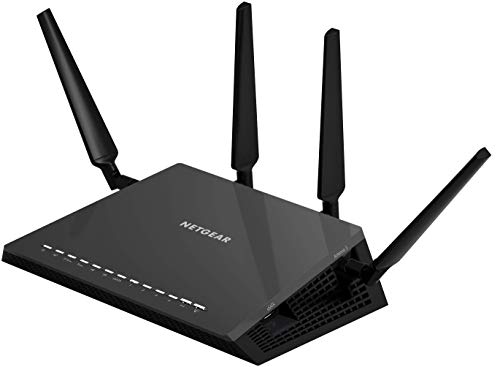
Nighthawk X4S AC2600 Dual-Band WiFi Router (R7800)
Running these analyses costs money. Buy through my links to help keep lights on! I may get a small commission.
Top Pros
Top Cons
Reddit Reviews
 e60deluxe 1.0
Look at something like a Netgear R7800 and then flash it with OpenWRT If you want something that works out of the Box, look at the GL.Inet Flint or Flint2. They run OpenWRT under the hood. GL.Inet routers (preloaded custom OpenWRT build), Routers that you can flash with full OpenWRT support (such as the Netgear i mentioned) and Mikrotik routers with Wifi Built in, those 3 are probably your best/easiest ways to solve this.
enduro_jet 1.0[https://www.waveform.com/tools/bufferbloat?test-id=4720d1a5-dce4-4ea9-b536-e3f583b12c5b](https://www.waveform.com/tools/bufferbloat?test-id=4720d1a5-dce4-4ea9-b536-e3f583b12c5b) ISP is Converge. 5GHz wifi on R7800 router using built-in SQM. Bumaba lang yung download speed due to other users. Sadly phased-out na yung router ko. My recommendation for built-in SQM is eero Pro. Expensive but very user-friendly. Cheaper option would be flashing OpenWRT to Cudy WR3000 or WR3000S, this one I recommend since the manufacturer already provided the files needed, and guides are available which makes it a lot easier. Good luck!
goonsuey 1.0Best? LOL. I use the cheapest gear I can find and I flash OpenWRT on it. My router is 10 years old (Netgear r7800). I pulled it out of a recycle bin. It's an amazing router. I have over 50 devices connected, working perfectly. 20ms pings. 250mbps transfer (on a 300mbps ISP subscription). What model of router are you using? Is it personally owned, or was it provided by your ISP?
Labyrinth35 1.0have an old nighthawk Netgear x4s netgear like that and it works very well downstairs, pushing the signal upstairs as well. But I also have another router AP upstairs, connected via telephone wire as ethernet, for the heck of it, but I seldom connect to it.
OldObject4651 1.0Much same situation here, I have a Netgear R7800 with OpenWrt and set to channel 52 (40MHz). It’s a DFS channel but so far (2months) have not seen conflicts. No other access points in the area do DFS so I’m by myself on ch52
Quick caveat: my Roku units do not see me on Channel 52 but iPhones and laptops do
ResolutionCandid3901 1.0Netgear R7800 or Netgear Nighthawk XR500 -- almost same hardware!
RolandMT32 1.0I had a Linksys WRT54GL, and I thought that router was awesome at the time. I've also had one of those Asus routers, and I thought it was pretty good. I had installed 3rd-party firmware on mine though; I had DD-WRT on the Linksys (though you might need the GL version for that rather than the G), and I ran Tomato on my Asus router. Currently, I have a Netgear Nighthawk R7800 router (which is capable of running DD-WRT), which is currently [$90 on Amazon](https://www.amazon.com/dp/B0192911RA). But that model is at least 5 years old now, and I imagine there are probably better routers available (though not sure how affordable they are).
RonaldHarding 0.2With a descent router wireless is nearly as good as wired these days. I speak as someone who was once a 'wired network' purist for the same reasons as you, and also someone who works from home. A good router, set in a centralized place will probably be a cheaper and simpler solution than wiring everything together. I use one of those nighthawk routers with four antenna. Alternatively, doing data cabling runs throughout your house can be in DIY territory. It would be much cheaper than hiring a contractor and you could be done with it in about a day depending on how many rooms you want patched in and how much you care about wire enclosures being visible. Lots of people just put cable mounts in the corner near the ceiling and run them outside the wall.
With a descent router wireless is nearly as good as wired these days. I speak as someone who was once a 'wired network' purist for the same reasons as you, and also someone who works from home. A good router, set in a centralized place will probably be a cheaper and simpler solution than wiring everything together. I use one of those nighthawk routers with four antenna. Alternatively, doing data cabling runs throughout your house can be in DIY territory. It would be much cheaper than hiring a contractor and you could be done with it in about a day depending on how many rooms you want patched in and how much you care about wire enclosures being visible. Lots of people just put cable mounts in the corner near the ceiling and run them outside the wall.
promaster9500 0.0I dont know about this model but fuck Netgeat Nighthawk. I owned a different one few years ago that was supposed to be a a high spec version, and it caused me infinite problems, which all disappeared when I bought a different one.
Academic-Swimming919 0.0I agree. I have tried numerous Netgear products, going back to a PCMCIA card, and all of them have had problems. The last Nighthawk I had constantly resulted in "Connected, No internet" for too many devices.