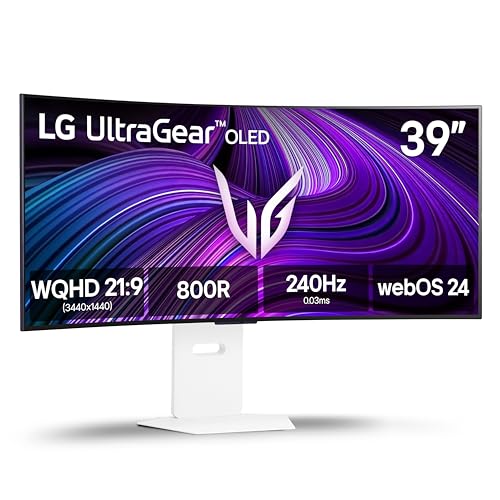
I’m a primarily WFH architect currently running a dual setup: an LG 39GX90SA alongside an LG C3 42” 4K TV. I use the C3 for gaming and extra real estate, but jumping between the two for productivity is jarring. The 3440x1440 resolution on my current 39" just isn't enough when I need to juggle heavy architectural workflows; like comparing plan sets and submittals in Bluebeam on one half, while running Revit, AutoCAD, SketchUp, Lumion, or the Adobe suite on the other.
While having dual screens gives me the raw space I need, the mismatched sizes and inconsistent PPI make the experience clunky. Constantly swiveling between the two is taking a toll on my neck and eyes. I’m looking for a single-panel solution, and the 39" form factor is the perfect sweet spot for scanning without strain. A unified, high-resolution canvas would let me seamlessly manage the multiple windows required for coordinating with clients, contractors, and engineers.
Moving back to a single-screen setup would also clear up my physical desk space for the drawings, material samples, and tools that end up getting in the way otherwise. Beyond the ergonomics, I am really excited about the brightness upgrades on this new panel. It looks like it matches the punchiness of my C3 but in a true monitor format, meaning no remote and less aggressive ABL! It’s exactly the bridge I need between my current two displays!
On the gaming side, my RTX 5090 is itching to push more pixels than it's currently handling, which would just be the cherry on top. I’d love the chance to put this monitor through its paces. Even if I’m not selected, I’ll be glued to the reviews as this genuinely looks like it could be my end-game display. Good luck with the launch, and thanks for the opportunity!
You don't need an Oled but at the same price on Amazon there was the **LG 39GX90SA-W** 3440x1440 240hz oled. I had to jump all the way up from my Innocn 40c1r to the LG 45" 5k2k to ensure a noticeable upgrade. I turn that Innocn vertical now as my 2nd monitor. A 40" Ultrawide is a killer vertical 2nd monitor, so I recommend that if you decide to upgrade again before this one gives out.
I specifically wanted a 39 bc of the additional height.
The 34 inch panels have the same height as my current 27 inch so I was looking for something that covers a little more of that vertical peripheral view.
Ended up ordering a like new/open box LG 39GX today off eBay for a pretty solid deal ($649 + tax).
I had a $250 gift card and figured it was a good deal to hold me over for now until something better comes out.
Gonna use it for my racing sim rig until I build a bigger desk to house all three monitors
Ya refresh rate and overall performance are my biggest concerns as some triple A games can barely crack 40-50 fps base frame rates.
DLSS and FG can only push heavier games so far
Ended up ordering a LG 39GX (2K ultrawide) today to hold me over for now until something more suitable comes out. Got a pretty good deal on it
For me, the 800r on my 39GX90SA-W is great for gaming and my data entry job. I couldn't go back to a 15-1800r.
My secondary monitor is a Neo g7 32" with 1000r curve and for my personal use I think that would be a perfect curve for my 39".
Because I work and game in a room with a lot of windows and lights, one of which is directly behind me. I have both a glossy oled and a matte VA in this setup, but the glossy is so annoying with reflections. Matte is the preferable and optimal choice. I won’t pay full price for the GX9, just waiting for it to lower in price, but I did wish it had a kvm tho.
The main factor for me came down to my 16:9 monitor size preference. If you never find yourself wanting more vertical space then a 27" monitor I think the 49 is a valid choice.
Personally I like a larger 32"+ monitor size, and with that massive 32" desk you're more then safe going with one.
The two main things things people don't like about the 39" are the 1200r curve; It's admittedly a bit off putting at first. And the second being the low PPI, both of which a non issue for me.
Overall I'm convinced that the 39" is the best option for me at the moment despite the negatives. However if there were a 240hz 42" 16:9 option I would run that, and run 3840x1600 in games when I want 21:9 resolution.
It's hard to say what's best for you without knowing your pain points preferences, but if you like big go big. If you just want wider, just go wider.
The image would only stretch if you run a lower resolution than the monitors native resolution and force it into full screen mode. When a game doesn't support super ultra wide it should just put black bars the sides.
Sometimes playing FPS games, assuming the game doesn't have HUD settings to adjust them towards the center it can be hard to see your health, ammo, ect. But you can just run a lower aspect ratio and boarder-less full-screen to black bar the sides of the monitor and narrow your field of view.
There's a work around for just about everything, So those issues are easy enough to get around.
Top Ultrawide Monitors on Reddit
1
LG
45GX950A-B
70% positive of 908 users
45-inch 800R OLED: immersive gaming, polarizing curve for work.


 Archisaurus






